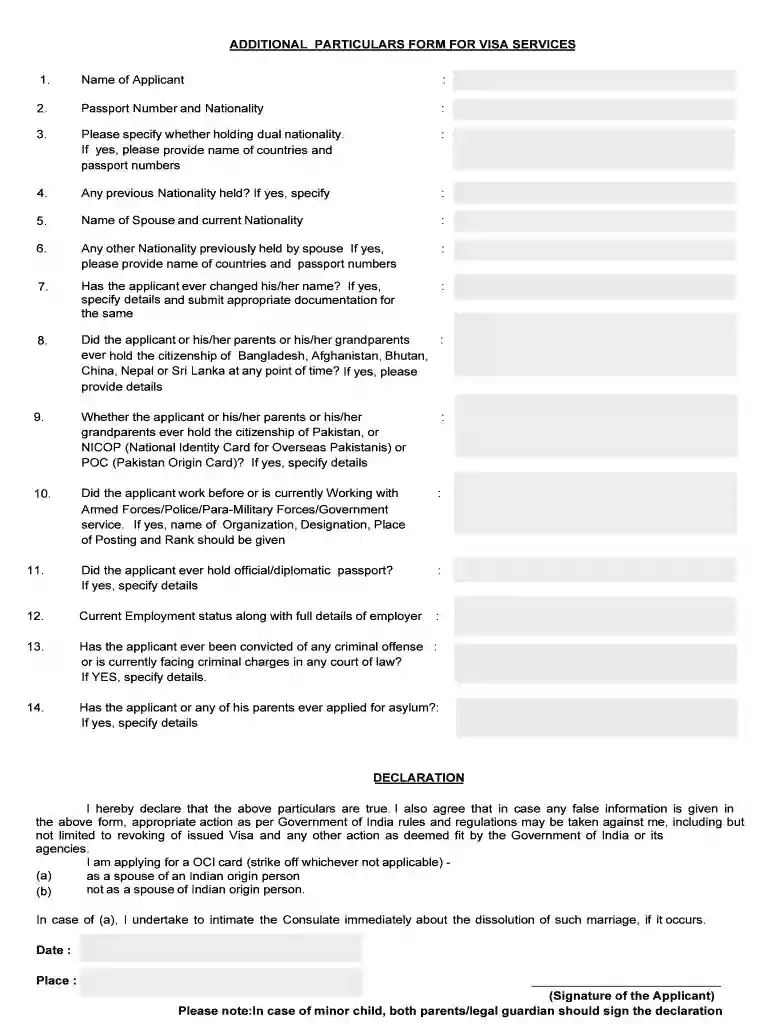
Additional particulars form for visa services 2026

Get Form
additional particular form annexure a Preview on Page 1

Here's how it works

01. Edit your additional particular form annexure a online
Type text, add images, blackout confidential details, add comments, highlights and more.

02. Sign it in a few clicks
Draw your signature, type it, upload its image, or use your mobile device as a signature pad.

03. Share your form with others
Send additional particular form annexure a original mandatory via email, link, or fax. You can also download it, export it or print it out.

How to use or fill out additional particulars form for visa services with our platform

Form edit decoration
9.5
Ease of Setup
DocHub User Ratings on G2
9.0
Ease of Use
DocHub User Ratings on G2
  1. Click ‘Get Form’ to open the additional particulars form for visa services in the editor.
  2. Begin by entering the 'Name of Applicant' in the designated field. Ensure that it matches your passport details for accuracy.
  3. Fill in your 'Passport Number and Nationality'. This information is crucial for verifying your identity.
  4. Indicate if you hold dual nationality. If yes, provide the names of the countries and corresponding passport numbers.
  5. Complete sections regarding any previous nationalities held, including those of your spouse, if applicable.
  6. If you have changed your name, specify the details and prepare to upload supporting documentation.
  7. Answer questions about citizenship history related to Bangladesh, Pakistan, or other specified countries as required.
  8. Provide current employment status and details of any past affiliations with armed forces or government services.
  9. Finally, review all entries for accuracy before signing the declaration at the end of the form.

Start filling out your additional particulars form today on our platform for free!

be ready to get more

Complete this form in 5 minutes or less

Get form

Got questions?

We have answers to the most popular questions from our customers. If you can't find an answer to your question, please contact us.
Contact us
Renewal Process Complete Form DS-160 (Online Nonimmigrant Visa Application) Upload a digital visa photo. Pay the required government filing fees. Schedule and attend a tourist visa interview at your nearest U.S. Embassy or consulate.
IMPORTANT: Do not send any documents to NVC by mail. However, you must bring every civil document you uploaded and submitted with your application to your visa interview. To submit documents, log into CEAC and go to the Start Now buttons located under Affidavit of Support Documents and Civil Documents.
How to Submit 221(g) Documents Click here to print a Document Submission Letter. Go to the nearest document pickup location. Drop off your documents and the 221(g) submission slip at the document pickup location. Your documents will be delivered to the U.S. Embassy in Caracas.
Visa applicants must submit a completed DS-160, Online Nonimmigrant Visa Application for all nonimmigrant visa categories, including applicants applying for K visas.
Log in to your USCIS online account and go to the Documents tab to view notices and respond to the RFE. While your case is pending, you may provide additional information, including evidence we did not specifically request, about your case. This is available in the Documents tab, except when you have an open RFE.

Security and compliance

At DocHub, your data security is our priority. We follow HIPAA, SOC2, GDPR, and other standards, so you can work on your documents with confidence.

Learn more
ccpa2
pci-dss
gdpr-compliance
hipaa
soc-compliance
be ready to get more

Complete this form in 5 minutes or less

Get form

People also ask

Furnish information exactly in the manner asked for in the forms, especially the names, address and date of birth. Applicants are required to verify the application details before submitting the online application. They have an option to save the online application form, in case it is not to be submitted.
Visa applications You can attach documents to your visa application after you have submitted and paid for your application, up until it is finalised.

additional particulars form