South Dakota Self-Proving Affidavit Form 2026

Get Form
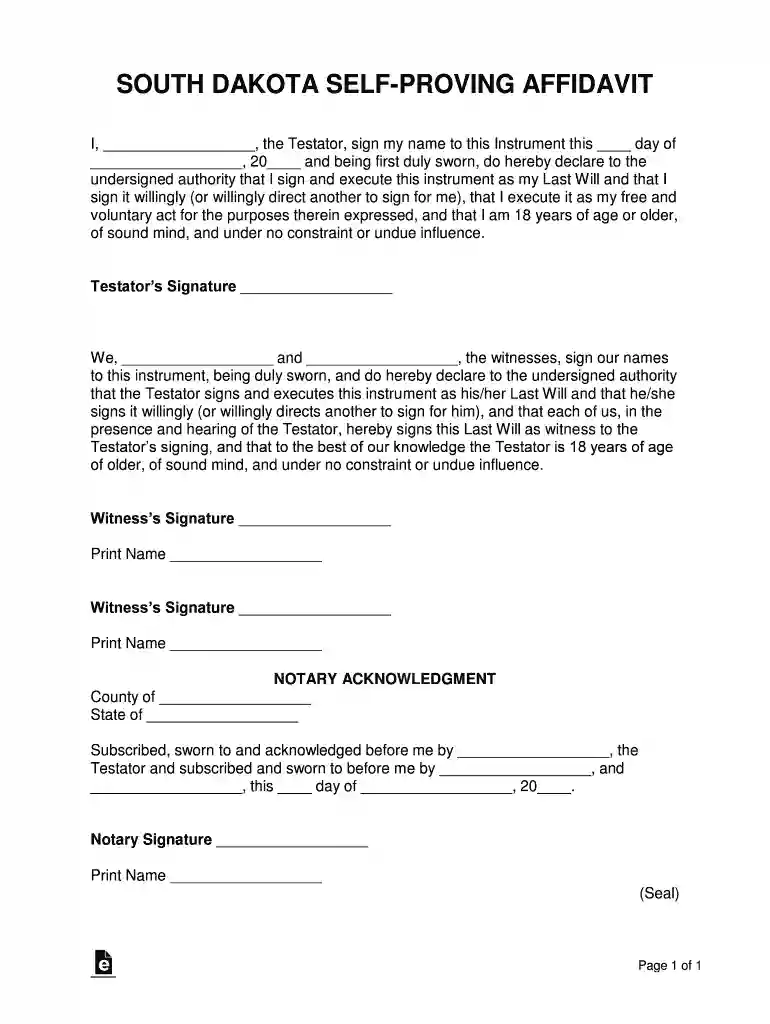
South Dakota Self-Proving Affidavit Form Preview on Page 1

Here's how it works

01. Edit your form online
Type text, add images, blackout confidential details, add comments, highlights and more.

02. Sign it in a few clicks
Draw your signature, type it, upload its image, or use your mobile device as a signature pad.

03. Share your form with others
Send it via email, link, or fax. You can also download it, export it or print it out.

How to use or fill out South Dakota Self-Proving Affidavit Form with DocHub

Form edit decoration
9.5
Ease of Setup
DocHub User Ratings on G2
9.0
Ease of Use
DocHub User Ratings on G2
  1. Click ‘Get Form’ to open the South Dakota Self-Proving Affidavit Form in our editor.
  2. Begin by filling in your name as the Testator in the designated field. Ensure you also enter the date of signing accurately.
  3. In the section for the Testator’s signature, sign your name. This confirms that you are executing this document willingly and are of sound mind.
  4. Next, two witnesses must sign. Each witness should fill in their name and signature in the provided fields, affirming they witnessed your signing.
  5. Complete the Notary Acknowledgment section by entering the county and state. The notary will then sign and print their name after witnessing all signatures.

Start using our platform today to easily complete your South Dakota Self-Proving Affidavit Form for free!

be ready to get more

Complete this form in 5 minutes or less

Get form

Got questions?

We have answers to the most popular questions from our customers. If you can't find an answer to your question, please contact us.
Contact us
A self-proving affidavit is a document, signed by you and two witnesses, that verifies under oath that your witnesses saw you sign your will and that its legally valid. Generally speaking, your self-proving affidavit must be docHubd, meaning you and the witnesses sign it in front of a notary public.
Sign your Will, and have the appropriate number of witnesses as required by your state law sign it. Find a Self Proving Affidavit form (be sure its acceptable for your state - wording can matter). Together with your witnesses, go to a notary public. Banks, libraries and UPS stores often offer notary services.
A self-proving affidavit is a sworn statement attached to a will that can speed up the probate process after the testators passing. This separate document, which must be signed and witnessed in front of a notary public, verifies that the testator was of sound mind when they signed their will.
1:21 2:48 And attach a list of the estates assets. And their associated values. Step four Department ofMoreAnd attach a list of the estates assets. And their associated values. Step four Department of Revenue. File the affidavit with the South Dakota Department of Revenue.
Although affidavits are considered legal documents, anyone can draft one. As long as it is signed, witnessed, and docHubd correctly, the affidavit will be valid. This means that you do not need to ask a lawyer to create an affidavit.

Security and compliance

At DocHub, your data security is our priority. We follow HIPAA, SOC2, GDPR, and other standards, so you can work on your documents with confidence.

Learn more
ccpa2
pci-dss
gdpr-compliance
hipaa
soc-compliance
be ready to get more

Complete this form in 5 minutes or less

Get form

People also ask

Together with your witnesses, go to a notary public. Banks, libraries and UPS stores often offer notary services. You and your witnesses will sign the affidavit, under oath, in front of the notary public. He or she will then officially sign and stamp the affidavit.
What to include in your affidavit. Title. This is either your name (Affidavit of Jane Doe) or the specific case information. Statement of identity. The next paragraph tells the court about yourself. Statement of truth. Statement of facts. Closing statement of truth. Sign and docHub.

Related links