




Here's how it works



How to use or fill out South Dakota Gun Bill of Sale with our platform

- Click ‘Get Form’ to open the South Dakota Gun Bill of Sale in the editor.
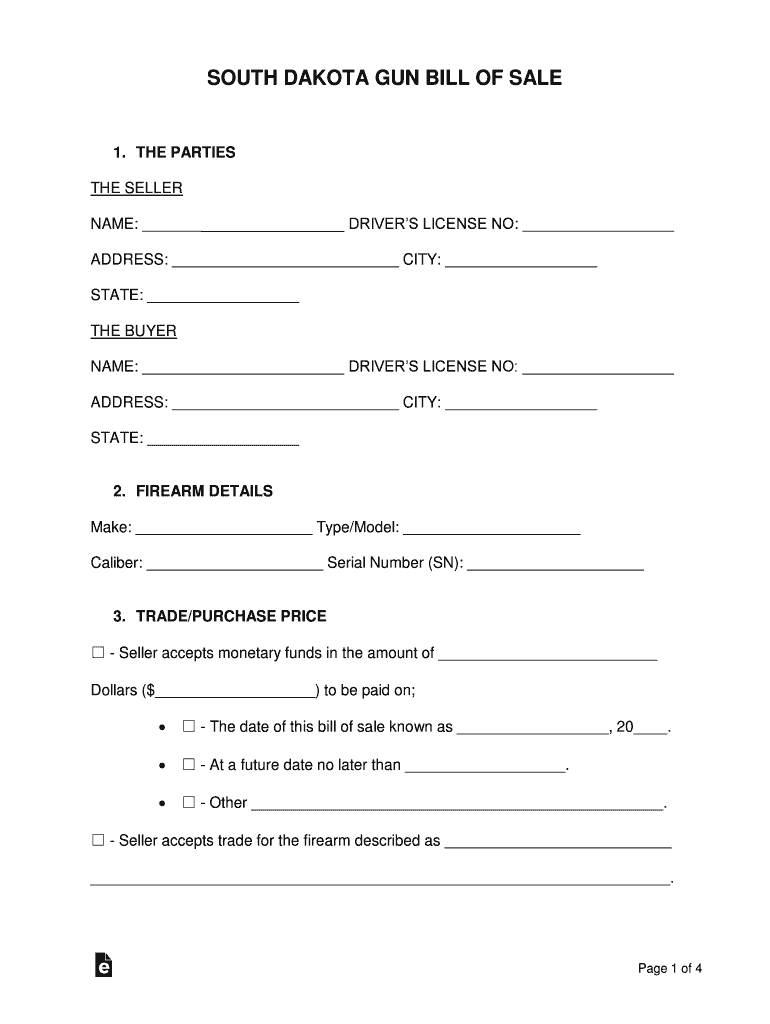
- Begin by filling in the details for 'THE SELLER' and 'THE BUYER'. Enter names, driver's license numbers, addresses, cities, and states accurately.
- In the 'FIREARM DETAILS' section, provide the make, type/model, caliber, and serial number of the firearm being sold.
- Specify the trade/purchase price. Indicate whether payment is made immediately or at a future date. If applicable, include any trade details.
- Review and complete the 'BUYER’S DISCLOSURE' section by checking each statement that applies to you as the buyer.
- The seller must also complete their disclosures in the 'SELLER’S DISCLOSURE' section by confirming ownership and condition of the firearm.
- Finally, both parties should sign in the 'SIGNATURE AREA', along with two witnesses if required. Ensure all signatures are dated correctly.
Start using our platform today to easily fill out your South Dakota Gun Bill of Sale for free!
It's free
Got questions?
Can I sign my South Dakota Gun Bill of Sale on a mobile?
Yes, you’ll find many different apps for this on the web. Nonetheless, if you need to eSign your South Dakota Gun Bill of Sale without installing additional software, DocHub is the best choice you can make. This robust editor works on mobile devices just like on desktops. Open our editor in your preferred internet browser, register or log in to your account, and start processing your forms.
How do you modify South Dakota Gun Bill of Sale from Google Drive?
If you store your documents in Google Drive, there is no need to download your South Dakota Gun Bill of Sale on the computer and upload it back to our editor. A much easier way is to install a browser extension developed by DocHub to simplify this flow. The extension allows editing PDFs in your internet browser. Alternatively, you may integrate your DocHub and Gmail accounts for more efficient modifying.
Security and compliance
At DocHub, your data security is our priority. We follow HIPAA, SOC2, GDPR, and other standards, so you can work on your documents with confidence.
Learn more




