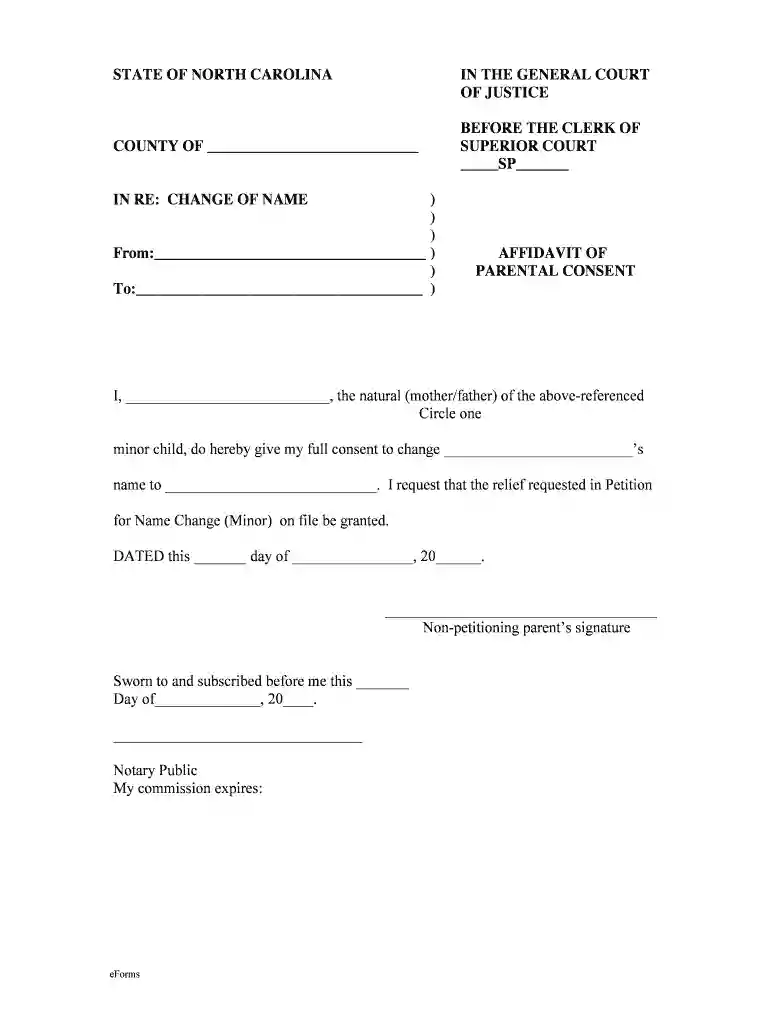
STATE OF NORTH CAROLINA File No. In The General Court Of ... 2026

Get Form
nccourtcalendar Preview on Page 1

Here's how it works

01. Edit your nccourtcalendar online
Type text, add images, blackout confidential details, add comments, highlights and more.

02. Sign it in a few clicks
Draw your signature, type it, upload its image, or use your mobile device as a signature pad.

03. Share your form with others
Send nccourtcalender via email, link, or fax. You can also download it, export it or print it out.

How to use or fill out STATE OF NORTH CAROLINA File No. In The General Court Of ... with our platform

Form edit decoration
9.5
Ease of Setup
DocHub User Ratings on G2
9.0
Ease of Use
DocHub User Ratings on G2
  1. Click ‘Get Form’ to open it in the editor.
  2. Begin by filling in the 'COUNTY OF' section with the appropriate county name where the petition is being filed.
  3. In the 'From' field, enter your name as the natural parent of the minor child. Ensure accuracy for legal purposes.
  4. In the 'To' field, write the name of the minor child whose name is being changed.
  5. Select whether you are the mother or father by circling the appropriate option next to 'natural'.
  6. Fill in the new name you wish to give to your child in the designated space.
  7. Complete the date section at the bottom with today’s date and provide your signature as a non-petitioning parent.
  8. Finally, ensure that a notary public witnesses your signature and fills out their information, including commission expiration date.

Start using our platform today for free to streamline your document editing and signing process!

be ready to get more

Complete this form in 5 minutes or less

Get form

Got questions?

We have answers to the most popular questions from our customers. If you can't find an answer to your question, please contact us.
Contact us
Clearly state your request or relief sought Use clear and concise language Follow the courts rules and formatting guidelines Include any relevant evidence or legal authority to support your motion Address any potential counterarguments or objections that the other party may raise.
Government records in North Carolina are public in nature unless identified as confidential pursuant to law. Wake County must adhere to the North Carolina Public Records Law, found at N.C.G.S.
Take your completed Motion and attached Certificate of Service to the Civil Filing Department (Suite 3725). There is no filing fee for filing these documents. Go to the Caseflow Management Division (Suite 3420) to obtain a hearing date. Then return to the Civil Filing Department to have your Notice of Motion filed.
3:00 4:10 In summary yes you can file a motion without a lawyer by understanding court rules preparing yourMoreIn summary yes you can file a motion without a lawyer by understanding court rules preparing your motion properly. And following the necessary steps you can navigate the process of self-representation
COURT RECORDS To request records regarding criminal and civil cases, police reports and traffic citations, contact the North Carolina Judicial Branch or the Clerk of Court in the county where the citation was issued.

Security and compliance

At DocHub, your data security is our priority. We follow HIPAA, SOC2, GDPR, and other standards, so you can work on your documents with confidence.

Learn more
ccpa2
pci-dss
gdpr-compliance
hipaa
soc-compliance
be ready to get more

Complete this form in 5 minutes or less

Get form

People also ask

If you want to file a motion, the process is generally something like this: You write your motion. You file your motion with the court clerk. The court clerk inserts the date and time your motion will be heard by the judge. You serve (mail) your motion to the other side.

nc court calendar district and superior