



Here's how it works



How to use or fill out medfools with our platform

- Click ‘Get Form’ to open the medfools document in the editor.
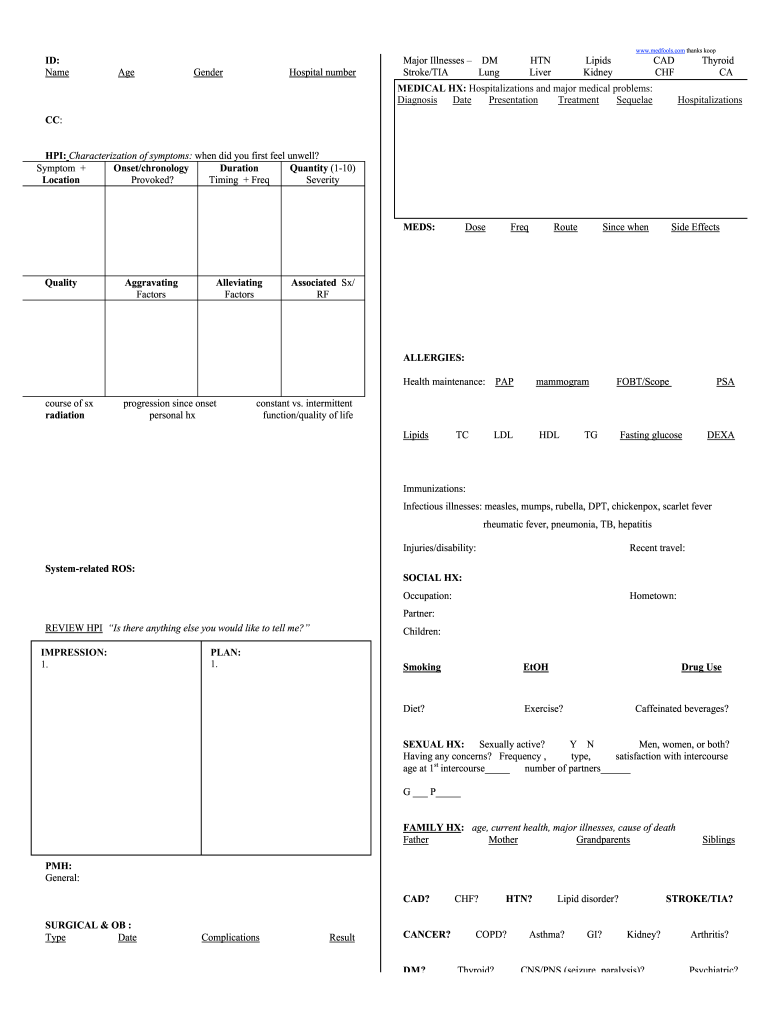
- Begin by entering your personal information in the 'ID' section, including your Name, Age, Gender, and Hospital number.
- In the 'Major Illnesses' section, check all relevant conditions such as Diabetes Mellitus (DM), Stroke/TIA, and others listed.
- Proceed to 'MEDICAL HX' where you will detail any hospitalizations and major medical problems. Fill in the Diagnosis, Date, Presentation, Treatment, and Sequelae for each condition.
- Continue with the 'CC' and 'HPI' sections to describe your current health concerns. Be specific about symptoms including their onset, duration, severity (on a scale of 1-10), and any aggravating or alleviating factors.
- Complete the 'MEDS' section by listing current medications along with their doses and frequency. Don't forget to note any side effects experienced.
- Fill out the 'ALLERGIES' section detailing any known allergies and their associated symptoms.
- Finally, review all sections for accuracy before saving or sharing your completed form using our platform's features.
Start filling out your medfools form today for free using our editor!
It's free
Got questions?
How do I sign my medfools scutsheet free of charge?
Most eSignature services require users to have a paid subscription. With DocHub, there are two ways for you to add an electronic signature to your medfools scutsheet at no cost:
- You can do it during a 7-day trial period;
- You can subscribe to a free plan.
The second option, however, has limitations on the number of signatures, sign requests, emails, and forms for editing available per month. You can check for full information here.
How do you edit medfools on Android?
Document editing with DocHub is equally convenient on desktop and mobile devices. You just need an internet browser to edit your medfools on Android. Open our website and sign in to access the tools you need. Add your file and introduce your intended changes. After that, you can keep your form in your file storage or send it out instantly.
How do you pre-round effectively?
What is a scutsheet?
What is Prerounding?
Security and compliance
At DocHub, your data security is our priority. We follow HIPAA, SOC2, GDPR, and other standards, so you can work on your documents with confidence.
Learn more