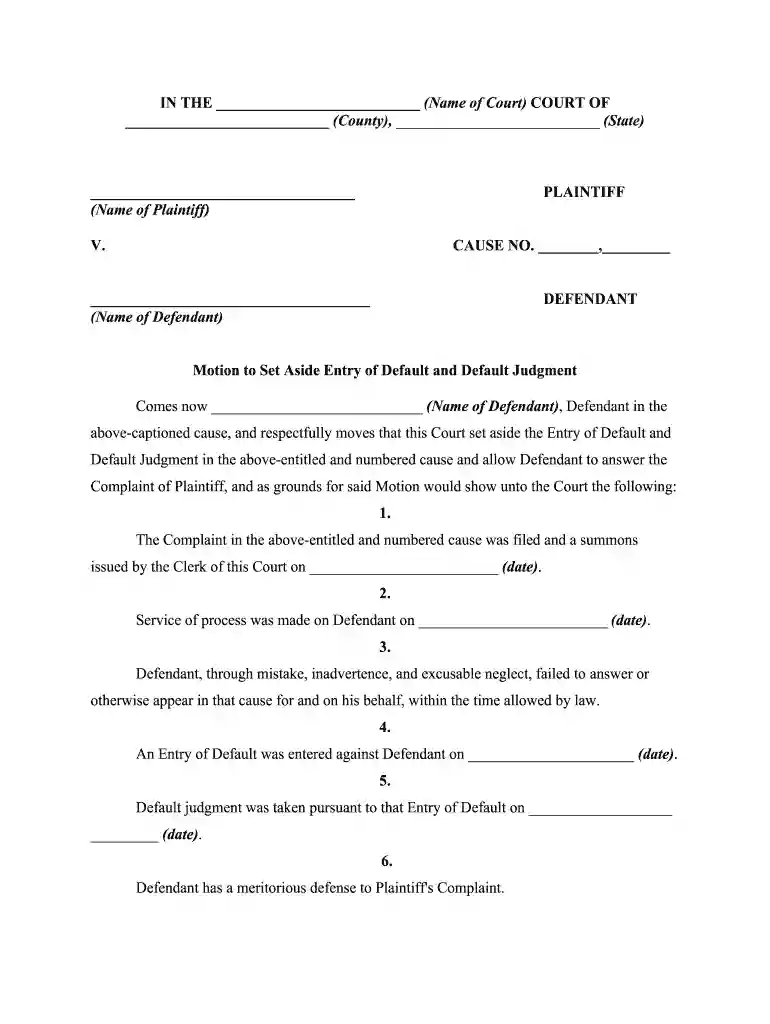
small claims court default judgment process Preview on Page 1

Default judgment procedure 2026

Here's how it works

  • 01. Edit your small claims court default judgment process online

    Type text, add images, blackout confidential details, add comments, highlights and more.

  • 02. Sign it in a few clicks

    Draw your signature, type it, upload its image, or use your mobile device as a signature pad.

  • 03. Share your form with others

    Send default judgement process via email, link, or fax. You can also download it, export it or print it out.

How to use or fill out default judgment procedure with our platform

Form edit decoration
9.5
Ease of Setup
DocHub User Ratings on G2
9.0
Ease of Use
DocHub User Ratings on G2
  1. Click ‘Get Form’ to open the default judgment procedure document in the editor.
  2. Begin by filling in the name of the court, county, and state at the top of the form. This information is crucial for identifying where your motion will be filed.
  3. In the section labeled 'Plaintiff' and 'Defendant', enter the names as they appear in your case. Ensure accuracy to avoid any delays.
  4. Complete the cause number field with the appropriate case number assigned by the court.
  5. In the body of the motion, provide specific dates for when the complaint was filed, service of process occurred, and when default was entered. This establishes a timeline for your request.
  6. Clearly state your reasons for requesting to set aside the default judgment, focusing on any mistakes or excusable neglect that led to your absence.
  7. Sign and date at the bottom of the form. Make sure all signatures are legible and correctly placed.
  8. Finally, complete the Certificate of Service section by providing details about how you served notice to opposing counsel.

Start using our platform today to streamline your document editing and ensure a smooth filing process!

be ready to get more

Complete this form in 5 minutes or less

Security and compliance

At DocHub, your data security is our priority. We follow HIPAA, SOC2, GDPR, and other standards, so you can work on your documents with confidence.

Related links

FL-635 NOTICE OF ENTRY OF JUDGMENT AND PROOF OF

You are notified that the following judgment was entered on (date):. Default taken and proposed judgment entered under Family Code section 17430 a. b. c. ARead more

Learn more
INSTRUCTIONS CONCERNING DEFAULT JUDGMENT

Entry of a default formalizes a judicial recognition that a defendant has, through its failure to defend the action, admitted liability to the plaintiff. CityRead more

Learn more
Rule 55. Default; Default Judgment - Cornell Law School

A default judgment may be entered against a minor or incompetent person only if represented by a general guardian, conservator, or other like fiduciary who hasRead more

Learn more
If you believe that this page should be taken down, please follow our DMCA take down process here