Type text, add images, blackout confidential details, add comments, highlights and more.
02. Sign it in a few clicks
Draw your signature, type it, upload its image, or use your mobile device as a signature pad.
03. Share your form with others
Send dvla fep1 form via email, link, or fax. You can also download it, export it or print it out.
How to use or fill out fep1 form with our platform
Ease of Setup
DocHub User Ratings on G2
Ease of Use
DocHub User Ratings on G2
Click ‘Get Form’ to open the fep1 form in the editor.
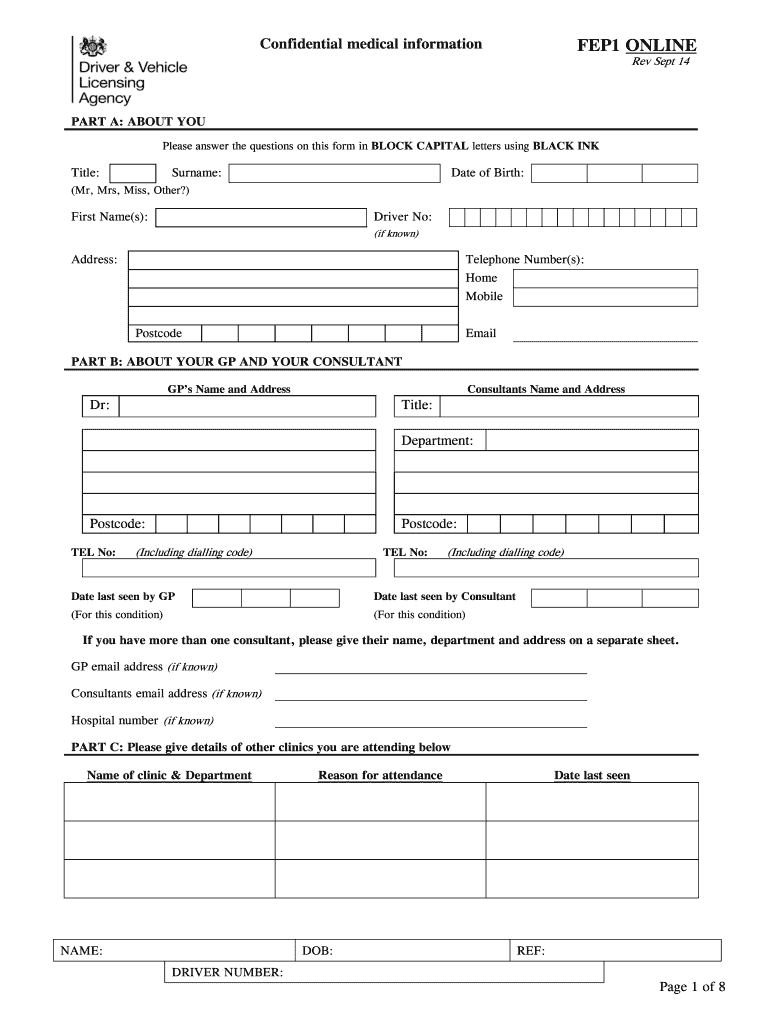
Begin with Part A: About You. Fill in your title, surname, first name(s), date of birth, driver number (if known), address, telephone numbers, and email using BLOCK CAPITAL letters and BLACK INK.
Proceed to Part B: About Your GP and Your Consultant. Enter your GP's name and address, consultant's details, dates last seen by both, and any additional consultants on a separate sheet if necessary.
In Part C, provide details of other clinics you are attending. Include the clinic name, department, reason for attendance, and relevant dates.
Answer the questionnaire regarding your medical fitness to drive. Follow the prompts based on your condition and provide accurate information as required.
Complete the declaration section at the end of the form by signing and dating it to confirm all information is correct.
Start filling out your fep1 form online for free today!
FEP1 form post officeFEP1 form download pdfWhere can I get an FEP1 formFEP1 form helpOrder FEP1 formFEP1 form DVLAFEP1 online formHow to fill out FEP1 form post office
Security and compliance
At DocHub, your data security is our priority. We follow HIPAA, SOC2, GDPR, and other standards, so you can work on your documents with confidence.
Mechanistic Insights Into an Iron-Responsive Repressor
by AN Kimsey 2022 Cited by 1 assays conducted with the maltose binding protein (MBP)-tagged Fep1 DNA binding domain demonstrated that Fep1 forms a complex with DNA using sequence-specific.Read more
peptide for iron deficiency FEP1 functions in iron homeostasis
The concept of peptide iron chelate is gaining traction as a superior form of iron supplementation for relieving iron deficiency. FEP1 functions in ironRead more
Cookie consent notice
This site uses cookies to enhance site navigation and personalize your experience.
By using this site you agree to our use of cookies as described in our Privacy Notice.
You can modify your selections by visiting our Cookie and Advertising Notice.