Type text, add images, blackout confidential details, add comments, highlights and more.
02. Sign it in a few clicks
Draw your signature, type it, upload its image, or use your mobile device as a signature pad.
03. Share your form with others
Send cna change of address via email, link, or fax. You can also download it, export it or print it out.
How to use or fill out cna address change with our platform
Ease of Setup
DocHub User Ratings on G2
Ease of Use
DocHub User Ratings on G2
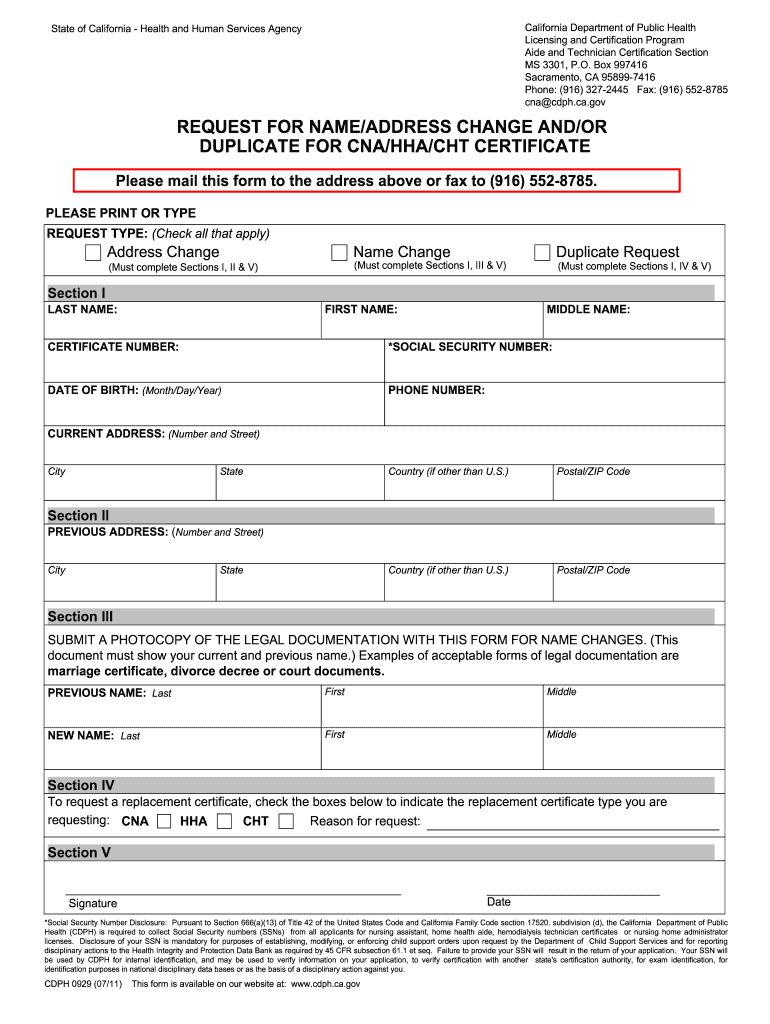
Click ‘Get Form’ to open the cna address change document in the editor.
Begin by selecting the request type at the top of the form. Check 'Address Change' if you are updating your address, or select other options as needed.
In Section I, fill in your last name, first name, middle name, certificate number, social security number, date of birth, and phone number. Ensure all information is accurate.
Provide your current address in the designated fields. Include street number and name, city, state, and postal/ZIP code.
If applicable, complete Section II with your previous address details.
For name changes, submit a photocopy of legal documentation in Section III and fill out both previous and new names.
In Section IV, indicate if you are requesting a replacement certificate by checking the appropriate boxes.
Finally, sign and date the form in Section V before submitting it via mail or fax as instructed.
Start using our platform today to easily manage your cna address change for free!
Ariz. Admin. Code R4-19-812 - Change of Name or Address
An applicant, CNA, LNA, or CMA certificate holder shall notify the Board in writing or electronically through the Boards website of any change of addressRead more
ExtremeXOS Command Reference Guide for Release 15.4
Specifications are subject to change without notice. All other registered trademarks, trademarks, and service marks are property of their respective owners. ForRead more
Change your Contact, Address, Name or Personal Status
The Personal Status Change Application provides the process for updating an EMS certification record when a persons name, address or agency changes.Read more
Cookie consent notice
This site uses cookies to enhance site navigation and personalize your experience.
By using this site you agree to our use of cookies as described in our Privacy Notice.
You can modify your selections by visiting our Cookie and Advertising Notice.