Type text, add images, blackout confidential details, add comments, highlights and more.
02. Sign it in a few clicks
Draw your signature, type it, upload its image, or use your mobile device as a signature pad.
03. Share your form with others
Send hawaiian falls application via email, link, or fax. You can also download it, export it or print it out.
How to use or fill out Hawaiian Falls donation request with our platform
Ease of Setup
DocHub User Ratings on G2
Ease of Use
DocHub User Ratings on G2
Click ‘Get Form’ to open the Hawaiian Falls donation request form in the editor.
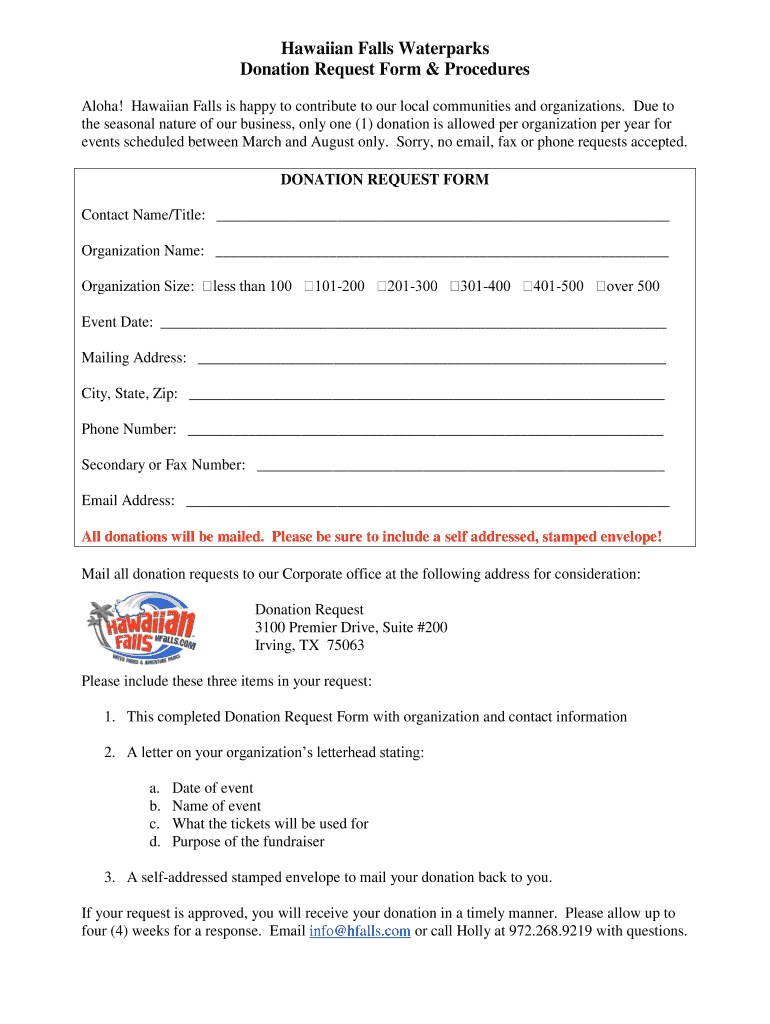
Begin by filling in your Contact Name and Title, followed by your Organization Name. Ensure that this information is accurate as it will be used for correspondence.
Next, enter the Event Date. This is crucial as donations are only considered for events scheduled between March and August.
Provide your Mailing Address, including City, State, and Zip Code. This ensures that any correspondence or donations are sent to the correct location.
Fill in your Phone Number and Secondary or Fax Number if applicable. This allows for easy communication regarding your request.
Include your Email Address for digital correspondence. Remember, all donations will be mailed back to you, so include a self-addressed stamped envelope.
Finally, ensure you attach a letter on your organization’s letterhead detailing the event date, name of the event, purpose of tickets, and purpose of the fundraiser along with this completed form.
Start using our platform today to streamline your donation request process for free!
Fill out hawaiian falls donation request online It's free
The suggested donation amount is $10 per person. All school tour requests must be made through our field trip request form found on the education webpage.Read more
Cookie consent notice
This site uses cookies to enhance site navigation and personalize your experience.
By using this site you agree to our use of cookies as described in our Privacy Notice.
You can modify your selections by visiting our Cookie and Advertising Notice.