01. Edit your blank football roster template online
Type text, add images, blackout confidential details, add comments, highlights and more.
02. Sign it in a few clicks
Draw your signature, type it, upload its image, or use your mobile device as a signature pad.
03. Share your form with others
Send football roster template free via email, link, or fax. You can also download it, export it or print it out.
How to use or fill out football roster template with our platform
Ease of Setup
DocHub User Ratings on G2
Ease of Use
DocHub User Ratings on G2
Click ‘Get Form’ to open the football roster template in the editor.
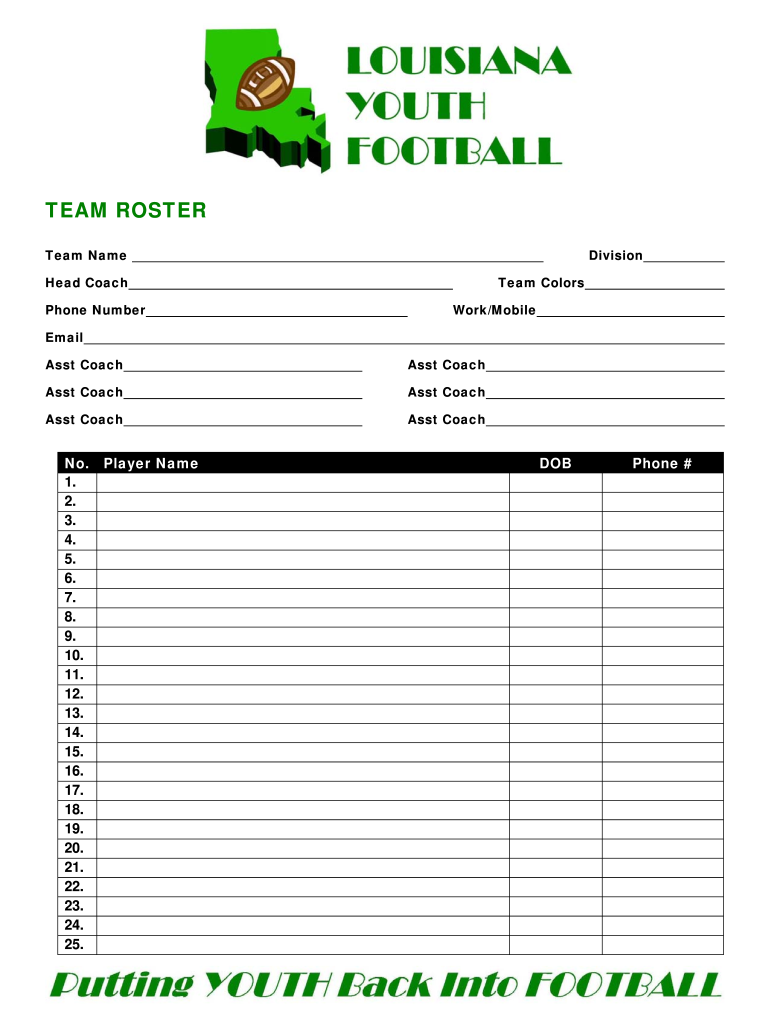
Begin by entering the 'Team Name' and 'Division' at the top of the form. This information is crucial for identifying your team.
Fill in the 'Team Colors' to represent your team's identity visually.
Provide contact details for the Head Coach, including 'Phone Number', 'Work/Mobile', and 'Email'. This ensures effective communication.
List all Assistant Coaches by filling in their names in the designated fields. You can add up to six assistants.
In the player section, sequentially enter each player's number and name. Ensure that you adhere to the minimum and maximum player limits based on your division.
For each player, include their date of birth and phone number as required.
Finally, complete the eligibility affidavit by having the Head Coach and Assistant Coaches sign and date where indicated.
Start using our platform today to streamline your football roster management for free!
Fill out football roster template online It's free
A typical NFL teams roster is made up of 53 players which are then split into three smaller teams depending on the situation of the game. These being offense, defence and special teams.
How do you create a roster in Google Sheets?
How to Use the Roster Template in Google Sheets Name. Enter the full name of the individual. Position. Specify the role or position of the individual within the team or organization. Email Address. Provide the email address of the individual for communication purposes. Phone Number. Availability. Notes.
What is the roster size for D1 track?
Track will be set at 45 spots, cross country at 17 for most D1 programs. The most powerful of all track conferences, the SEC, has set even stricter limits, 35 and 10. While 45 (or 35) scholarships seems like a lot and its certainly a big boost from the old days not all schools will be able to fund that many.
What is the roster limit for Division 1 football teams?
There are 262 D1 football teams, FBS and FCS. The average roster size is 132. The new roster limit is 105. That is a loss of 27 players per team, on average.
How many people are on a D1 football roster?
While college football teams limit their scholarships to 85 athletes, the average roster size of a FBS football team is roughly 128 players.
football roster template
Football roster template pdfFootball roster template freeFootball roster template excelFootball roster template free pdfTeam Roster templateYouth football roster TemplateTeam Roster Template with picturesTeam roster template free
Security and compliance
At DocHub, your data security is our priority. We follow HIPAA, SOC2, GDPR, and other standards, so you can work on your documents with confidence.
Beginning with the 2025-26 academic year, Division I schools will have roster limits of 34 players, all of whom can be given full scholarships.
What does 53 man roster mean?
Teams are required to have 53 players on their active roster. Each team has also has a practice squad that consisted of more than a dozen players.
How big can a D1 football roster be?
NCAA Division 1 Football Bowl Subdivision (FBS): Starting in the 2025-2026 season, teams will have a roster cap of 105 players, including walk-ons (non-scholarship players).
football roster maker
Microsoft Word - Template All-Time Roster.docx (PDF)
May 15, 2017 Microsoft Word - Template All-Time Roster.docx (PDF) Football Golf Soccer (M) Soccer (W) Softball Tennis (M) Tennis (W)Read more
Cookie consent notice
This site uses cookies to enhance site navigation and personalize your experience.
By using this site you agree to our use of cookies as described in our Privacy Notice.
You can modify your selections by visiting our Cookie and Advertising Notice.