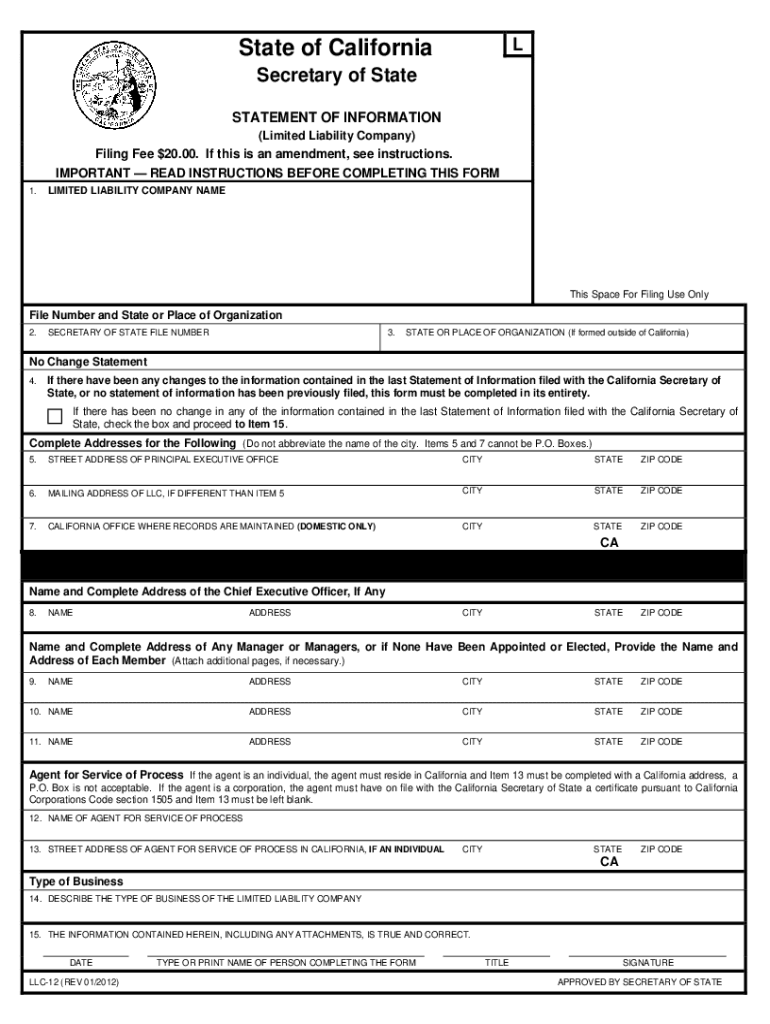
Form llc 12 online 2026

Get Form
file form llc 12 online Preview on Page 1

Here's how it works

01. Edit your file form llc 12 online online
Type text, add images, blackout confidential details, add comments, highlights and more.
02. Sign it in a few clicks
Draw your signature, type it, upload its image, or use your mobile device as a signature pad.
03. Share your form with others
Send form llc 12 via email, link, or fax. You can also download it, export it or print it out.

How to use or fill out form llc 12 online with DocHub

Form edit decoration
9.5
Ease of Setup
DocHub User Ratings on G2
9.0
Ease of Use
DocHub User Ratings on G2
  1. Click ‘Get Form’ to open it in the editor.
  2. In Item 1, enter the name of your limited liability company exactly as it appears on record with the California Secretary of State.
  3. For Item 2, input the Limited Liability Company number issued by the California Secretary of State.
  4. In Item 3, specify the state or place under which your LLC is organized.
  5. If there have been changes since your last Statement of Information, complete all fields. If not, check the box in Item 4 and proceed to Item 15.
  6. Provide the complete street address for your principal executive office in Item 5. Avoid using a P.O. Box.
  7. If applicable, enter a different mailing address in Item 6.
  8. Complete Items 8 through 11 with details about your chief executive officer and any managers or members.
  9. Designate an agent for service of process in Item 12 and provide their address in Item 13 if they are an individual.
  10. Describe your business type in Item 14 and finalize by typing or printing your name and title in Item 15 before submitting.

Start filling out form LLC-12 online today for free using our platform!

be ready to get more

Complete this form in 5 minutes or less

Get form

Got questions?

We have answers to the most popular questions from our customers. If you can't find an answer to your question, please contact us.
Contact us
All Statements of Information for limited liability companies can be filed online at bizfile.sos.ca.gov. Status of LLC: In order to file Form LLC-12, the status of the LLC must be active or suspended/forfeited on the records of the California Secretary of State.
How much does it cost to file a statement of information in California? The fee to file a statement of information in California is $25 for for-profit domestic and foreign corporations and $20 for LLCs and nonprofit corporations.
Failure to file the required Statement of Information with the Secretary of State as outlined in statute may result in penalties being assessed by the Franchise Tax Board and suspension or forfeiture.
Filing your LLC-12 form costs $20. If you need additional certified copies (for other members or investors, for instance), copy fees are $1.00 for the first page and $. 50 for each attachment page. For certified copies, it is an additional $5.00 fee per document.
Every corporation and limited liability company is required to file a Statement of Information either every year or every two years as applicable.

Security and compliance

At DocHub, your data security is our priority. We follow HIPAA, SOC2, GDPR, and other standards, so you can work on your documents with confidence.

Learn more
ccpa2
pci-dss
gdpr-compliance
hipaa
soc-compliance

People also ask

If you cancel your LLC within one year of organizing, you can file Short form cancellation (SOS Form LLC-4/8) with the SOS. Your LLC will not be subject to the annual $800 tax for its first tax year.
If you would like a free filed copy of your Statement of Information, go to BusinessSearch.sos.ca.gov. Processing Dates: For current processing dates, go to .sos.ca.gov/business/be/processing-dates.
Statements of Information, Common Interest Development Statements and Publicly Traded Disclosure Statements can be filed online at bizfileOnline.sos.ca.gov.

form llc 12r