Default judgment 2026

Get Form
default judgment Preview on Page 1

Here's how it works

01. Edit your default judgment online
Type text, add images, blackout confidential details, add comments, highlights and more.
02. Sign it in a few clicks
Draw your signature, type it, upload its image, or use your mobile device as a signature pad.
03. Share your form with others
Send default judgement via email, link, or fax. You can also download it, export it or print it out.

How to use or fill out default judgment with our platform

Form edit decoration
9.5
Ease of Setup
DocHub User Ratings on G2
9.0
Ease of Use
DocHub User Ratings on G2
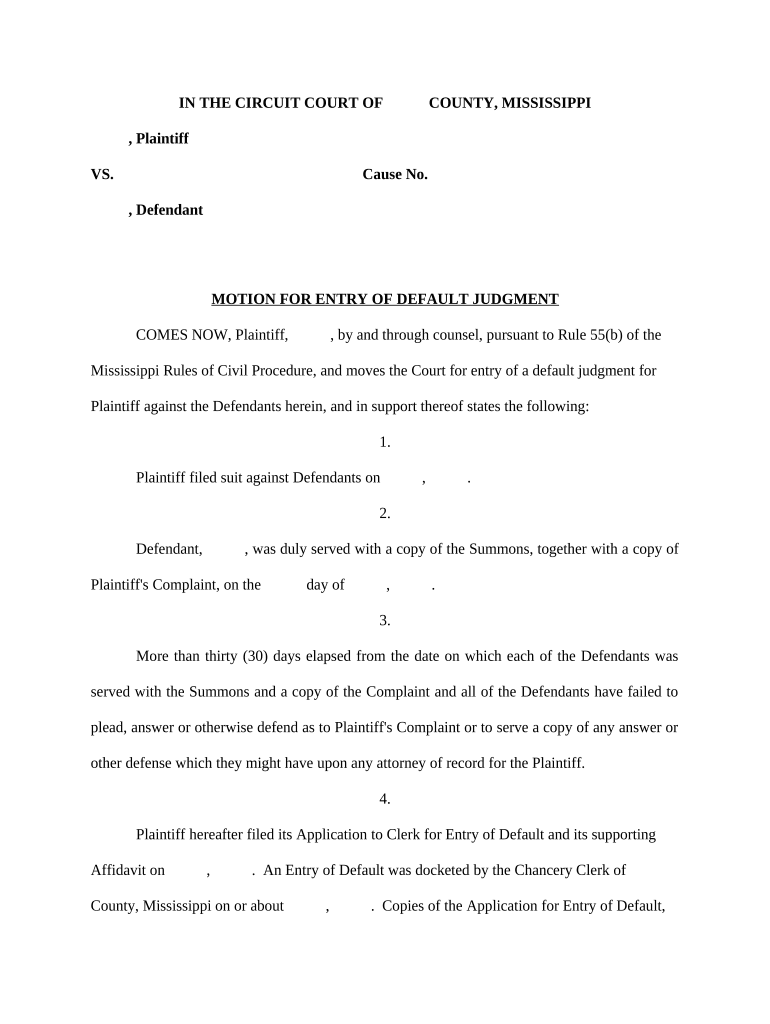
  1. Click ‘Get Form’ to open the default judgment document in the editor.
  2. Begin by filling in the Plaintiff's name and the Defendant's name at the top of the form. Ensure that you accurately enter the Cause Number for proper identification.
  3. In section one, provide the date when the suit was filed against the Defendants. This is crucial for establishing timelines.
  4. Next, indicate the date on which each Defendant was served with a copy of the Summons and Complaint. This information is vital for compliance with legal procedures.
  5. In section three, confirm that more than thirty days have passed since service, and note that no responses have been received from any Defendants.
  6. Complete section four by detailing when you filed your Application to Clerk for Entry of Default and ensure to attach any supporting documents as required.
  7. Finally, in section six, state your request for a default judgment clearly, specifying what relief you are seeking regarding the property in question.

Start using our platform today to streamline your document editing and complete your default judgment form effortlessly!

be ready to get more

Complete this form in 5 minutes or less

Get form

Got questions?

We have answers to the most popular questions from our customers. If you can't find an answer to your question, please contact us.
Contact us

With DocHub, you can easily approve your default of judgement or any other document on iOS, even without setting up additional applications. You can access your DocHub account from any web-connected browser and fill out and sign your form in any preferred method with just a couple of clicks.

You can easily edit and complete your default judgements on any iOS gadget. Open an internet browser of your choice, go to the DocHub website, authorize or create a new account, upload your file for editing, and make your desired changes. Our service is mobile-friendly, so using its features on your phone will be a no-brainer, even on the first try.

A default judgment can negatively affect your credit profile and result in the attachment of your assets. In some cases, it may even lead to an emolument attachment order, where your salary is garnished.
If you dont pay a debt you owe, a creditor or debt collector can sue you. If they win the case theyll get a court judgment, which gives them access to serious debt collection methods like wage garnishment. In most states, judgments last for 510 years, but in some states the time frame is longer.
After a default judgment, the Plaintiff will try to collect the money you owe. The Plaintiff may be able to take money from your paycheck or bank account and put a lien on your property. If you dont have any assets to pay the debt, you can let the Plaintiff. They may give up or try to collect in the future.

Security and compliance

At DocHub, your data security is our priority. We follow HIPAA, SOC2, GDPR, and other standards, so you can work on your documents with confidence.

Learn more
ccpa2
pci-dss
gdpr-compliance
hipaa
soc-compliance

People also ask

Yes, a default judgment may negatively affect your credit score, and will be a lien on all of your real estate.
No, you cannot go to jail simply for failing to pay a civil judgment. However, you can face serious legal and financial consequencesespecially if you ignore court orders or fail to appear in court related to the debt.

what is default judgement