Preliminary notice 2026

Get Form
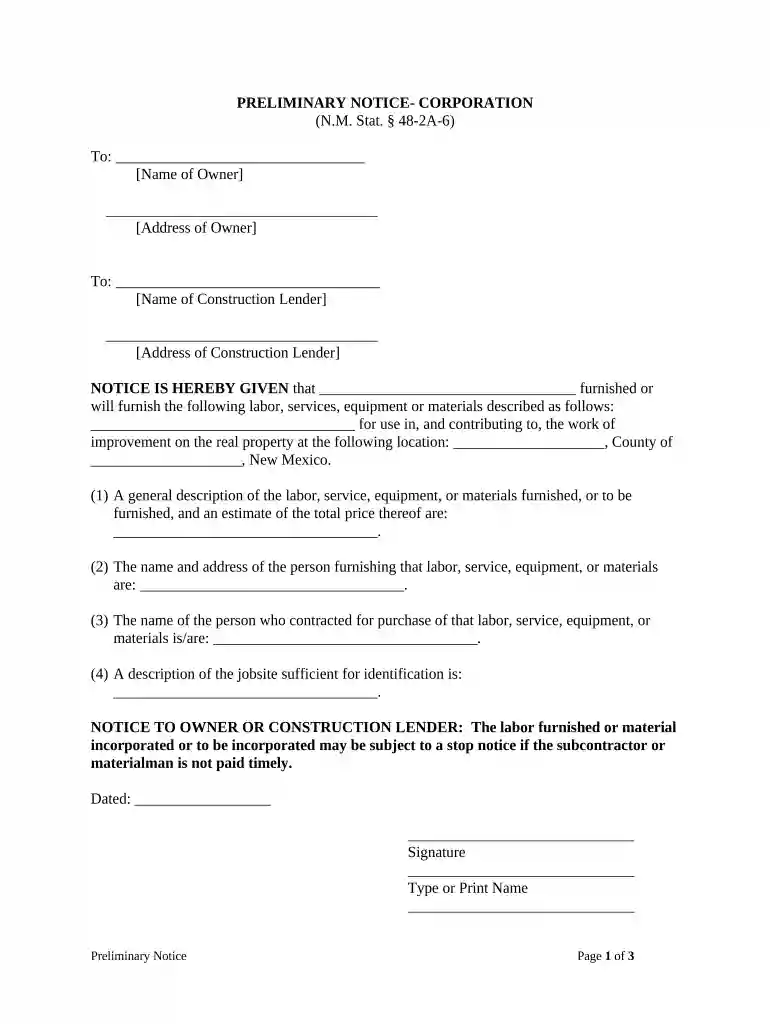
preliminary notice Preview on Page 1

Here's how it works

01. Edit your form online
Type text, add images, blackout confidential details, add comments, highlights and more.

02. Sign it in a few clicks
Draw your signature, type it, upload its image, or use your mobile device as a signature pad.

03. Share your form with others
Send it via email, link, or fax. You can also download it, export it or print it out.

How to use or fill out preliminary notice with our platform

Form edit decoration
9.5
Ease of Setup
DocHub User Ratings on G2
9.0
Ease of Use
DocHub User Ratings on G2
  1. Click ‘Get Form’ to open the preliminary notice in the editor.
  2. Begin by entering the name and address of the owner in the designated fields. This information is crucial for identifying the parties involved.
  3. Next, input the name and address of the construction lender. Ensure accuracy as this will be used for any necessary notifications.
  4. In the section regarding labor, services, equipment, or materials, provide a detailed description along with an estimated total price. This clarity helps prevent disputes later on.
  5. Fill in your name and address as the person furnishing these services. This establishes your role in the transaction.
  6. Identify who contracted for these services by entering their name in the appropriate field.
  7. Describe the job site sufficiently for identification purposes. This ensures that all parties are aware of where work is being performed.
  8. Finally, sign and date the document. If required, have it notarized to validate its authenticity before delivery.

Start using our platform today to streamline your document editing and ensure your preliminary notice is completed efficiently!

be ready to get more

Complete this form in 5 minutes or less

Get form

Got questions?

We have answers to the most popular questions from our customers. If you can't find an answer to your question, please contact us.
Contact us
A preliminary notice, also called a prelim or pre-lien, is a legal document that contractors, subcontractors, and material suppliers send to inform key stakeholders of their involvement in a construction project.
Pre-lien (preliminary) notice: This notice should be submitted at the start of every project, typically within a specified time frame after the subcontractor begins work or delivers materials. It serves as a formal notification of the subcontractors involvement and their intent to protect their right to payment.
A Preliminary notice (P-notice) - an activity or condition that will become permanent and will result in a chart revision. A P-notice will always be followed later by a notice of effect. A Temporary notice (T-notice) - conditions that will not become permanent.
The Preliminary Notice If you receive a Preliminary Notice, dont panic. The preliminary notice isnt a lien; it is a notice that a subcontractor or supplier has provided or will be providing goods and/or services to improve your property and could file a lien claim if he/she is not paid.

Security and compliance

At DocHub, your data security is our priority. We follow HIPAA, SOC2, GDPR, and other standards, so you can work on your documents with confidence.
Learn more
ccpa2
pci-dss
gdpr-compliance
hipaa
soc-compliance
be ready to get more

Complete this form in 5 minutes or less

Get form