Mn notarized 2026

Get Form
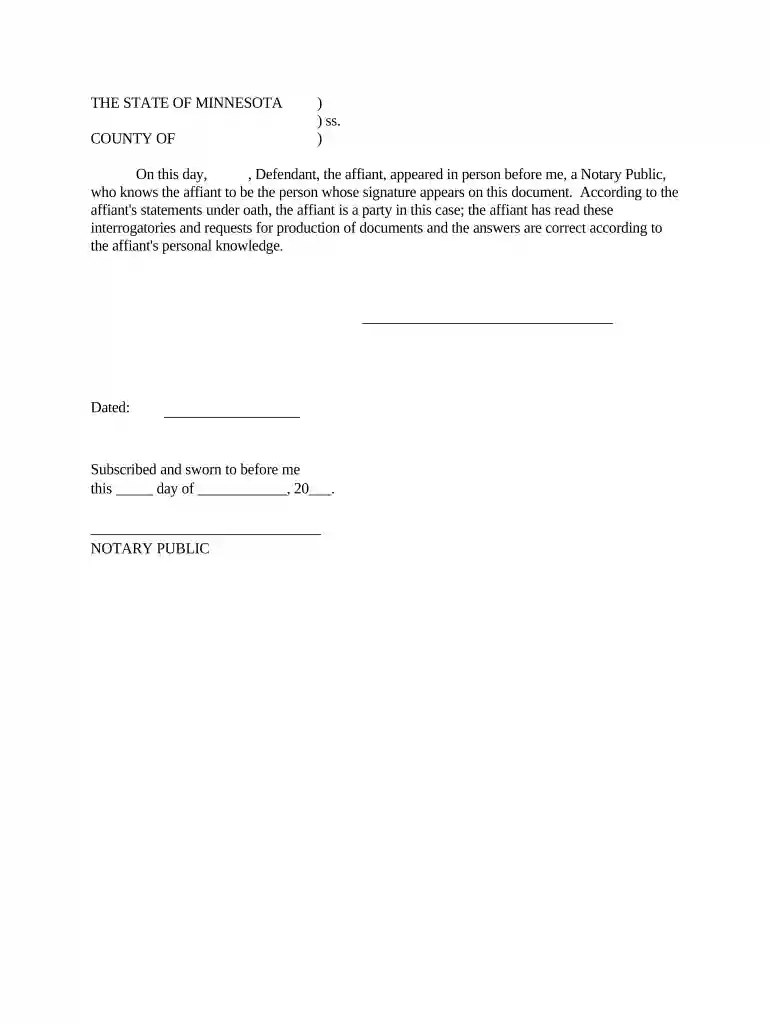
can you notarize for family in mn Preview on Page 1

Here's how it works

01. Edit your can you notarize for family in mn online
Type text, add images, blackout confidential details, add comments, highlights and more.

02. Sign it in a few clicks
Draw your signature, type it, upload its image, or use your mobile device as a signature pad.

03. Share your form with others
Send mn notary lookup via email, link, or fax. You can also download it, export it or print it out.

How to use or fill out mn notarized with our platform

Form edit decoration
9.5
Ease of Setup
DocHub User Ratings on G2
9.0
Ease of Use
DocHub User Ratings on G2
  1. Click ‘Get Form’ to open the mn notarized document in the editor.
  2. Begin by entering the date at the top of the form where it states 'On this day,' ensuring accuracy for legal purposes.
  3. In the section labeled 'Defendant,' input the name of the affiant who is appearing before the Notary Public.
  4. Next, ensure that you have a Notary Public present to witness your signature. The Notary will need to verify your identity.
  5. After signing, leave space for the Notary Public to fill in their details, including their signature and date of notarization.
  6. Finally, review all entries for accuracy before saving or exporting your completed document.

Start using our platform today to streamline your document editing and notarization process for free!

be ready to get more

Complete this form in 5 minutes or less

Get form

Got questions?

We have answers to the most popular questions from our customers. If you can't find an answer to your question, please contact us.
Contact us
The UPS Store locations offer notary services to help make life easier. Once your documents are docHubd, the center will help you make any necessary copies and ship them where they need to go.
Yes, Minnesota allows Remote Online Notarization (RON). It has laws providing for the performance of notarization by notaries remotely using secured, state-approved technological platforms.
The U.S. Embassy, Consulates, and Consular Agencies in Brazil provide notary services. They are available for all nationalities and available by appointment only. Except for affidavits, we can only provide notarial services for documents that are to be used in the United States.
In Brazil, notary publics, otherwise known as Tabelio de Notas or Cartrio de Notas, are one of those responsible for docHubing documents. These professionals authenticate and docHub the authenticity of signatures on various legal documents, such as powers of attorney, contracts, and affidavits.
Notarization is an identity-based, anti-fraud measure performed by a government-authorized person called a notary public. A notary publics role is to verify a document signers identity, to witness the signing of a legal document and to provide an independent check on the mental capacity of the signer.

Security and compliance

At DocHub, your data security is our priority. We follow HIPAA, SOC2, GDPR, and other standards, so you can work on your documents with confidence.
Learn more
ccpa2
pci-dss
gdpr-compliance
hipaa
soc-compliance

People also ask

Period of Issuance: 5 years, or earlier. Commission expires on Jan. 31st of the fifth year after issuance.
When living in Brazil, a common day to day necessity any person may have is going to a public notary, known in Portuguese as Cartrio.

Related links