Discovery - Plaintiff's Request for Production of Documents - Minnesota 2026

Get Form
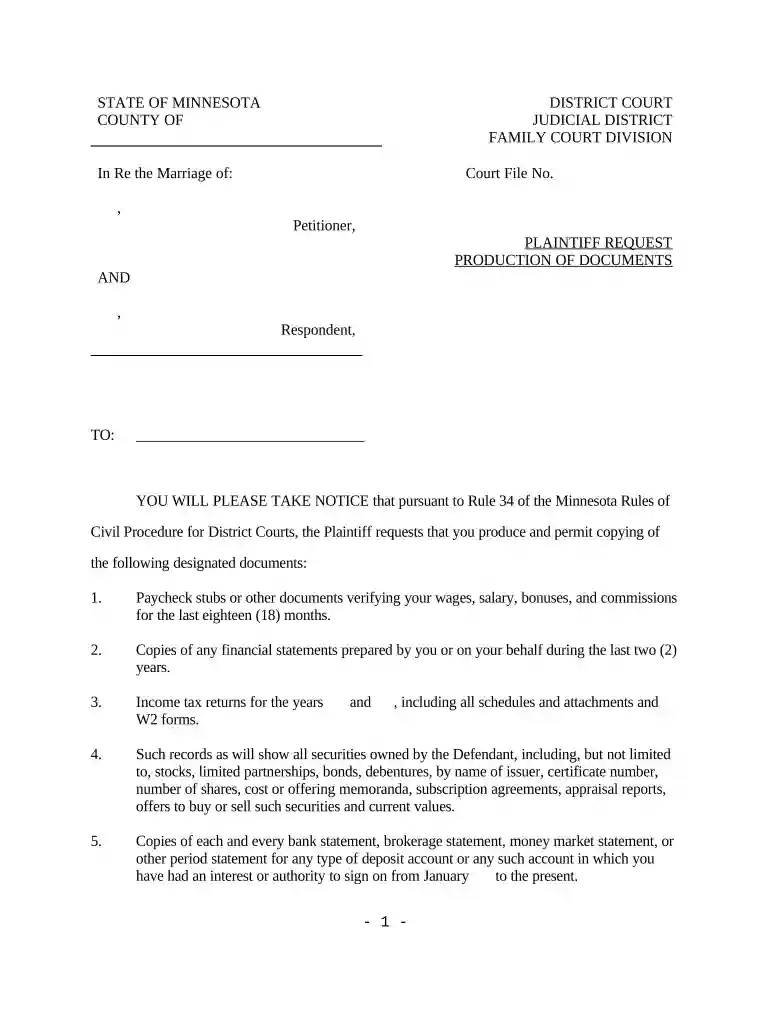
Discovery - Plaintiff's Request for Production of Documents - Minnesota Preview on Page 1

Here's how it works

01. Edit your form online
Type text, add images, blackout confidential details, add comments, highlights and more.

02. Sign it in a few clicks
Draw your signature, type it, upload its image, or use your mobile device as a signature pad.

03. Share your form with others
Send it via email, link, or fax. You can also download it, export it or print it out.

How to use or fill out Discovery - Plaintiff's Request for Production of Documents - Minnesota with our platform

Form edit decoration
9.5
Ease of Setup
DocHub User Ratings on G2
9.0
Ease of Use
DocHub User Ratings on G2
  1. Click ‘Get Form’ to open the Discovery - Plaintiff's Request for Production of Documents in the editor.
  2. Begin by entering the names of the parties involved in the case at the top of the form, ensuring accuracy to avoid any confusion.
  3. Fill in the Court File Number, which is essential for identifying your case within the judicial system.
  4. In Section 1, list all requested documents clearly. For example, specify paycheck stubs and financial statements as outlined in the document.
  5. Ensure you provide a detailed description for each document request, including time frames and types of records needed.
  6. Complete the section regarding where and when documents should be produced, making sure to adhere to the 30-day timeline specified.
  7. Finally, sign and date the form at the bottom, adding your attorney’s information if applicable.

Start using our platform today to streamline your document editing and ensure a smooth completion process!

be ready to get more

Complete this form in 5 minutes or less

Get form

Got questions?

We have answers to the most popular questions from our customers. If you can't find an answer to your question, please contact us.
Contact us
Discovery may be obtained by one or more of the methods provided under the Federal Rules of Civil Procedure, including: written interrogatories, depositions, requests for production of documents or things for inspection or copying, and requests for admission addressed to parties.
Rule 69. Execution Process to enforce a judgment for the payment of money shall be a writ of execution, unless the court directs otherwise.
A Request for Production (RFP) is a discovery tool that permits you to request documents or electronically stored information in the opposing sides possession, custody or control. An RFP can also allow you to inspect, copy, test, or sample tangible things in the opposing sides possession, custody or control.
In a civil action, a request for admission is a discovery tool that allows one party to request that another party admit or deny the truth of a statement under oath.
55.01Judgment If a party against whom judgment is sought has appeared in the action, that party shall be served with written notice of the application for judgment at least 14 days prior to the hearing on such application.

Security and compliance

At DocHub, your data security is our priority. We follow HIPAA, SOC2, GDPR, and other standards, so you can work on your documents with confidence.

Learn more
ccpa2
pci-dss
gdpr-compliance
hipaa
soc-compliance

People also ask

63.03Notice to Remove A judge or judicial officer who has presided at a motion or other proceeding or who is assigned by the Chief Justice of the Minnesota Supreme Court may not be removed except upon an affirmative showing that the judge or judicial officer is disqualified under the Code of Judicial Conduct.
Request for production is part of pretrial discovery whereby one party provides a written request to another party, seeking access to specified documents or other tangible things for inspection and copying.[1] As with all discovery tools, requests for production must be used to seek information reasonably

Related links