Type text, add images, blackout confidential details, add comments, highlights and more.
02. Sign it in a few clicks
Draw your signature, type it, upload its image, or use your mobile device as a signature pad.
03. Share your form with others
Send texas utility help com via email, link, or fax. You can also download it, export it or print it out.
How to use or fill out Texas Utility with our platform
Ease of Setup
DocHub User Ratings on G2
Ease of Use
DocHub User Ratings on G2
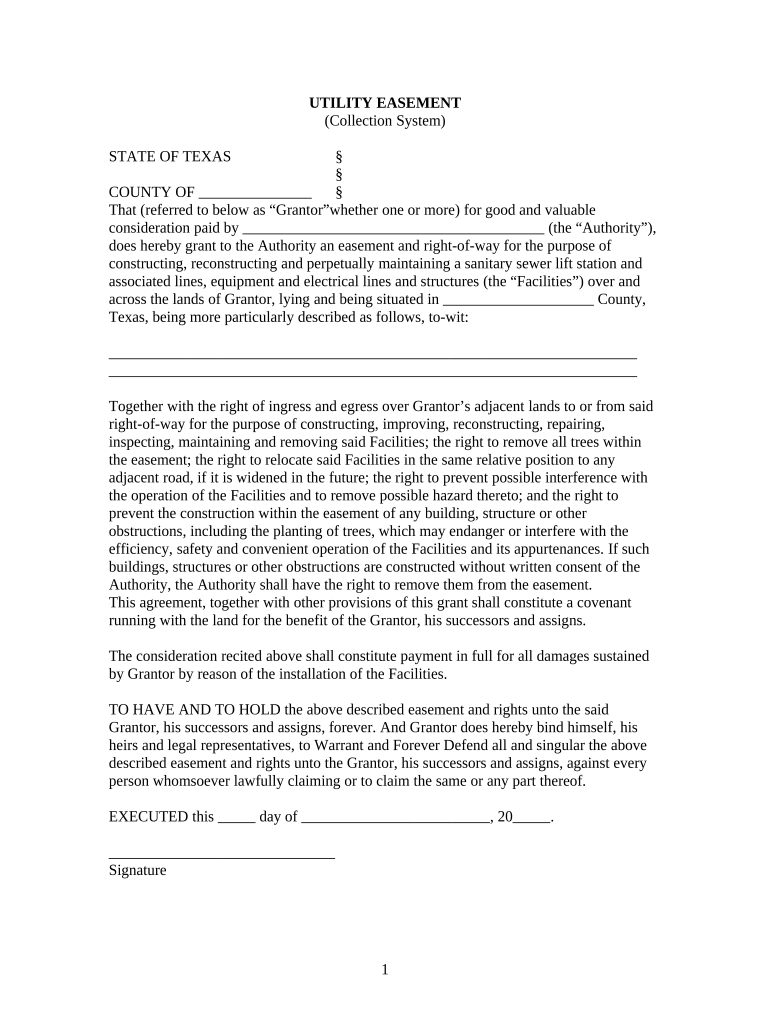
Click ‘Get Form’ to open the Texas Utility document in the editor.
Begin by filling in the 'Grantor' section with your name or the names of all parties granting the easement. Ensure accuracy as this identifies who is providing the rights.
In the 'Authority' field, enter the name of the entity receiving the easement. This is crucial for legal clarity regarding who will maintain and operate the facilities.
Specify the location details in 'County' and provide a clear description of the land involved. This helps in identifying the exact area affected by this agreement.
Review and complete any additional sections regarding rights of ingress and egress, ensuring you understand what rights are being granted.
Finally, sign and date the document at the bottom. If required, have it notarized to validate your agreement legally.
Start using our platform today to fill out your Texas Utility form easily and for free!
16 Tex. Admin. Code 25.5 - Definitions | State Regulations
(1) Above-market purchased power costs --Wholesale demand and energy costs that a utility is obligated to pay under an existing purchased power contract.Read more
Jan 30, 2026 Central Utility Plant - Texas AM power station is an operating power station of at least 50-megawatts (MW) in College Station, Brazos, Texas,Read more
Texas Utility Help (TUH) Website for Utility Assistance is
Texas Utility Help (TUH) Website for Utility Assistance is CLOSED If you or someone you know is in need of assistance, please visit our Help for Texans Page.
Cookie consent notice
This site uses cookies to enhance site navigation and personalize your experience.
By using this site you agree to our use of cookies as described in our Privacy Notice.
You can modify your selections by visiting our Cookie and Advertising Notice.