Waiver services 2026

Get Form
waiver services Preview on Page 1

Here's how it works

01. Edit your form online
Type text, add images, blackout confidential details, add comments, highlights and more.

02. Sign it in a few clicks
Draw your signature, type it, upload its image, or use your mobile device as a signature pad.

03. Share your form with others
Send it via email, link, or fax. You can also download it, export it or print it out.

How to use or fill out waiver services with our platform

Form edit decoration
9.5
Ease of Setup
DocHub User Ratings on G2
9.0
Ease of Use
DocHub User Ratings on G2
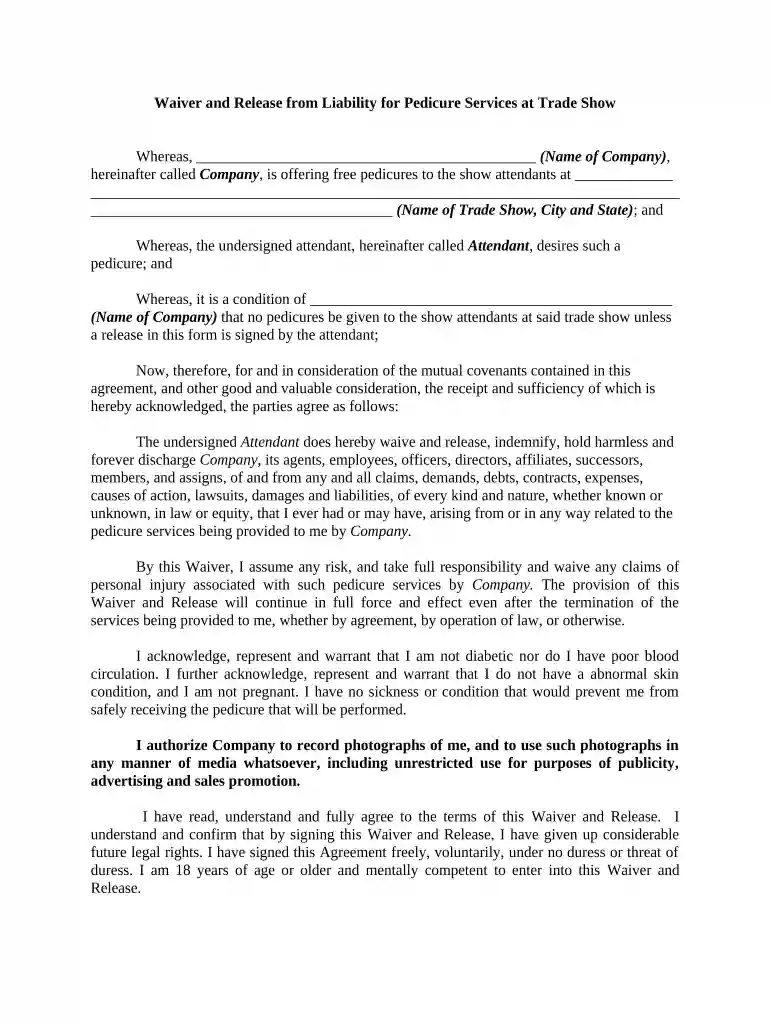
  1. Click ‘Get Form’ to open the Waiver and Release from Liability for Pedicure Services in the editor.
  2. Begin by entering the name of the company offering the pedicure services in the designated field. This ensures clarity on who is providing the service.
  3. Next, fill in the name of the trade show, along with its city and state. This information contextualizes your participation.
  4. In the section regarding personal health, confirm that you do not have any conditions such as diabetes or poor blood circulation. Check each box as applicable to affirm your eligibility for receiving services.
  5. Review the waiver terms carefully. Ensure you understand that by signing, you are waiving certain legal rights. This is crucial for your protection and understanding.
  6. Finally, sign and date the form at the bottom. Make sure to witness your signature if required, confirming that you are over 18 and mentally competent.

Start using our platform today to easily complete your waiver form online for free!

be ready to get more

Complete this form in 5 minutes or less

Get form

Got questions?

We have answers to the most popular questions from our customers. If you can't find an answer to your question, please contact us.
Contact us

Sure, electronically drawing your signature is appropriate, but only if you use a tool that complies with industry laws and regulations. Consider DocHub, which guarantees eSignature validity under ESIGN and UETA requirements. All you need to eSign your waiver services is an account with DocHub and an internet connection. When you open your document in our editor, click Sign and choose the Draw tool.

When you edit your waiver services with DocHub, you merely require a stable web connection and virtually any browser installed on your device. No need to install any third-party software or study tutorials. Just open a tab with DocHub, drag and drop your file, and edit it on the spot.

Waivers (also known as releases) are written agreements that say the sponsor of an activity will not be liable for harm suffered by participants. Although waivers are primarily legal tools, they also serve an educational purpose by making people think about the potential risks of an activity.
This allows foreign nationals who have good reasons due to individual, corporate or personal circumstances and grounds as to why they cannot or do not need to comply with the prescribed form or requirement the opportunity to have such waived.
A waiver works by having one party sign a document that removes or reduces their ability to claim certain rights, such as liability for damages or injuries. In business, waivers help minimize risk by clearly defining responsibilities and ensuring that companies are not held liable for certain situations.

Security and compliance

At DocHub, your data security is our priority. We follow HIPAA, SOC2, GDPR, and other standards, so you can work on your documents with confidence.
Learn more
ccpa2
pci-dss
gdpr-compliance
hipaa
soc-compliance

People also ask

The purpose of a waiver is to release or limit legal claims, often protecting businesses from potential liability or financial loss.
In essence, a waiver does two primary things: It informs your customers about the inherent risks involved with your business activities. It helps to limit your liability should any incidents occur.
The PA Waiver Program provides financial assistance to individuals who require long-term services but wish to receive them in their homes or communities instead of in institutional settings like nursing homes.
A waiver is a legally binding provision where either party in a contract agrees to voluntarily forfeit a claim without the other party being liable. Waivers can either be in written form or some form of action.
A waiver is the voluntary relinquishment or surrender of a known legal right, claim, or privilege. It may be made in writing, orally, or implied by conduct, and is commonly used in contractual, legal, and regulatory contexts.

Related links