Release liability form 2026

Get Form
release of liability form Preview on Page 1

Here's how it works

01. Edit your release of liability form online
Type text, add images, blackout confidential details, add comments, highlights and more.

02. Sign it in a few clicks
Draw your signature, type it, upload its image, or use your mobile device as a signature pad.

03. Share your form with others
Send release of liability via email, link, or fax. You can also download it, export it or print it out.

How to use or fill out release liability form with DocHub

Form edit decoration
9.5
Ease of Setup
DocHub User Ratings on G2
9.0
Ease of Use
DocHub User Ratings on G2
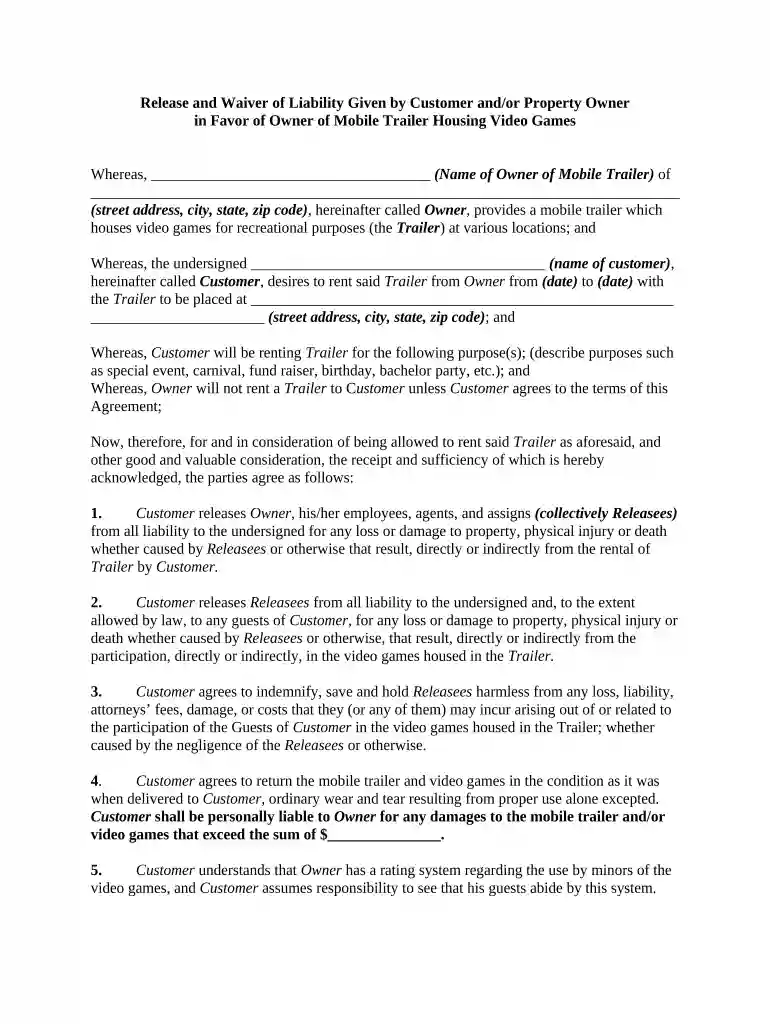
  1. Click ‘Get Form’ to open the release liability form in our editor.
  2. Begin by entering the name of the Owner of the mobile trailer in the designated field. Ensure accuracy as this identifies the party providing the service.
  3. Fill in the complete address of the Owner, including street address, city, state, and zip code. This information is crucial for legal identification.
  4. Next, input your name as the Customer in the specified area. This confirms who is renting the trailer.
  5. Indicate the rental dates by filling in both start and end dates clearly. This defines the rental period.
  6. Describe the purpose for renting the trailer (e.g., birthday party, carnival) in detail to clarify usage intentions.
  7. Review each section carefully, ensuring all fields are completed accurately before signing at the bottom of the form.

Start using our platform today to easily fill out your release liability form for free!

be ready to get more

Complete this form in 5 minutes or less

Get form

Got questions?

We have answers to the most popular questions from our customers. If you can't find an answer to your question, please contact us.
Contact us
With WaiverSign, you can quickly and easily create and sign online waivers, release of liability forms, digital consent forms, permission slips, damage release forms, electronic rental agreements, and more.
Is a notary required for vehicle release of liability in California? No. The California DMV does not require notarization of the REG 138 form. However, notarization offers an added layer of legal protectionespecially during private party sales or disputes.
A release of liability, also known as a liability waiver or a hold harmless agreement, is a contract in which one party agrees not to hold another party liable for damages or injury.
While creating your own release forms is possible, its important to consider a few things before you decide to do so. Consent forms involve intricate legal considerations that have to be specifically tailored to the situation at hand and adhere to certain laws and regulations.
Easily create, share, and sign digital waivers and release forms, directly from your mobile device or computer. Accelerate the completion of digital waivers and release forms with form sharing and electronic signature capture.

Security and compliance

At DocHub, your data security is our priority. We follow HIPAA, SOC2, GDPR, and other standards, so you can work on your documents with confidence.
Learn more
ccpa2
pci-dss
gdpr-compliance
hipaa
soc-compliance
be ready to get more

Complete this form in 5 minutes or less

Get form

People also ask

Signing a release of liability without consulting a lawyer can have long-lasting consequences. By speaking with a personal injury lawyer first, you can fully understand the terms of the agreement, ensure that you are not settling for less than what you deserve, and protect your rights against unforeseen complications.
It depends on your state. In California, notarization isnt typically required by the DMV but may be requested for added protection in private sales.

Related links