



Here's how it works



How to use or fill out default judgment with our platform

- Click ‘Get Form’ to open the default judgment document in the editor.
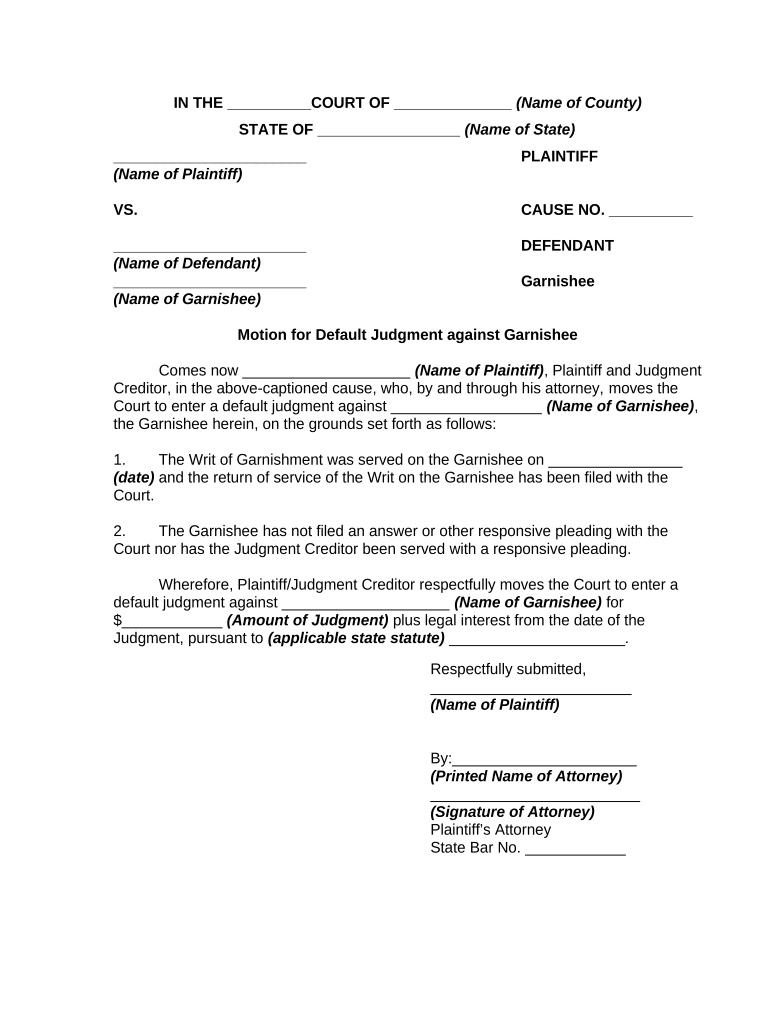
- Begin by filling in the court name and county at the top of the form. This sets the jurisdiction for your case.
- Enter the names of the plaintiff and defendant in their respective fields, ensuring accuracy to avoid any legal issues.
- In the motion section, specify the grounds for your default judgment, including details about service dates and responses from the garnishee.
- Fill in the amount of judgment sought and applicable state statute, which is crucial for legal validity.
- Complete attorney information, including signature and State Bar number, to authenticate your motion.
- Finally, review all entries for accuracy before saving or exporting your completed document.
Start using our platform today to streamline your document editing and ensure a smooth filing process!
It's free
Got questions?
Can I fill out and sign my default judgment online?
Yes, and it’s really easy! DocHub is a web-based PDF editor with advanced document management features that allow you promptly modify your forms, fill out empty fields and drop new ones for others to fill out, and create eSignatures in several ways. Add your default judgment, provide information as requested, and decide how you want to eSign your document - by typing your name, drawing your signature, uploading its image, or using a QR code.
Do I need to install software to edit my what is a default judgement?
When you edit your what is a default judgement with DocHub, you merely need a steady web connection and virtually any web browser installed on your device. No need to set up any third-party software or study tutorials. Simply open a tab with DocHub, drag and drop your file, and modify it on the spot.
Security and compliance
At DocHub, your data security is our priority. We follow HIPAA, SOC2, GDPR, and other standards, so you can work on your documents with confidence.
Learn more