Consent release 2026

Get Form
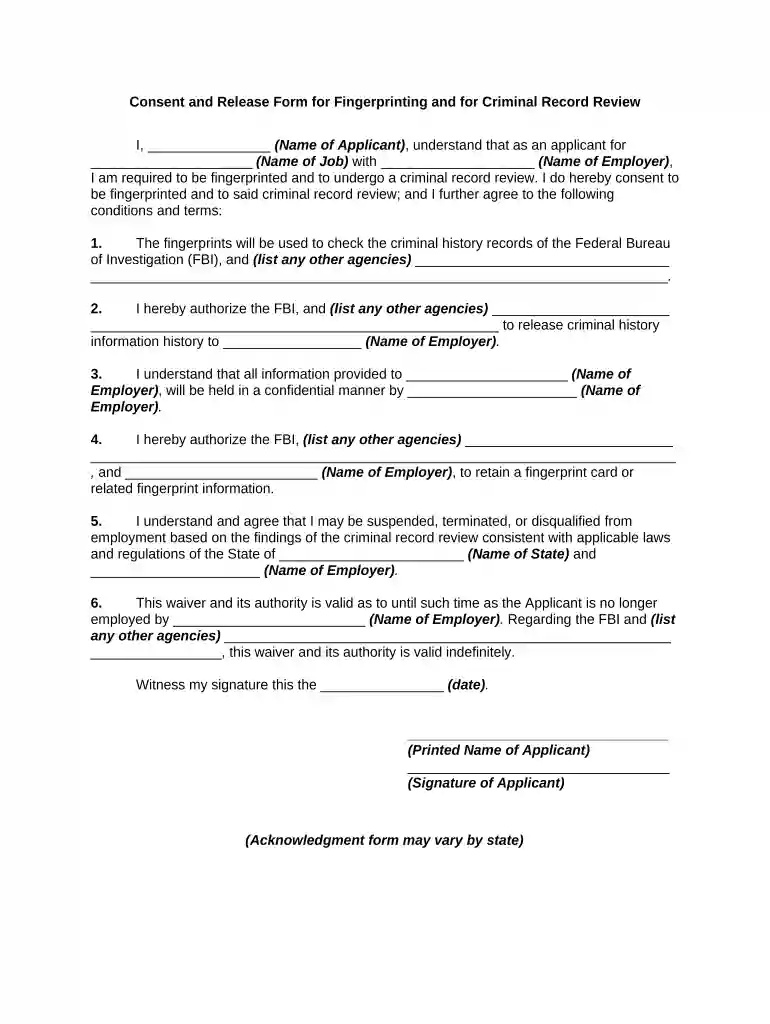
consent release Preview on Page 1

Here's how it works

01. Edit your form online
Type text, add images, blackout confidential details, add comments, highlights and more.

02. Sign it in a few clicks
Draw your signature, type it, upload its image, or use your mobile device as a signature pad.

03. Share your form with others
Send it via email, link, or fax. You can also download it, export it or print it out.

How to use or fill out consent release with our platform

Form edit decoration
9.5
Ease of Setup
DocHub User Ratings on G2
9.0
Ease of Use
DocHub User Ratings on G2
  1. Click ‘Get Form’ to open the consent release form in the editor.
  2. Begin by entering your name in the designated field for 'Name of Applicant'. This personalizes the document and confirms your identity.
  3. Next, fill in the 'Name of Job' and 'Name of Employer' fields. This information is crucial as it specifies the context of your consent.
  4. In section one, list any additional agencies that will be involved in checking your criminal history records alongside the FBI.
  5. Authorize the release of your criminal history information by filling in the 'Name of Employer' again in section two.
  6. Ensure you understand confidentiality terms by reviewing section three, which outlines how your information will be handled.
  7. Complete sections four through six by providing necessary details about retention and validity periods, including state-specific regulations.
  8. Finally, sign and date the form at the bottom to finalize your consent. Make sure all fields are filled accurately before submission.

Start using our platform today to easily complete your consent release form online for free!

be ready to get more

Complete this form in 5 minutes or less

Get form

Got questions?

We have answers to the most popular questions from our customers. If you can't find an answer to your question, please contact us.
Contact us
A photo release form sometimes called a media release or consent form is an agreement between a photographer and an individual (most often, the subject of the photo), which gives the photographer the right to commercialize the picture.
EXPIRES WHEN: This authorization is good for 12 months from the date signed.
By signing an authorization to release information, a party is consenting to provide another party with access to otherwise confidential information or records about an individual. However, signing a release doesnt mean the complete loss of confidentiality because most authorization forms are subject to limitations.
All authorizations must be in plain language, and contain specific information regarding the information to be disclosed or used, the person(s) disclosing and receiving the information, expiration, right to revoke in writing, and other data.
A consent to release document is used by an individual or entity who does not represent the Medicare beneficiary but is requesting information regarding the beneficiarys conditional payment information.

Security and compliance

At DocHub, your data security is our priority. We follow HIPAA, SOC2, GDPR, and other standards, so you can work on your documents with confidence.

Learn more
ccpa2
pci-dss
gdpr-compliance
hipaa
soc-compliance