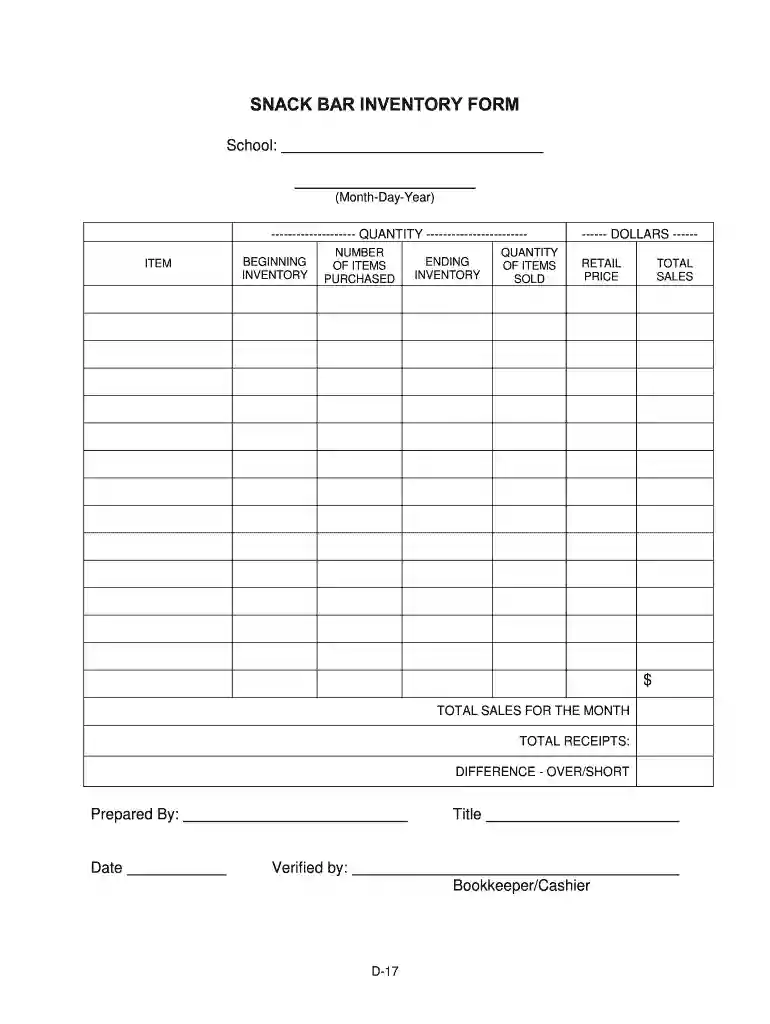
Concession stand inventory template 2026

Get Form
concession stand inventory template Preview on Page 1

Here's how it works

01. Edit your concession stand inventory template online
Type text, add images, blackout confidential details, add comments, highlights and more.

02. Sign it in a few clicks
Draw your signature, type it, upload its image, or use your mobile device as a signature pad.

03. Share your form with others
Send concession stand inventory spreadsheet via email, link, or fax. You can also download it, export it or print it out.

Comprehensive Overview of Concession Stand Inventory Template

A concession stand inventory template is an essential tool for ensuring effective management and tracking of inventory within a concession stand setting, such as those found at schools, sports events, and fairs. This structured document assists in maintaining accurate records of all items available for sale, including snacks and beverages.

Purpose and Importance of the Concession Stand Inventory Template

The primary function of a concession stand inventory template is to streamline inventory management. It serves the following purposes:

  • Tracking Inventory Levels: This template allows vendors to monitor quantities on hand, track purchases, and identify what items need to be replenished.
  • Sales Analysis: By incorporating sections for sales data, concession operators can analyze trends, informing them which products are popular and which may need to be discounted or removed.
  • Financial Accuracy: Keeping precise inventory records aids in preparing reports for financial analysis, enhancing budget planning and accountability.

Key Elements of the Concession Stand Inventory Template

A well-designed concession stand inventory template typically includes the following components:

  • Item Description: Each item available for sale should be listed with a clear description. This may include snacks, drinks, or other merchandise.
  • Category of Item: Organizing inventory into categories (e.g., beverages, snacks, candies) can help streamline sales tracking and ordering.
  • Quantity in Stock: A column for the current quantity of each item helps in assessing stock levels, facilitating timely reordering.
  • Unit Cost: Capturing the cost price for each item allows operators to calculate total inventory value and establish pricing strategies.
  • Retail Price: Listing the price at which items are sold provides clarity on markup and potential revenue.

Using the Concession Stand Inventory Spreadsheet Effectively

To maximize the utility of your concession stand inventory spreadsheet, consider these steps:

  1. Regular Updates: Ensure the spreadsheet is updated regularly, especially after each event or sales period. This practice maintains accurate stock levels.
  2. Use Formulas for Calculations: Incorporating formulas (such as SUM for totals) can automate calculations for total inventory value or sales figures, simplifying financial assessments.
  3. Analyze Sales Trends: Periodically review sales data to identify trends. This analysis can inform future stock purchases based on what sells best, reducing waste and increasing profitability.

Best Practices for Organizing Inventory

Adopting effective practices for organizing your concession stand inventory can enhance efficiency. These methods include:

  • Categorization: Grouping items by type or popularity simplifies inventory management and aids customers in easily finding products.
  • FIFO Method (First In, First Out): This strategy ensures that older stock is sold first, reducing the risk of spoilage, particularly for perishable items.
  • Labeling: Clear labeling of all inventory not only improves organization but also assists staff in locating items quickly during peak sales times.

Digital Tools and Applications for Inventory Management

In today's digital age, multiple apps and software solutions can aid in managing concession stand inventories efficiently. Consider the following options:

  • Inventory Management Software: Various applications allow for real-time inventory tracking, notifications for low stock, and easier sales reporting.
  • Spreadsheet Programs: Utilizing advanced spreadsheet programs, such as Excel or Google Sheets, allows for customizable templates and the ability to analyze data through graphical representations.
  • Mobile Applications: Some mobile apps provide on-the-go inventory management solutions, enabling access and updates from smartphones or tablets, which is particularly useful during busy events.

Understanding Concession Stand Pricing in 2024

Ensuring competitive yet profitable pricing is crucial, and understanding market trends for concession stand prices in 2024 can inform your strategy. Factors include:

  • Market Research: Conduct pricing research at similar events to establish competitive price points.
  • Cost Considerations: Regularly assess the cost of goods sold to ensure margins are maintained in line with expenses.
  • Adjustments for Seasonality: Implementing seasonal pricing strategies can optimize profits during peak event times and attract customers during slower periods.

Each of these elements contributes to a more successful concession stand operation, supporting both the logistical and financial aspects of inventory management.

be ready to get more

Complete this form in 5 minutes or less

Get form

Got questions?

We have answers to the most popular questions from our customers. If you can't find an answer to your question, please contact us.
Contact us
The most successful concession stands typically offer a balanced mix of: High-margin staples (popcorn, soft drinks) that provide consistent profit. Quick-service items (hot dogs, nachos) that satisfy hungry customers. Grab-and-go snacks (candy, chips) that require minimal preparation.
1. Find an inventory template Open Excel or if Excel is already open, select File New. (In Excel for the Web, select File New Browse Templates.) In the search box, type inventory or something similar. Browse the results. Once youve found the one you like, select Create. The template will open in Excel.
Yes, Google Sheets offers a selection of pre-made inventory templates that you can customize to your needs. These are accessible from the Google Sheets template gallery.
Here is a simple Google Sheets inventory template with pre-filled information and some basic formulas to show the power of inventory tracking. It is done in the form of a workbook with three tabs.
What is an inventory list? An inventory list is a comprehensive, itemized list that details every product your company has in stock, including raw materials, work-in-progress items, and finished goods. In general, an inventory list should include the products name, SKU number, description, pricing, and quantity.

Security and compliance

At DocHub, your data security is our priority. We follow HIPAA, SOC2, GDPR, and other standards, so you can work on your documents with confidence.

Learn more
ccpa2
pci-dss
gdpr-compliance
hipaa
soc-compliance

People also ask

Step-by-Step Guide: How to Use the Google Sheets Inventory Management Template Step 1: Download the Template. Step 2: Customize the Template. Step 3: Input Your Inventory. Step 4: Implement Tracking. Step 5: Set Up Alerts. Step 6: Analyze the Data. Step 7: Maintain the Inventory Sheet.
For small businesses seeking powerful yet cost-effective inventory tools, top free options include Square, Odoo, Zoho Inventory, Boxstorm, SalesBinder, and Sortly. These platforms help streamline inventory tracking, automate order and sales management, and provide real-time insights without breaking the bank.

bar inventory template