Imm5708 francais 2026

Get Form
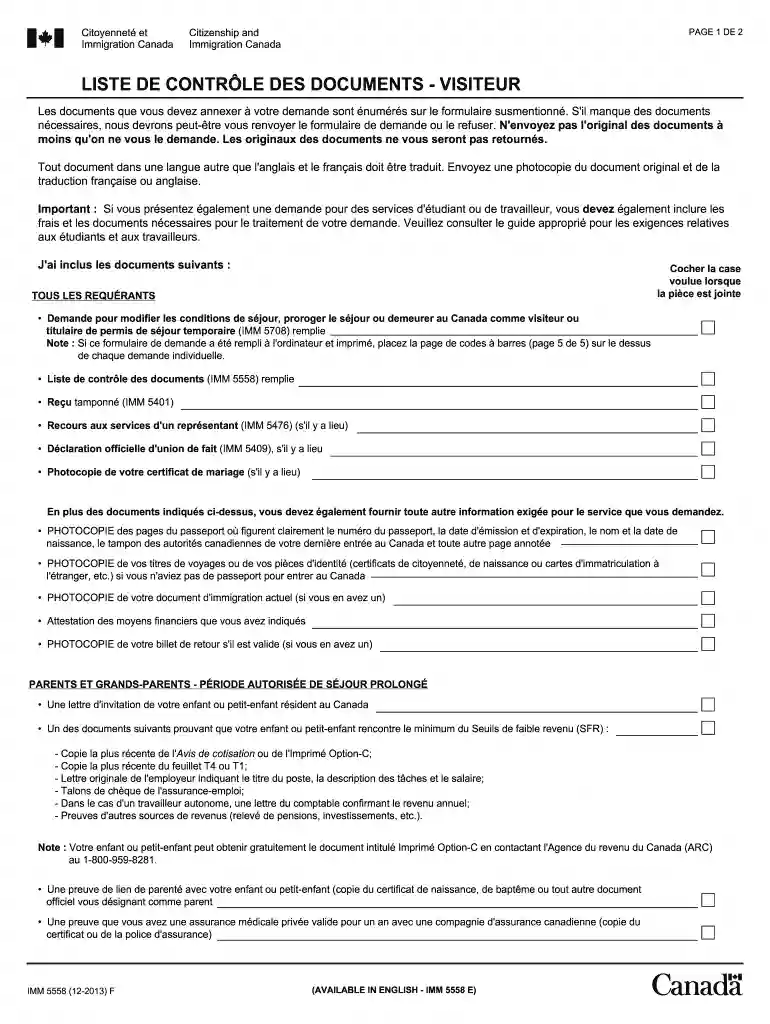
imm 5708 pdf français Preview on Page 1

Here's how it works

01. Edit your imm 5708 pdf français online
Type text, add images, blackout confidential details, add comments, highlights and more.

02. Sign it in a few clicks
Draw your signature, type it, upload its image, or use your mobile device as a signature pad.

03. Share your form with others
Send imm5708 via email, link, or fax. You can also download it, export it or print it out.

How to use or fill out imm5708 francais with our platform

Form edit decoration
9.5
Ease of Setup
DocHub User Ratings on G2
9.0
Ease of Use
DocHub User Ratings on G2
  1. Click ‘Get Form’ to open the imm5708 francais in the editor.
  2. Begin by filling out your personal information in the designated fields, including your full name, date of birth, and passport details. Ensure accuracy as this information is crucial for processing.
  3. Next, check the boxes for any documents you are attaching. This includes the completed IMM 5708 form itself and any additional required documents such as proof of financial means or invitation letters.
  4. For each document listed, ensure you provide photocopies as specified. If any documents are in a language other than French or English, include translations.
  5. Review all sections carefully before finalizing. Use our platform’s editing tools to make any necessary adjustments easily.

Start using our platform today to fill out your imm5708 francais form online for free!

be ready to get more

Complete this form in 5 minutes or less

Get form

Got questions?

We have answers to the most popular questions from our customers. If you can't find an answer to your question, please contact us.
Contact us
0:23 6:39 Walk you through the completing the form 5257. And things you should know before you submit thisMoreWalk you through the completing the form 5257. And things you should know before you submit this document on the governments. Website so without further ado lets get into it. So the UCI. Number is
If youre applying at a visa application centre (VAC), they may ask you to re-fill out the form at their internet kiosks. IRCC forms that need to be validated using the validate button at the bottom of the form use special encoding. You need a computer with docHub Reader 10 or higher to use them.
Open this form in Acrobat Reader Open Acrobat Reader. You need Acrobat Reader version 10 or higher to open our forms. Get the latest version of Acrobat Reader. Select File from the top menu. Click Open. Find the location where you saved the form, click on the file, and click Open.
On Windows: Right click on the downloaded file. On Mac: Control click on the downloaded file. Go to Open with and click docHub Your form will open with the Acrobat Reader program.
To view these PDF forms, you need to: Use your computer (Mac or PC). The forms wont open on mobile devices (iPads, tablets, mobile phones, etc.) docHub Reader 10 (or higher) Download the PDF file to your computer. Save the file in a place you can remember. Make sure you use docHub Reader to open the form.

Security and compliance

At DocHub, your data security is our priority. We follow HIPAA, SOC2, GDPR, and other standards, so you can work on your documents with confidence.

Learn more
ccpa2
pci-dss
gdpr-compliance
hipaa
soc-compliance