Wi corporation wisconsin 2026

Get Form
wi corporation wisconsin Preview on Page 1

Here's how it works

01. Edit your form online
Type text, add images, blackout confidential details, add comments, highlights and more.
02. Sign it in a few clicks
Draw your signature, type it, upload its image, or use your mobile device as a signature pad.
03. Share your form with others
Send it via email, link, or fax. You can also download it, export it or print it out.

How to use or fill out wi corporation wisconsin with our platform

Form edit decoration
9.5
Ease of Setup
DocHub User Ratings on G2
9.0
Ease of Use
DocHub User Ratings on G2
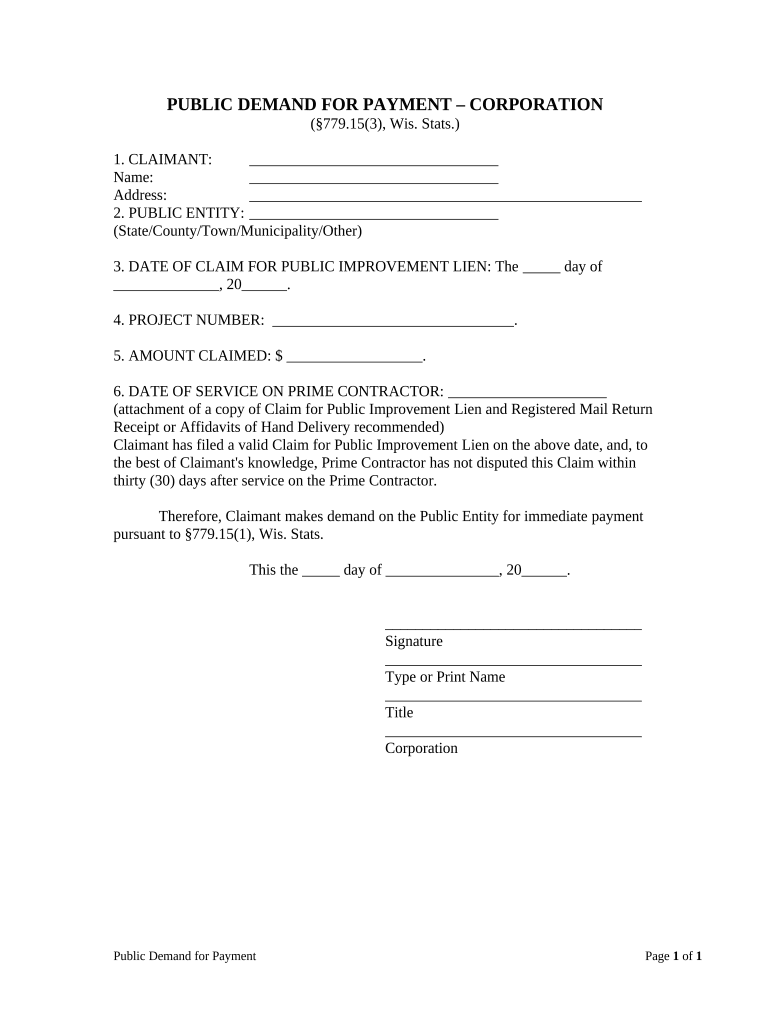
  1. Click ‘Get Form’ to open the wi corporation wisconsin document in the editor.
  2. Begin by filling in your name and address in the 'CLAIMANT' section. Ensure all details are accurate for proper identification.
  3. In the 'PUBLIC ENTITY' field, specify the relevant state, county, town, municipality, or other entity involved in your claim.
  4. Enter the date of your claim for public improvement lien in the designated area. Use the format: day, month, year.
  5. Fill in the project number associated with your claim to ensure it is linked correctly to the right project.
  6. Indicate the amount you are claiming in dollars. Double-check this figure for accuracy.
  7. Document the date of service on the prime contractor. It’s advisable to attach a copy of your Claim for Public Improvement Lien and any relevant receipts.
  8. Finally, sign and print your name along with your title and corporation details at the bottom of the form before submitting.

Start using our platform today to streamline your document editing and form completion process for free!

be ready to get more

Complete this form in 5 minutes or less

Get form

Got questions?

We have answers to the most popular questions from our customers. If you can't find an answer to your question, please contact us.
Contact us
8 methods for how to find out who owns a business Check the company website. Check a WHOIS domain lookup. Submit a public information request. Consult alternative public records. Check with the local Chamber of Commerce. Read Better Business Bureau (BBB) reports. Look up news mentions. Search state secretary of state databases.
Corporations, limited liability companies, limited liability partnerships, limited partnerships, nonprofits, and franchises MUST register with DFI . Sole proprietors and general partnerships do not have to register with DFI .
Go to the DFIs Corporate Records website To start a Wisconsin business entity search, enter the WI DFI Corporate Records homepage, type your desired business name or a known business entity ID into the search bar, and hit enter.
Wisconsin Certificate of Good Standing. In Wisconsin, a Certificate of Good Standing is referred to as a Certificate of Status. It is an official, state-issued document that verifies that a business is compliant with state requirements.
How to do a business name search in California: Visit the California Business Search. Scroll down and enter all or part of your business name in the Search bar. Click the down arrow for Advanced Search. Filter by keyword, exact match, or begins with. Click Search.

Security and compliance

At DocHub, your data security is our priority. We follow HIPAA, SOC2, GDPR, and other standards, so you can work on your documents with confidence.

Learn more
ccpa2
pci-dss
gdpr-compliance
hipaa
soc-compliance

People also ask

A prospective business owner can search each state individually or search the USPTO database. However, if another business is using the name in another state and does not trademark it, the business owner can use the same name but will not be able to trademark it at the federal level.

Related links