Type text, add images, blackout confidential details, add comments, highlights and more.
02. Sign it in a few clicks
Draw your signature, type it, upload its image, or use your mobile device as a signature pad.
03. Share your form with others
Send what does no breeding rights mean via email, link, or fax. You can also download it, export it or print it out.
How to use or fill out breeding contract with our platform
Ease of Setup
DocHub User Ratings on G2
Ease of Use
DocHub User Ratings on G2
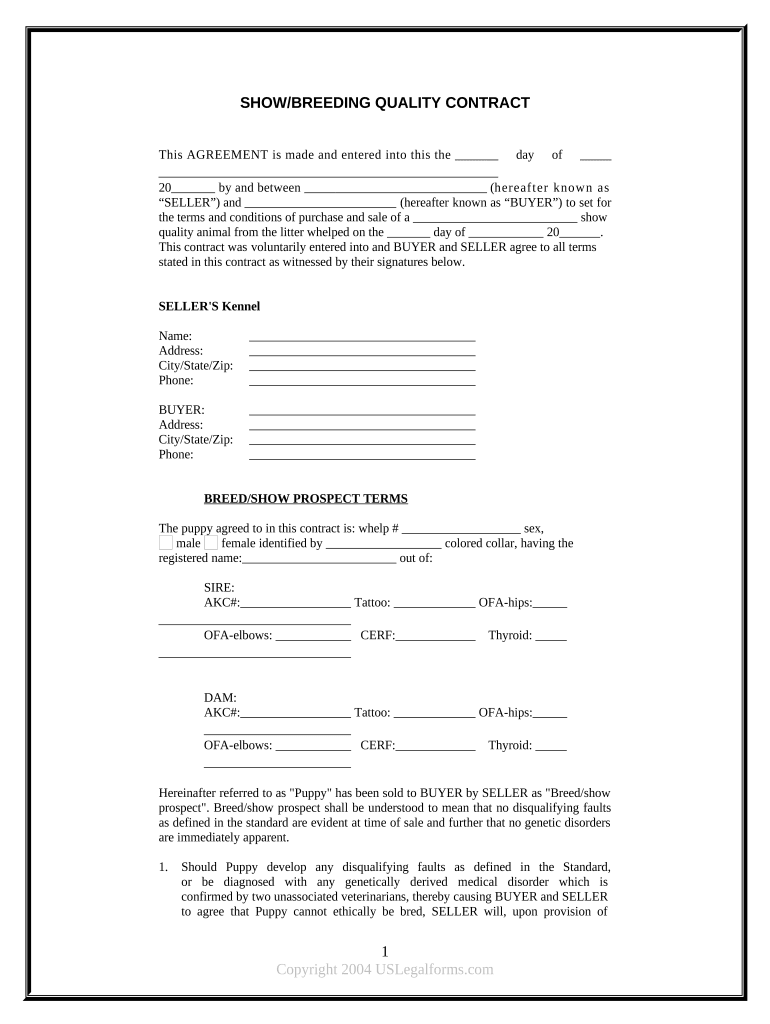
Click ‘Get Form’ to open the breeding contract in the editor.
Begin by entering the date at the top of the form, specifying the day and year when the agreement is made.
Fill in the names and contact information for both the SELLER and BUYER, including kennel name, address, city/state/zip, and phone number.
In the 'BREED/SHOW PROSPECT TERMS' section, provide details about the puppy such as whelp number, sex, color collar identification, and registered name. Include SIRE and DAM information along with their respective AKC numbers.
Review the health guarantee clauses carefully. Ensure you understand your responsibilities regarding veterinary certifications before breeding.
Finally, sign and date the document at the bottom to finalize your agreement. Make sure both parties retain a copy for their records.
Start using our platform today to easily complete your breeding contract online for free!
Query Rules Regulations - California Horse Racing Board
All breeding contracts with registered standardbred stallions shall contain therein a statementas a condition of the contract that the stallion has not left andRead more
A non-refundable booking fee of $500 is payable with this contract and the entire balance plus all unpaid expenses (including shipping charges) will be payableRead more
Aug 6, 2023 You can work at raising one, two, or all three of the following 3 Progress qualities ( Thwarting Beastly Devils, Taming the Beast and The Hunt is On!) to 6 inRead more
Cookie consent notice
This site uses cookies to enhance site navigation and personalize your experience.
By using this site you agree to our use of cookies as described in our Privacy Notice.
You can modify your selections by visiting our Cookie and Advertising Notice.