Dismissal form 2026

Get Form
dismissal form Preview on Page 1

Here's how it works

01. Edit your form online
Type text, add images, blackout confidential details, add comments, highlights and more.

02. Sign it in a few clicks
Draw your signature, type it, upload its image, or use your mobile device as a signature pad.

03. Share your form with others
Send it via email, link, or fax. You can also download it, export it or print it out.

How to use or fill out dismissal form with our platform

Form edit decoration
9.5
Ease of Setup
DocHub User Ratings on G2
9.0
Ease of Use
DocHub User Ratings on G2
  1. Click ‘Get Form’ to open the dismissal form in the editor.
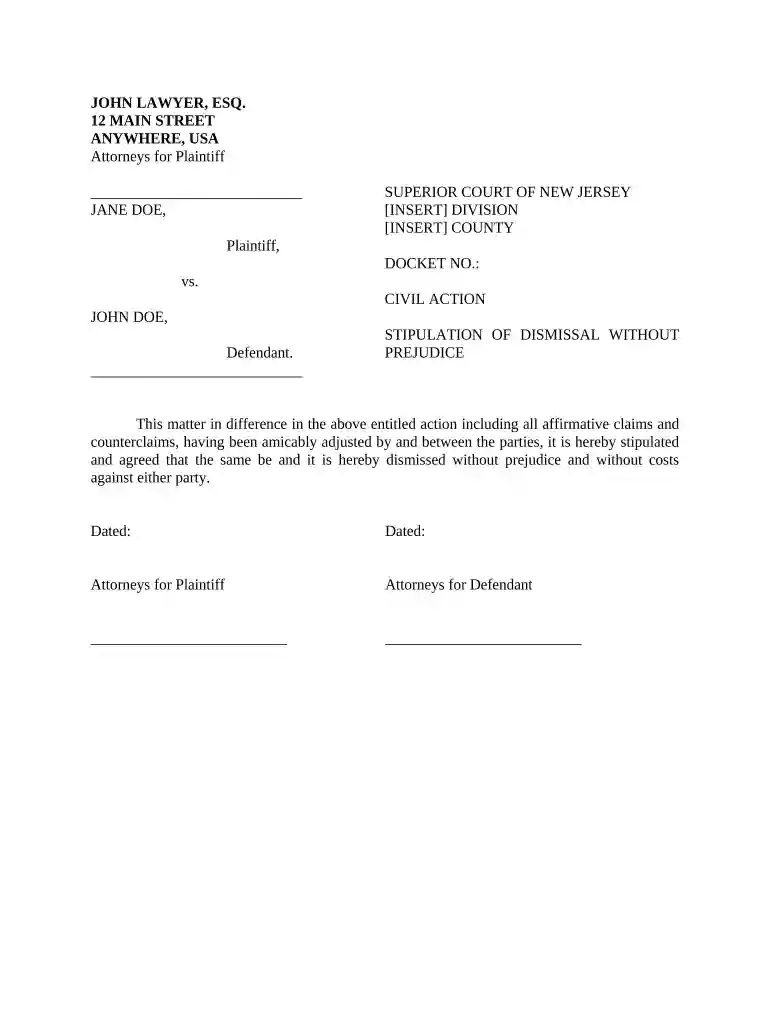
  2. Begin by entering the relevant details in the header section, including the names of the parties involved and their respective addresses.
  3. Fill in the court information, including the division and county where the case is filed, along with the docket number.
  4. In the body of the form, ensure that you clearly state that both parties have amicably resolved their differences and agree to dismiss the case without prejudice.
  5. Sign and date the form in the designated areas for both attorneys representing each party.

Start using our platform today to streamline your document editing and signing process for free!

be ready to get more

Complete this form in 5 minutes or less

Get form

Got questions?

We have answers to the most popular questions from our customers. If you can't find an answer to your question, please contact us.
Contact us

With DocHub, you can easily sign your dismissal form or any other paperwork on iOS, even without installing extra programs. You can access your DocHub account from any web-connected browser and fill out and sign your document in any way you like with just a few clicks.

Having a swift editing system like DocHub, you do not require anything but a browser and internet connection to edit your dismissal form online swiftly. Upload your document or find the appropriate form in DocHub’s catalog, open our editor with a single click, and complete it electronically. To revise your forms anytime, sign up a free account with DocHub.

A party seeking dismissal of a case under Code of Civil Procedure sections 583.410-583.430 must serve and file a notice of motion at least 45 days before the date set for hearing of the motion. The party may, with the memorandum, serve and file a declaration stating facts in support of the motion.
Whoever serves the forms must complete the Notice of Entry of Dismissal and Proof of Service form (CIV-120) and give it back to you. You must file the original and a copy of this form at the Clerks Office.
In California state criminal procedure, a motion to dismiss pursuant to Penal Code Section 995 gives the defendant the option of moving a trial court to dismiss their criminal case following a preliminary hearing at which the defendant was held to answer on one or more criminal charges.

Security and compliance

At DocHub, your data security is our priority. We follow HIPAA, SOC2, GDPR, and other standards, so you can work on your documents with confidence.

Learn more
ccpa2
pci-dss
gdpr-compliance
hipaa
soc-compliance
be ready to get more

Complete this form in 5 minutes or less

Get form

People also ask

When a case is dismissed with prejudice, its closed for good. Neither party can reopen the case at a later date, and the matter is considered permanently resolved. On the other hand, dismissing a case without prejudice leaves the door open for the case to be reopened down the road.
If you file an lawsuit and you decide you do not want to move forward, you can ask the court to dismiss the case.
A party seeking dismissal of a case under Code of Civil Procedure sections 583.410-583.430 must serve and file a notice of motion at least 45 days before the date set for hearing of the motion. The party may, with the memorandum, serve and file a declaration stating facts in support of the motion.
If you file an lawsuit and you decide you do not want to move forward, you can ask the court to dismiss the case.
Defendants can file a motion to dismiss in many situations. Can a plaintiff also file a motion to dismiss in California? Generally, plaintiffs are allowed to file a motion to dismiss, as well.

Related links