Indictment 2026

Get Form
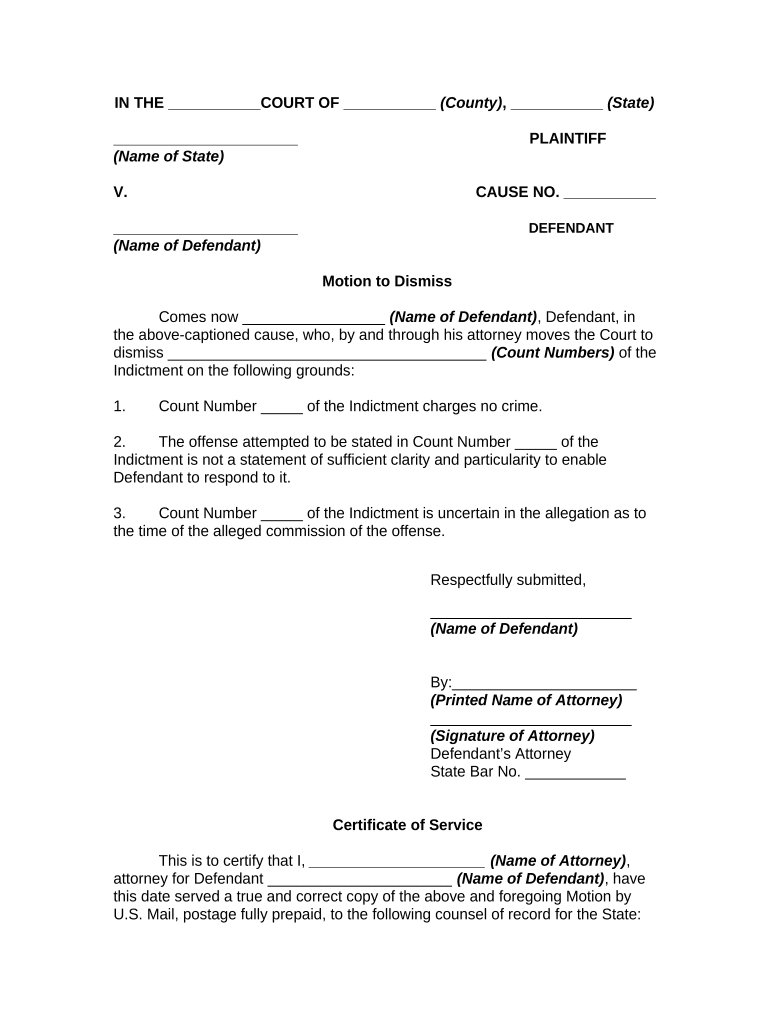
indictment form Preview on Page 1

Here's how it works

01. Edit your indictment form online
Type text, add images, blackout confidential details, add comments, highlights and more.
02. Sign it in a few clicks
Draw your signature, type it, upload its image, or use your mobile device as a signature pad.
03. Share your form with others
Send indictment example pdf via email, link, or fax. You can also download it, export it or print it out.

How to Use or Fill Out Indictment with Our Platform

Form edit decoration
9.5
Ease of Setup
DocHub User Ratings on G2
9.0
Ease of Use
DocHub User Ratings on G2
  1. Click ‘Get Form’ to open the indictment in the editor.
  2. Begin by filling in the court details at the top of the form, including the name of the court, county, and state.
  3. In the plaintiff section, enter the name of the state as well as the defendant's name in the appropriate fields.
  4. For each count you wish to dismiss, clearly specify the count number and provide a brief explanation for your motion in the designated areas.
  5. Complete the attorney information section by entering your printed name, signature, and state bar number.
  6. Fill out the Certificate of Service section with your name and address, ensuring that all parties involved are notified correctly.
  7. Finally, review all entries for accuracy before saving or exporting your completed document.

Start using our platform today to streamline your document editing and ensure a smooth process!

be ready to get more

Complete this form in 5 minutes or less

Get form

Got questions?

We have answers to the most popular questions from our customers. If you can't find an answer to your question, please contact us.
Contact us

Sure, electronically drawing your signature is acceptable, but only if you utilize a tool that complies with industry regulations and policies. Consider DocHub, which guarantees eSignature validity under ESIGN and UETA requirements. All you need to approve your indictment paperwork electronically is an account with DocHub and an internet connection. When you open your file in our editor, click Sign and choose the Draw tool.

You can find the latest and most relevant version of the indictment sample in our DocHub forms library. Search it by categories or utilize the search field to locate the exact template that fits your situation. You may open this form for editing after you find it.

An indictment is an outcome of a grand jury proceeding and is a written accusation where the jury accuses you of committing a crime. By contrast, a charge refers to the instance when a prosecutor brings criminal charges and accuses you of an offense.
Being Convicted vs Being Indicted While an indictment means you have been formally charged with a crime in Utah, a conviction means you have been found guilty of committing the crime. Once the indictment has established there is enough evidence to charge you with a crime, your case proceeds to a criminal trial.
(a) For a felony, six years; (b) For a misdemeanor other than a minor misdemeanor, two years; (c) For a minor misdemeanor, six months. (2) There is no period of limitation for the prosecution of a violation of section 2903.01 or 2903.02 of the Revised Code.

Security and compliance

At DocHub, your data security is our priority. We follow HIPAA, SOC2, GDPR, and other standards, so you can work on your documents with confidence.

Learn more
ccpa2
pci-dss
gdpr-compliance
hipaa
soc-compliance

People also ask

Word forms: indictments An indictment is a formal accusation that someone has committed a crime. [mainly US, law]
indictment, also called presentment or true bill, in the United States, a formal written accusation of crime affirmed by a grand jury and presented by it to a court for trial of the accused.
When a person is indicted, they are given formal notice that it is believed that they committed a crime. The indictment contains the basic information that informs the person of the charges against them.

printable indictment