Charges against 2026

Get Form
charges against Preview on Page 1

Here's how it works

01. Edit your form online
Type text, add images, blackout confidential details, add comments, highlights and more.

02. Sign it in a few clicks
Draw your signature, type it, upload its image, or use your mobile device as a signature pad.

03. Share your form with others
Send it via email, link, or fax. You can also download it, export it or print it out.

How to use or fill out charges against with our platform

Form edit decoration
9.5
Ease of Setup
DocHub User Ratings on G2
9.0
Ease of Use
DocHub User Ratings on G2
  1. Click ‘Get Form’ to open the charges against document in the editor.
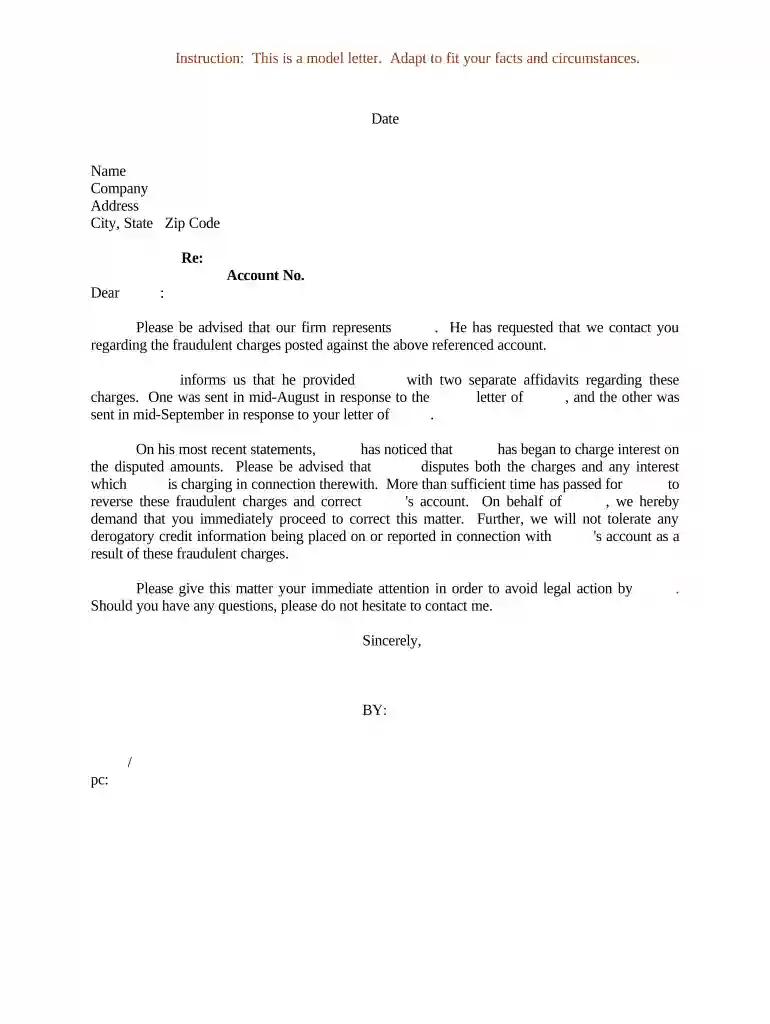
  2. Begin by entering the date at the top of the form. This is crucial for establishing a timeline regarding the fraudulent charges.
  3. Fill in your name, company, and address details accurately. Ensure that this information reflects your current contact details for effective communication.
  4. In the 'Re:' section, specify the subject of your letter, which should include a brief description of the issue at hand.
  5. Input the account number related to the fraudulent charges. This helps in identifying the specific account in question.
  6. Draft your message clearly, addressing any previous correspondence and outlining your demands regarding the fraudulent charges and interest.
  7. Conclude with a professional closing statement and include your signature line for authenticity.

Start using our platform today to streamline your document editing and ensure all forms are filled out correctly!

be ready to get more

Complete this form in 5 minutes or less

Get form

Got questions?

We have answers to the most popular questions from our customers. If you can't find an answer to your question, please contact us.
Contact us

If you regularly deal with documents kept in your Google Drive, DocHub is an excellent option for you to easily and quickly fill out, edit, and approve them. This editor integrates properly with Google apps, so you can export your charges against from your Google Drive to the editor without the need of downloading and re-uploading it. Right-click on your document, choose Open With → DocHub PDF Sign and Edit. In our editor, add and assign Signature Fields for all people involved, then click on the Menu option above → Send → decide on how you want to share your paperwork.

With DocHub, there are several convenient methods to edit your charges against online. You can drag and drop the form and modify it directly at the DocHub site or use our browser extension to fill out your form immediately. Additionally, you can modify your PDF on your smartphone, as DocHub works with all the available mobile platforms.

In reality, pressing charges means that someone has made a criminal complaint to law enforcement. From there, its up to the police to investigate and gather evidence. If they believe a crime was committed, the case is handed to the prosecutor, who ultimately decides whether to file formal charges.
: to charge (someone) with a crime. They are going to bring charges against him.
More Definitions of Formal charges Formal charges means the specific allegations of misconduct or disability identified by the Commission at the conclusion of a full investigation and upon which further proceedings will be conducted.

Security and compliance

At DocHub, your data security is our priority. We follow HIPAA, SOC2, GDPR, and other standards, so you can work on your documents with confidence.
Learn more
ccpa2
pci-dss
gdpr-compliance
hipaa
soc-compliance

People also ask

You can also call the local police department and ask them to do a warrant check. Again, it may help to let the police know why youre checking as that influences the advice they may give you next.
to complain officially about someone in a law court: press charges against The family have decided not to press charges against him.
: to formally accuse someone of a crime. After completing a full investigation of the vandalism, they did not have enough evidence to bring charges.
Legal charges are registered against the property at the Land Registry secure the repayment to the lender so that, for example, if the borrower defaulted on their loan repayments or died without having repaid the loan, the lender could recover the value of the loan against the value of the property when it was sold.

Related links