Type text, add images, blackout confidential details, add comments, highlights and more.
02. Sign it in a few clicks
Draw your signature, type it, upload its image, or use your mobile device as a signature pad.
03. Share your form with others
Send mil std 3037 pdf via email, link, or fax. You can also download it, export it or print it out.
How to use or fill out container inspection form with our platform
Ease of Setup
DocHub User Ratings on G2
Ease of Use
DocHub User Ratings on G2
Click ‘Get Form’ to open the container inspection form in the editor.
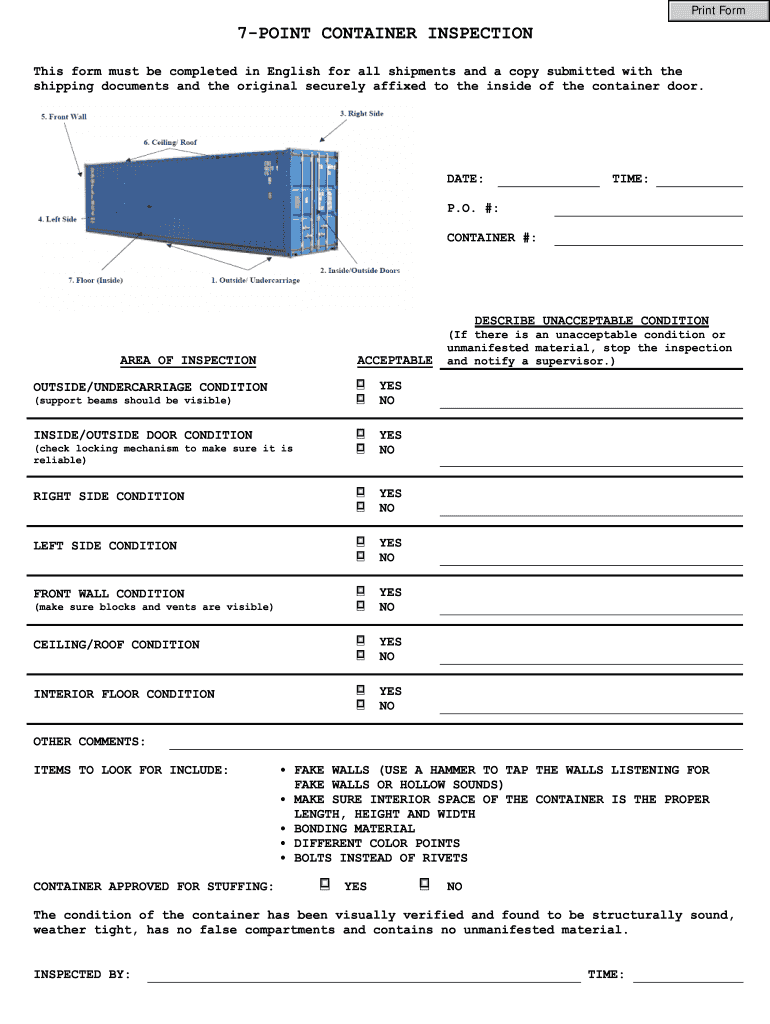
Begin by entering the 'DATE' and 'TIME' of the inspection at the top of the form. This information is crucial for record-keeping.
Fill in the 'P.O. #' and 'CONTAINER #' fields to identify the shipment clearly.
In the 'AREA OF INSPECTION' section, check each condition box (Acceptable/Unacceptable) based on your observations. Use the provided checklist to guide your assessment.
For each side of the container (Right Side, Left Side, Front Wall, Ceiling/Roof, Interior Floor), indicate whether they are acceptable or not by selecting 'YES' or 'NO'.
If any unacceptable conditions are noted, stop the inspection and notify a supervisor as instructed in the form.
Add any additional comments in the 'OTHER COMMENTS' section to provide further context about your findings.
Finally, confirm that all conditions have been visually verified and sign off as 'INSPECTED BY' along with the time of completion.
Start using our platform today for free to streamline your container inspections!
Fill out container inspection form online It's free
Apr 30, 1997 This WRD, which will remain in effect indefinitely, applies to WISHA inspections and consultations related to occupational exposure to asbestosRead more
Cookie consent notice
This site uses cookies to enhance site navigation and personalize your experience.
By using this site you agree to our use of cookies as described in our Privacy Notice.
You can modify your selections by visiting our Cookie and Advertising Notice.