





Id affidavit 2026

Get Form
affidavit idaho Preview on Page 1

Here's how it works

01. Edit your affidavit idaho online
Type text, add images, blackout confidential details, add comments, highlights and more.
02. Sign it in a few clicks
Draw your signature, type it, upload its image, or use your mobile device as a signature pad.
03. Share your form with others
Send idaho affidavit via email, link, or fax. You can also download it, export it or print it out.

How to use or fill out id affidavit with our platform

Form edit decoration
9.5
Ease of Setup
DocHub User Ratings on G2
9.0
Ease of Use
DocHub User Ratings on G2
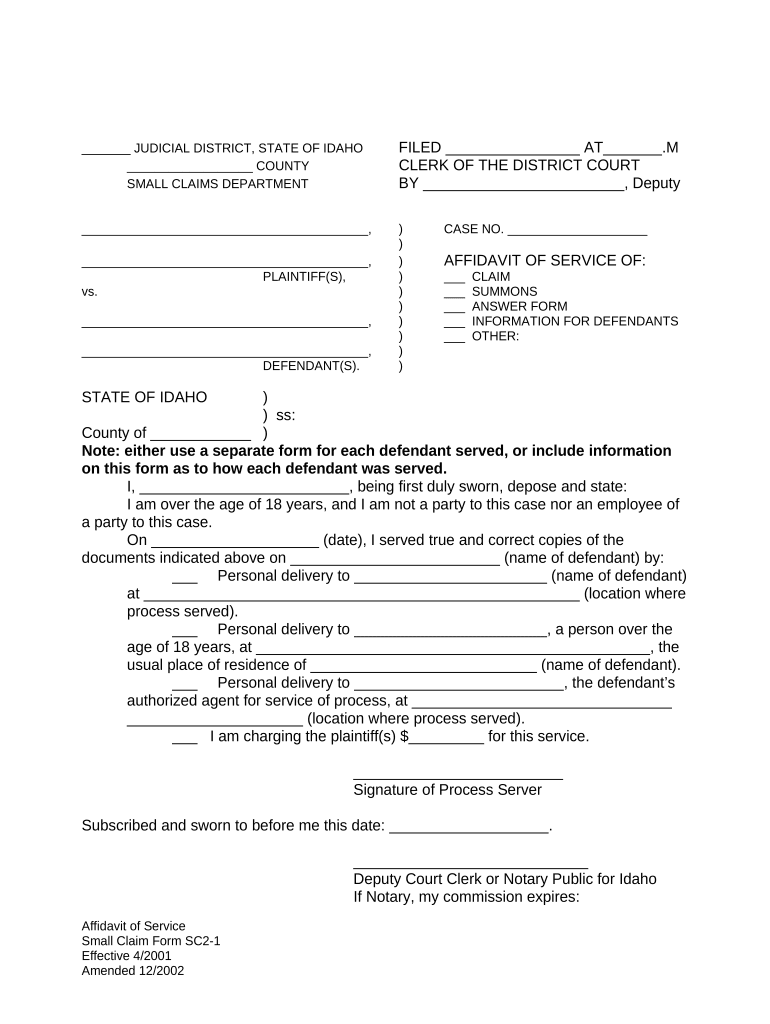
  1. Click ‘Get Form’ to open the id affidavit in the editor.
  2. Begin by entering the case number in the designated field at the top of the form. This is crucial for identifying your specific case.
  3. Fill in the names of the plaintiff(s) and defendant(s) in their respective sections. Ensure accuracy to avoid any legal complications.
  4. Indicate which documents you are serving by checking the appropriate boxes under 'Affidavit of Service'. This could include claims, summons, or other relevant documents.
  5. In the section regarding service details, provide the name of the defendant served and select how they were served (personal delivery, etc.). Fill in all required fields accurately.
  6. Complete the signature section by signing as the process server and including your printed name. Don’t forget to date it!
  7. If applicable, have a Deputy Court Clerk or Notary Public sign and stamp where indicated to finalize your affidavit.

Start using our platform today for free to streamline your document editing and signing process!

be ready to get more

Complete this form in 5 minutes or less

Get form

Got questions?

We have answers to the most popular questions from our customers. If you can't find an answer to your question, please contact us.
Contact us

Approving documents on a mobile device is fast, straightforward, and doesn’t require software installation when you have an account with DocHub. Log in from any browser, complete your empty fields with your data, and click on Sign → Create your signature. You can draw your electronic signature the same way you usually do on paper, add its picture to your id affidavit, or type in your name and stylize its look. Whatever option you select, your form will be valid.

You can quickly complete, edit, and even eSign your id affidavit using DocHub. Create a new account and begin your free trial. After that, you can add the file with the form and simply make all the necessary edits. No need to print on paper or use a third-party application to sign it, as you can place your electronic signature on your document faster via DocHub.

The ID Theft Affidavit provides a model form that can be used to report information to many companies, simplifying the process of alerting companies where a new account was opened in the victims name.
Completing Form 14039, attaching it to a paper tax return and mailing it to the IRS is the way to inform the IRS that the taxpayer may be a victim. The IRS will then identify the fraudulent return and, after an investigation, clear the account and process the paper tax return.
An affidavit is a sworn statement put in writing. When you use an affidavit, youre claiming that the information within the document is true and correct to the best of your knowledge. Like taking an oath in court, an affidavit is only valid when you make it voluntarily and without any coercion.

Security and compliance

At DocHub, your data security is our priority. We follow HIPAA, SOC2, GDPR, and other standards, so you can work on your documents with confidence.

Learn more
ccpa2
pci-dss
gdpr-compliance
hipaa
soc-compliance

People also ask

What you can do to detect identity theft Track what bills you owe and when theyre due. If you stop getting a bill, that could be a sign that someone changed your billing address. Review your bills. Check your bank account statement. Get and review your credit reports.
The primary purpose of the form is to provide a method of reporting identity theft issues to the IRS so that the IRS may document situations where individuals are or may be victims of identity theft. Additional purposes include the use in the determination of proper tax liability and to relieve taxpayer burden.
This affidavit has two parts: ID Theft Affidavit is where you report general information about yourself and the theft. Fraudulent Account Statement is where you describe the fraudulent account(s) opened in your name. Use a separate Fraudulent Ac- count Statement for each company you need to write to.
Where do I send my 14039 form? Mail Form 14039 to this address: Internal Revenue Service, Stop C2003, Fresno, CA 93888. You may also need to file a police report and a complaint with the Federal Trade Commission on their website if youre a victim of tax return fraud.
If you believe youre a victim of identity theft If you did not receive a notice but believe youve been the victim of identity theft, contact the IRS Identity Protection Specialized Unit at 800-908-4490, extension 245 right away so we can take steps to secure your tax account and match your SSN or ITIN.

Related links

