01. Edit your sss loan collection list form excel online
Type text, add images, blackout confidential details, add comments, highlights and more.
02. Sign it in a few clicks
Draw your signature, type it, upload its image, or use your mobile device as a signature pad.
03. Share your form with others
Send sss loan collection report excel format via email, link, or fax. You can also download it, export it or print it out.
How to use or fill out sss loan payment form with our platform
Ease of Setup
DocHub User Ratings on G2
Ease of Use
DocHub User Ratings on G2
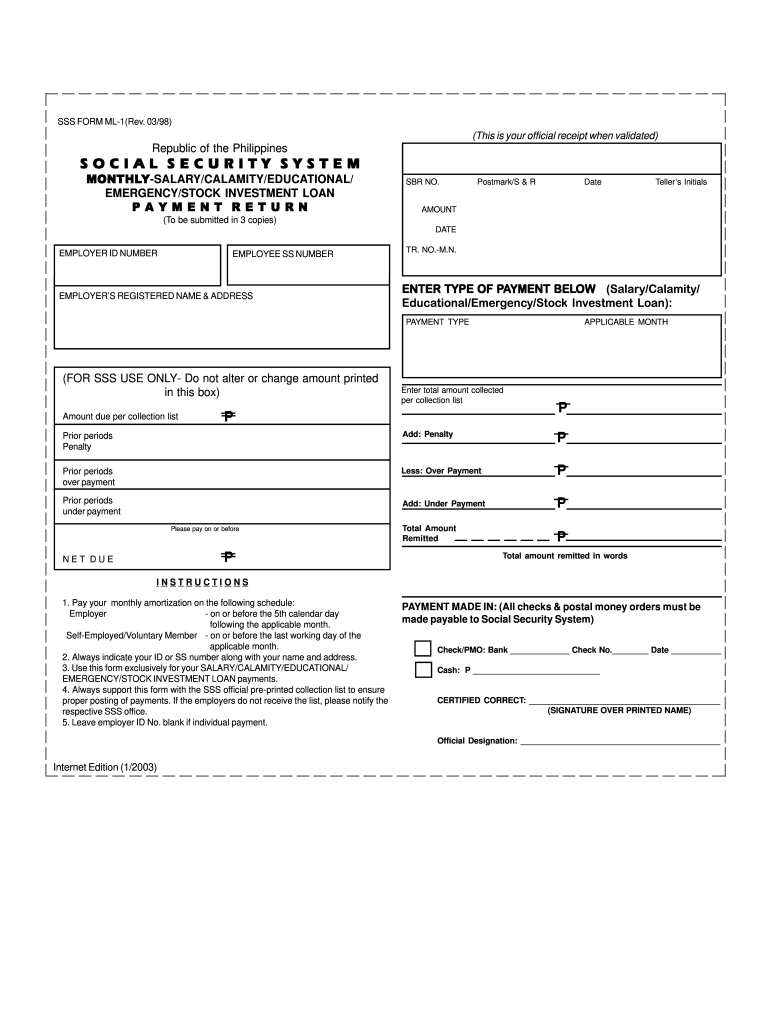
Click ‘Get Form’ to open the SSS Loan Payment Form in the editor.
Begin by entering your Employer ID Number and Employee SS Number at the top of the form. This information is crucial for proper identification.
Fill in the Employer’s Registered Name & Address, ensuring accuracy to avoid any processing delays.
Select the type of payment you are making (Salary, Calamity, Educational, Emergency, or Stock Investment Loan) by checking the appropriate box.
Enter the amount due as indicated on your collection list. Make sure to double-check this figure for accuracy.
Complete the sections for prior periods, penalties, and over/under payments as applicable. This will help calculate your total amount remitted accurately.
Finally, sign and print your name in the designated area to certify correctness before submitting your form.
Start using our platform today to fill out your SSS Loan Payment Form online for free!
All forms are FREE. Not all forms are listed. If you can't find the form you need, or you need help completing a form, please call us at 1-800-772-1213 (TTY ...
A national identification number, national identity number, or national insurance number or EMBG is used by the governments of many countries as a means of ...
Cookie consent notice
This site uses cookies to enhance site navigation and personalize your experience.
By using this site you agree to our use of cookies as described in our Privacy Notice.
You can modify your selections by visiting our Cookie and Advertising Notice.