Card name change 2026

Get Form
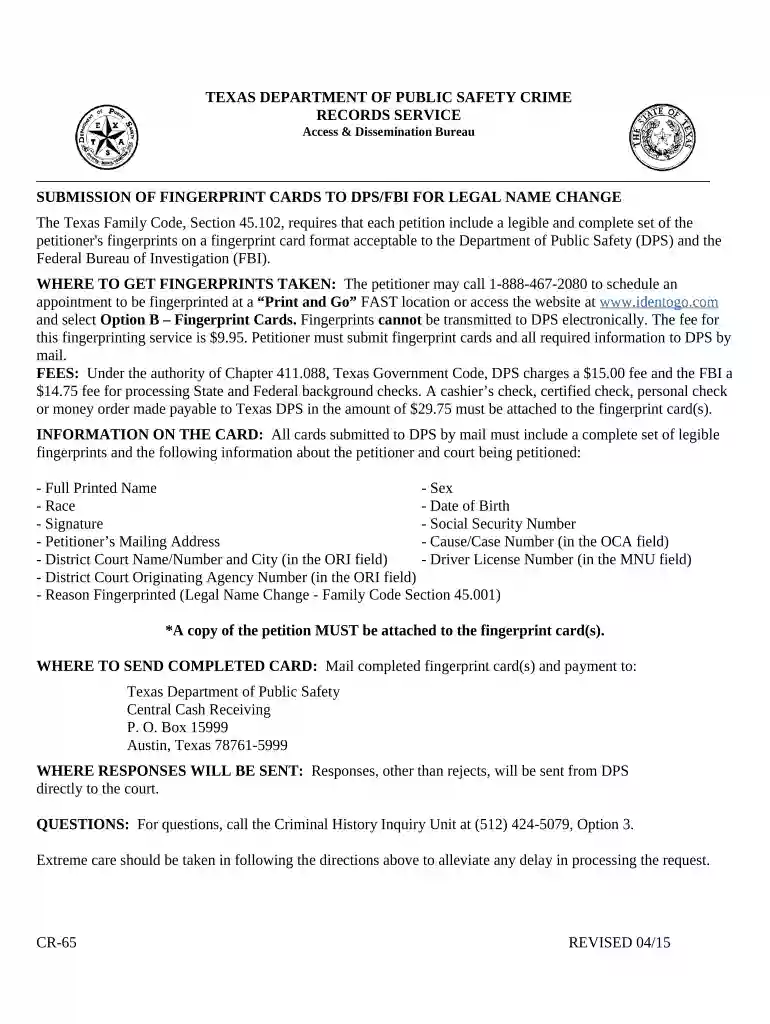
fingerprints for name change texas Preview on Page 1

Here's how it works

01. Edit your fingerprints for name change texas online
Type text, add images, blackout confidential details, add comments, highlights and more.

02. Sign it in a few clicks
Draw your signature, type it, upload its image, or use your mobile device as a signature pad.

03. Share your form with others
Send it via email, link, or fax. You can also download it, export it or print it out.

How to use or fill out card name change with our platform

Form edit decoration
9.5
Ease of Setup
DocHub User Ratings on G2
9.0
Ease of Use
DocHub User Ratings on G2
  1. Click ‘Get Form’ to open the card name change document in the editor.
  2. Begin by entering your Full Printed Name in the designated field. Ensure it is legible and matches your identification documents.
  3. Fill in your Sex and Race as required. This information is essential for processing your request.
  4. Enter your Date of Birth accurately. This helps verify your identity during the background check process.
  5. Sign the form in the Signature field, confirming that all provided information is correct.
  6. Input your Social Security Number and Petitioner’s Mailing Address to ensure proper communication from DPS.
  7. In the Cause/Case Number field, enter the relevant case number as indicated in the OCA field.
  8. Provide details for District Court Name/Number and City in the ORI field, along with your Driver License Number and District Court Originating Agency Number.
  9. Indicate 'Legal Name Change - Family Code Section 45.001' as the Reason Fingerprinted.
  10. Attach a copy of your petition to the fingerprint card(s) before mailing them to DPS at the specified address.

Start using our platform today to streamline your card name change process for free!

be ready to get more

Complete this form in 5 minutes or less

Get form

Got questions?

We have answers to the most popular questions from our customers. If you can't find an answer to your question, please contact us.
Contact us
Misspelled cardholder names If you notice a mistake, docHub out to your bank to request a correction. After verifying your identity, the bank will likely issue you a new card thats been corrected. Once in hand, you can activate your debit card as usual.
In conclusion, changing the name on your credit card is a straightforward process that requires timely communication with your credit card issuer and the submission of necessary documentation. By following the steps outlined in this guide, you can update your credit card with your current legal name efficiently.
Youll need to update your name on important financial and legal documents like your Social Security card, drivers license, bank accounts, will and passport.
Some financial institutions may require you to come into a local branch office. Most typically require a copy of your marriage certificate and your new identification. That includes your updated drivers license or state identification card and Social Security card.
Update your name with your creditors Typically, youll need to fill out some paperwork, provide a photo ID and submit evidence of your legal name change. After a creditor changes your name, it can be updated in your credit reports the next time the company submits your account information to the credit bureaus.

Security and compliance

At DocHub, your data security is our priority. We follow HIPAA, SOC2, GDPR, and other standards, so you can work on your documents with confidence.

Learn more
ccpa2
pci-dss
gdpr-compliance
hipaa
soc-compliance
be ready to get more

Complete this form in 5 minutes or less

Get form