Type text, add images, blackout confidential details, add comments, highlights and more.
02. Sign it in a few clicks
Draw your signature, type it, upload its image, or use your mobile device as a signature pad.
03. Share your form with others
Send it via email, link, or fax. You can also download it, export it or print it out.
How to Use or Fill Out the Restraining Order Form with Our Platform
Ease of Setup
DocHub User Ratings on G2
Ease of Use
DocHub User Ratings on G2
Click ‘Get Form’ to open the restraining order form in the editor.
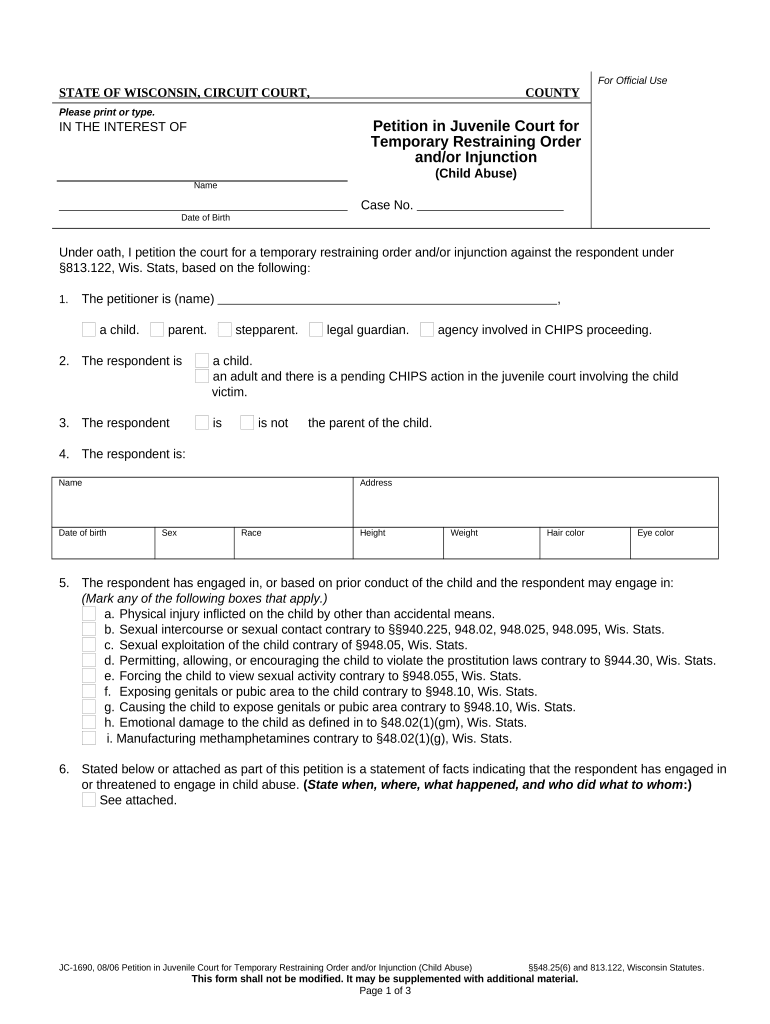
Begin by filling out the petitioner’s information, including your name and relationship to the child. Specify if you are a parent, stepparent, legal guardian, or involved agency.
Provide details about the respondent, including their name, date of birth, address, and physical characteristics such as sex and race.
Indicate whether the respondent has engaged in any harmful behaviors towards the child by marking applicable boxes. This includes physical injury or emotional damage.
Attach a statement of facts detailing incidents of abuse or threats made by the respondent. Be specific about when and where these occurred.
In the request section, mark any actions you want the court to take regarding restraining orders or other necessary measures for protection.
Finally, sign and date the form before submitting it for processing.
Start using our platform today to fill out your restraining order form online for free!
Domestic violence restraining orderCivil harassment restraining orderHow to win a restraining order hearingLos Angeles County restraining order lookupElder or dependent adult abuse restraining orderRestraining order onlineSelf-help restraining orderRestraining order in California
Security and compliance
At DocHub, your data security is our priority. We follow HIPAA, SOC2, GDPR, and other standards, so you can work on your documents with confidence.
A temporary court order issued to prohibit an individual from carrying out a particular action, especially approaching or contacting a specifiedRead more
Cookie consent notice
This site uses cookies to enhance site navigation and personalize your experience.
By using this site you agree to our use of cookies as described in our Privacy Notice.
You can modify your selections by visiting our Cookie and Advertising Notice.