Court transfer title order 2026

Get Form
court ordered title pa Preview on Page 1

Here's how it works

01. Edit your court ordered title pa online
Type text, add images, blackout confidential details, add comments, highlights and more.
02. Sign it in a few clicks
Draw your signature, type it, upload its image, or use your mobile device as a signature pad.
03. Share your form with others
Send involuntary transfer of vehicle title pa via email, link, or fax. You can also download it, export it or print it out.

How to use or fill out court transfer title order with our platform

Form edit decoration
9.5
Ease of Setup
DocHub User Ratings on G2
9.0
Ease of Use
DocHub User Ratings on G2
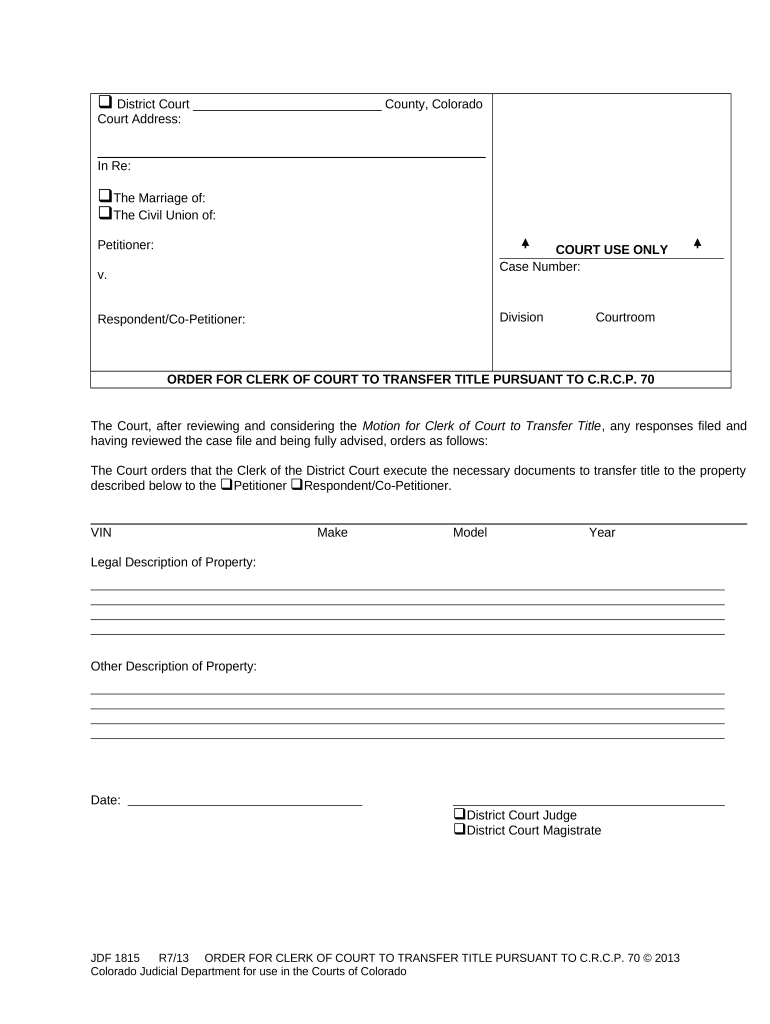
  1. Click ‘Get Form’ to open the court transfer title order in the editor.
  2. Begin by entering the District Court name and County at the top of the form. This identifies where your case is being processed.
  3. Fill in the 'In Re' section, specifying whether it pertains to 'The Marriage of' or 'The Civil Union of'. Include the names of the Petitioner and Respondent/Co-Petitioner as applicable.
  4. Enter the Case Number, Division, and Courtroom details in the designated fields for proper identification of your case.
  5. In the main body, indicate who will receive the property title by checking either 'Petitioner' or 'Respondent/Co-Petitioner'.
  6. Provide detailed information about the property including VIN, Make, Model, Year, and Legal Description. Ensure accuracy to avoid any legal issues.
  7. Finally, date your document and have it signed by either a District Court Judge or Magistrate as required.

Start using our platform today to easily complete your court transfer title order online for free!

be ready to get more

Complete this form in 5 minutes or less

Get form

Got questions?

We have answers to the most popular questions from our customers. If you can't find an answer to your question, please contact us.
Contact us

Of course, you’ll find numerous apps for this on the web. Nevertheless, if you need to eSign your court transfer title order without installing extra software, DocHub is the best choice you can make. This robust editor works on mobile devices just as on desktops. Open our editor in any internet browser, register or sign in to your account, and start managing your paperwork.

If you choose analog ways of completing your court transfer title order, you can easily download your file for printing. Search DocHub’s Forms & Templates catalog to get the exact file template you require and open it for editing or download it on your device in the format of your liking. It is possible to complete your form electronically and put your handwritten signature on it right after printing or eSign your file with DocHub.

File a petition with the local court explaining your claim to the vehicle. The court may require a hearing to verify ownership. After approval, obtain a court order directing the motor vehicle department to issue the title in your name. Follow state-specific procedures and keep copies of all filings and correspondence.
2:09 8:40 It. This is the perfect scenario to use a court order title. It can facilitate the issuance thinkMoreIt. This is the perfect scenario to use a court order title. It can facilitate the issuance think about that word facilitate. If youve been getting the runaround from DMV.
Title transfers must take place within 30 days of the date of sale, otherwise a late fee will be assessed. Dual ownership requires both parties to be present unless a docHubd power of attorney is provided. Social Security numbers for all parties are required.

Security and compliance

At DocHub, your data security is our priority. We follow HIPAA, SOC2, GDPR, and other standards, so you can work on your documents with confidence.

Learn more
ccpa2
pci-dss
gdpr-compliance
hipaa
soc-compliance