01. Edit your file a restraining order online las vegas online
Type text, add images, blackout confidential details, add comments, highlights and more.
02. Sign it in a few clicks
Draw your signature, type it, upload its image, or use your mobile device as a signature pad.
03. Share your form with others
Send can i file a temporary restraining order online via email, link, or fax. You can also download it, export it or print it out.
How to use or fill out Nevada Temporary Order with our platform
Ease of Setup
DocHub User Ratings on G2
Ease of Use
DocHub User Ratings on G2
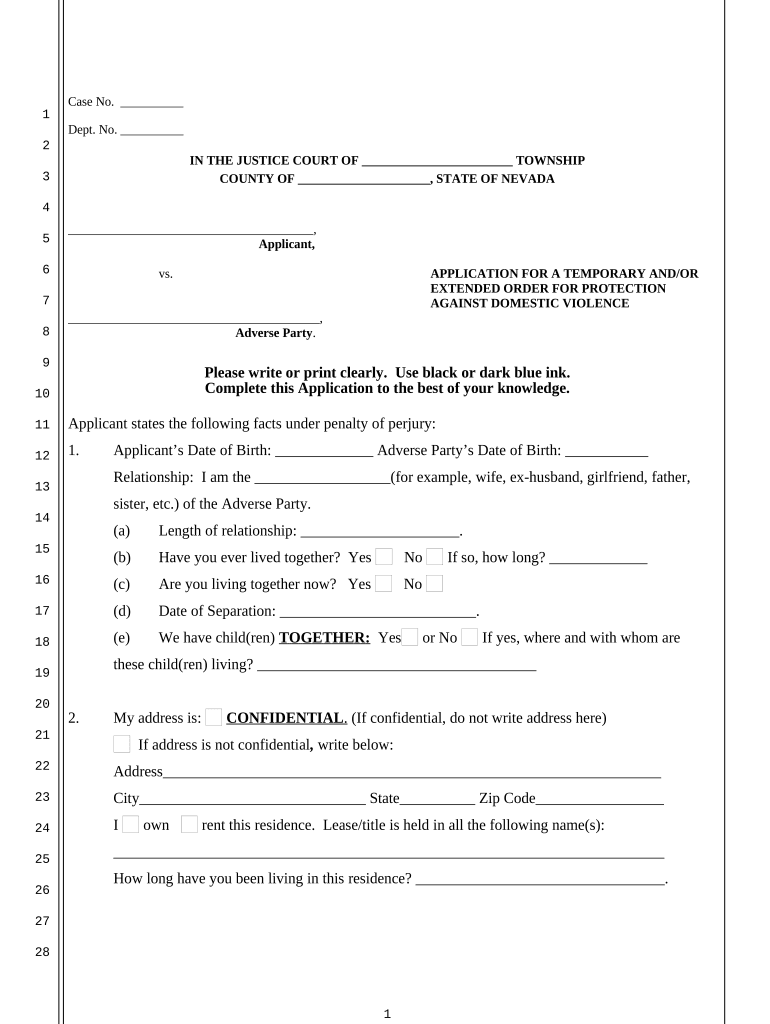
Click ‘Get Form’ to open the Nevada Temporary Order in the editor.
Begin by entering the case number and department number at the top of the form. This information is crucial for identifying your application.
In the 'Applicant' section, provide your name and relationship to the adverse party. Be sure to fill in your date of birth and that of the adverse party.
Complete the sections regarding your living situation, including whether you own or rent your residence, and provide details about both parties' addresses.
Fill out employment information for both yourself and the adverse party, ensuring all contact details are accurate.
Detail any children involved, including their names and dates of birth. Indicate custody arrangements if applicable.
In the final sections, clearly state any incidents of domestic violence and specify what protections you are seeking from the court.
Start filling out your Nevada Temporary Order today for free using our platform!
Temporary custody order NevadaMotion for emergency custody form NevadaFile restraining order online NevadaRestraining order Nevada rulesHow to get a restraining order in NevadaCheck restraining order status NevadaHow to file a restraining Order in Las Vegas NevadaWhat proof do you need for a restraining order in Nevada
Security and compliance
At DocHub, your data security is our priority. We follow HIPAA, SOC2, GDPR, and other standards, so you can work on your documents with confidence.
Technical and Regulatory Guidance for In Situ Chemical
Even if this state occurs, it is only temporary and localized near injection points. Natural soil and groundwater systems are not closed systems, so bacteria.Read more
Within 24 hours, the judge may decide to issue a temporary order of protection, depending upon the merits of the application. A partnership of Nevada countiesRead more
You can find information on this page about how to get temporary orders in place, and how to respond to a motion for temporary orders filed against you.Read more
Cookie consent notice
This site uses cookies to enhance site navigation and personalize your experience.
By using this site you agree to our use of cookies as described in our Privacy Notice.
You can modify your selections by visiting our Cookie and Advertising Notice.