Type text, add images, blackout confidential details, add comments, highlights and more.
02. Sign it in a few clicks
Draw your signature, type it, upload its image, or use your mobile device as a signature pad.
03. Share your form with others
Send it via email, link, or fax. You can also download it, export it or print it out.
How to use or fill out small claims with our platform
Ease of Setup
DocHub User Ratings on G2
Ease of Use
DocHub User Ratings on G2
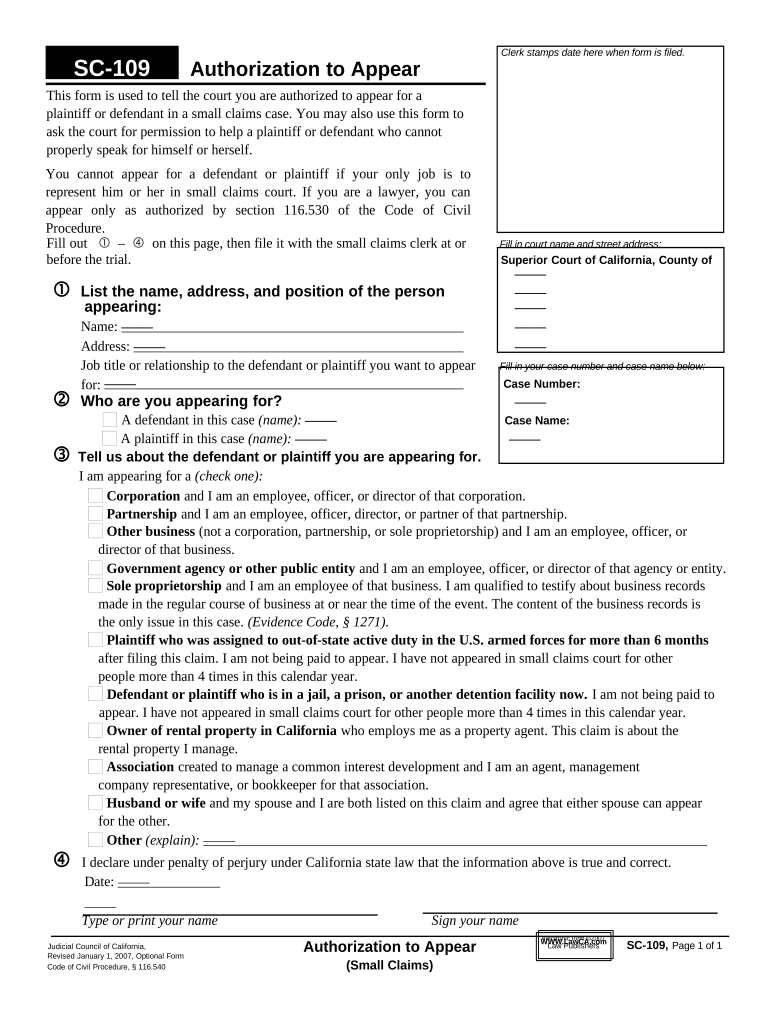
Click ‘Get Form’ to open the small claims form SC-109 in the editor.
Begin by filling out sections j through m. Start with the name, address, and job title of the person appearing on behalf of the plaintiff or defendant.
Next, indicate who you are appearing for by filling in the court name and street address, as well as your case number and case name.
Select the appropriate option regarding your relationship to the defendant or plaintiff by checking one of the provided boxes that best describes your role.
Finally, declare under penalty of perjury that all information is true and correct by signing and dating the form before submission.
Start using our platform today to easily complete your small claims form for free!
Small claims lawyerSmall Claims Court NYC maximum amountSmall Claims Court Albany, NYSmall Claims Court Long IslandNYS Small Claims CourtFile a Small Claims Court onlineBronx Small Claims CourtQueens Small Claims Court
Security and compliance
At DocHub, your data security is our priority. We follow HIPAA, SOC2, GDPR, and other standards, so you can work on your documents with confidence.
Small claims court allows you to sue a person, business, or government agency that you think owes you money. Generally, you can only sue for up to $12,500 inRead more
Cookie consent notice
This site uses cookies to enhance site navigation and personalize your experience.
By using this site you agree to our use of cookies as described in our Privacy Notice.
You can modify your selections by visiting our Cookie and Advertising Notice.