Wisconsin change name 2026

Get Form
wisconsin change name Preview on Page 1

Here's how it works

01. Edit your form online
Type text, add images, blackout confidential details, add comments, highlights and more.

02. Sign it in a few clicks
Draw your signature, type it, upload its image, or use your mobile device as a signature pad.

03. Share your form with others
Send it via email, link, or fax. You can also download it, export it or print it out.

How to use or fill out Wisconsin Change Name with Our Platform

Form edit decoration
9.5
Ease of Setup
DocHub User Ratings on G2
9.0
Ease of Use
DocHub User Ratings on G2
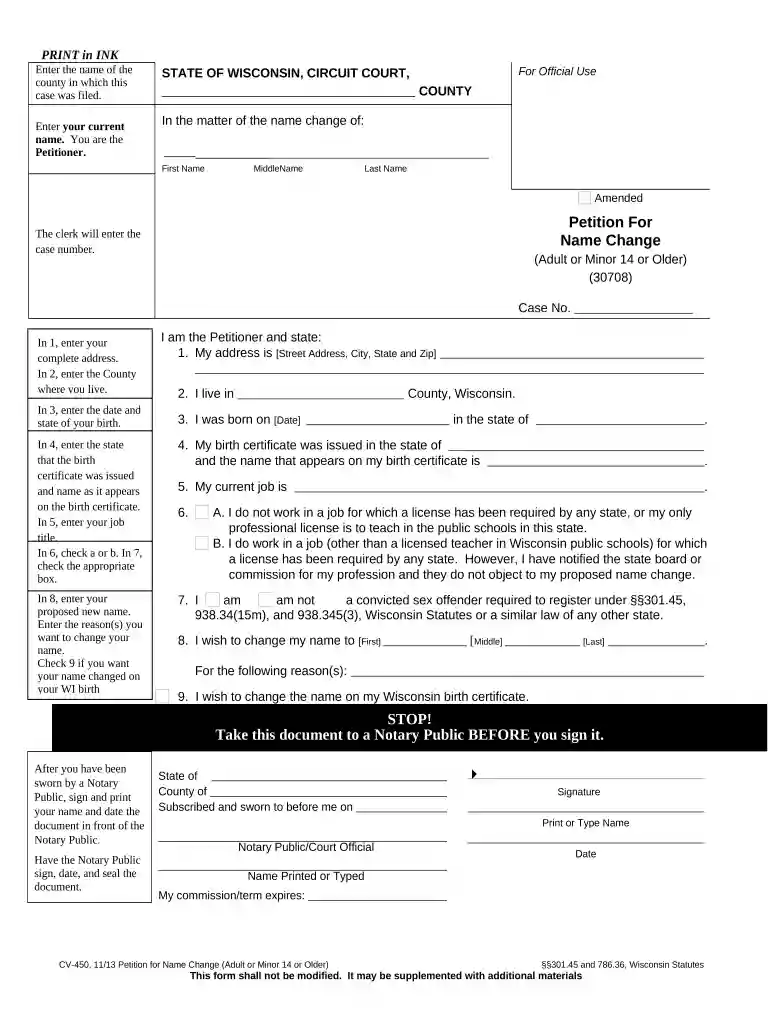
  1. Click ‘Get Form’ to open the Wisconsin Change Name document in the editor.
  2. Begin by entering the name of the county where your case is filed at the top of the form.
  3. In Section 1, provide your current name as you are the Petitioner. This includes your first, middle, and last names.
  4. Fill in your complete address in Section 2, followed by the county where you reside in Section 3.
  5. In Section 4, indicate the state where your birth certificate was issued and write your name as it appears on it.
  6. Complete Section 5 with your current job title and check either option A or B in Section 6 based on your employment status.
  7. In Section 8, enter your proposed new name and provide reasons for this change.
  8. If applicable, check Section 9 to request a name change on your Wisconsin birth certificate.
  9. Finally, take this document to a Notary Public for signing. Ensure you sign in their presence and have them notarize it.

Start using our platform today to easily fill out and manage your Wisconsin Change Name form online for free!

be ready to get more

Complete this form in 5 minutes or less

Get form

Got questions?

We have answers to the most popular questions from our customers. If you can't find an answer to your question, please contact us.
Contact us
In most cases, you must file a petition with your local court to change your name. To do so, you may need to file paperwork and appear before a judge to complete the process. Find your local government website and contact your circuit court to get information about how you can legally change your name.
Outside of marriage and divorce, legally changing your name usually comes with a price tag. The total amount can range from less than $100 to over $500. First, you should expect to pay a filing fee. This is the cost of filing your name change forms with the County Clerk.
Complete form CV-470 which has step-by-step instructions on the left side. File the Petition for Name Change, Notice and Order for Name Change Hearing and Order for Name Change. Publish the Notice and Order for Name Change Hearing form in a local newspaper.
How Long Will a Name Change Take? StateTime to Complete WA 2-8 weeks WI 2-8 weeks WV 2-8 weeks WY 2-8 weeks47 more rows
General information about the name change process is contained in Wisconsin Statutes 786.36 and 786.37. There is a $164.50 filing fee to file a Name Change action. The Clerk of Courts cannot give you legal advice. If you need further help, you may consult the Wisconsin Statutes, Sections 786.36 and 786.37.

Security and compliance

At DocHub, your data security is our priority. We follow HIPAA, SOC2, GDPR, and other standards, so you can work on your documents with confidence.

Learn more
ccpa2
pci-dss
gdpr-compliance
hipaa
soc-compliance
be ready to get more

Complete this form in 5 minutes or less

Get form

People also ask

Any Wisconsin resident can file a petition to change their name. The petition must be filed at your local circuit court and is a bit of a process. Expect to: Fill out a petition form and submit it to the local court.

Related links