Type text, add images, blackout confidential details, add comments, highlights and more.

02. Sign it in a few clicks
Draw your signature, type it, upload its image, or use your mobile device as a signature pad.

03. Share your form with others
Send sclarc sir via email, link, or fax. You can also download it, export it or print it out.

How to use or fill out sclarc sir with our platform
Ease of Setup
DocHub User Ratings on G2
Ease of Use
DocHub User Ratings on G2
Click ‘Get Form’ to open the sclarc sir in the editor.
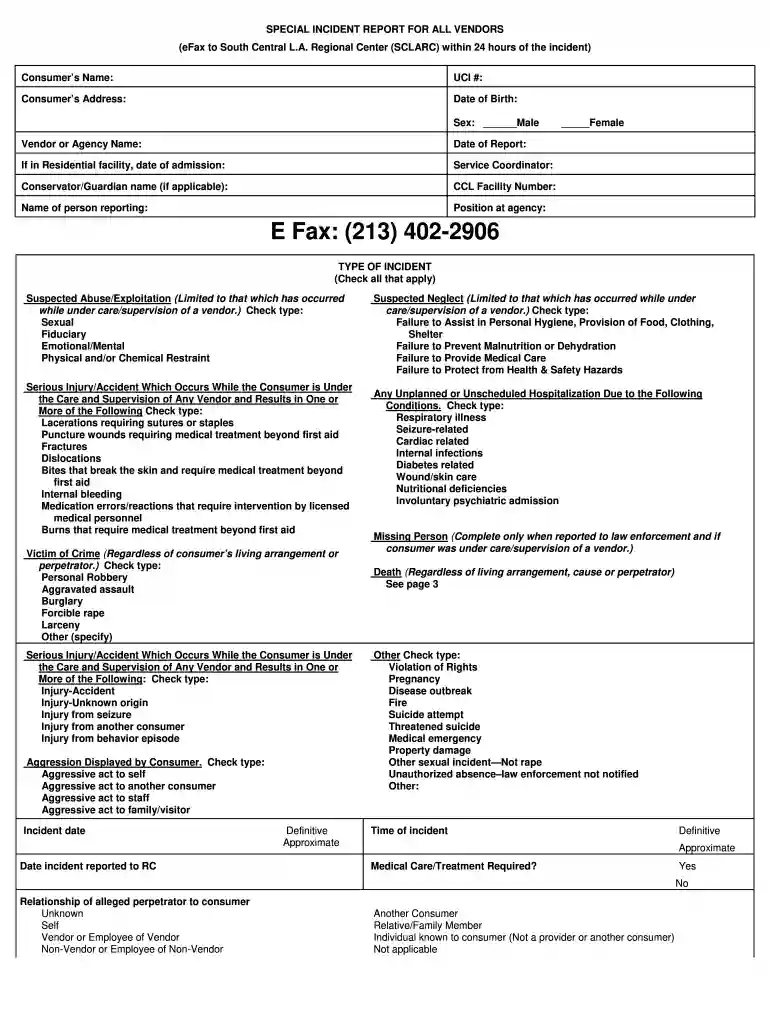
Begin by entering the consumer’s name, UCI number, and address in the designated fields. Ensure accuracy as this information is crucial for identification.
Fill in the date of birth and sex of the consumer. Select 'Male' or 'Female' as applicable.
Provide details about the vendor or agency name, along with the date of report and admission if applicable. This section helps establish context for the incident.
In the 'Type of Incident' section, check all relevant boxes that apply to the incident being reported. Be thorough to ensure all aspects are covered.
Document specifics such as incident date, time, and location. Include any medical care required and describe the incident clearly in the provided space.
Finally, review all entries for completeness before submitting your report through our platform.
Start using our platform today to streamline your sclarc sir form completion!
South Central Los Angeles Regional Center (SCLARC)
SCLARC is a private, non-profit organization offering evaluation, diagnosis, treatment, advocacy and support for people diagnosed with developmentalRead more
Transparency and Accountability in Californias Regional
by C Hite 2020 DDSs new PFR Unit would be ideally equipped to take the lead on making the NCI and SIR data more useful to stakeholders. Drawing on theRead more
Cookie consent notice
This site uses cookies to enhance site navigation and personalize your experience.
By using this site you agree to our use of cookies as described in our Privacy Notice.
You can modify your selections by visiting our Cookie and Advertising Notice.