Type text, add images, blackout confidential details, add comments, highlights and more.
02. Sign it in a few clicks
Draw your signature, type it, upload its image, or use your mobile device as a signature pad.
03. Share your form with others
Send it via email, link, or fax. You can also download it, export it or print it out.
How to use or fill out motion intervene with our platform
Ease of Setup
DocHub User Ratings on G2
Ease of Use
DocHub User Ratings on G2
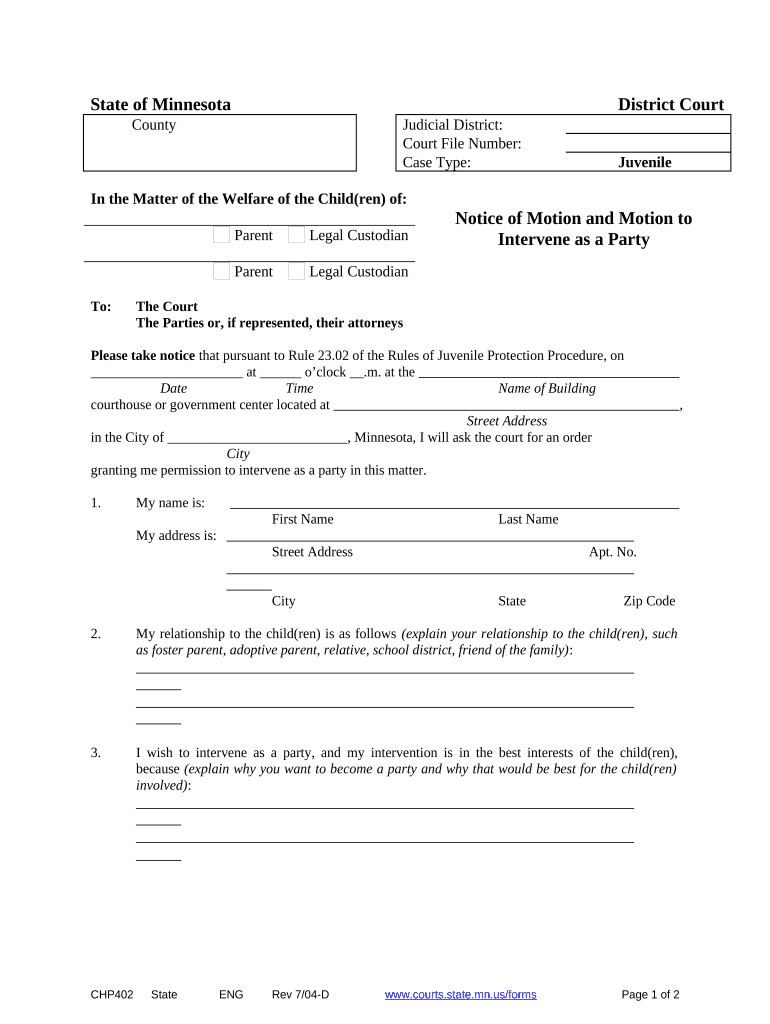
Click ‘Get Form’ to open the motion intervene document in the editor.
Begin by filling in the 'Judicial District' and 'Court File Number' at the top of the form. This information is crucial for identifying your case.
In the section labeled 'My name is:', enter your first and last name. Ensure that this matches your legal identification.
Next, provide your address in the designated fields, including street address, city, state, and zip code. This helps establish your identity and location.
Describe your relationship to the child(ren) in section 2. Be specific about how you are connected, such as being a foster parent or relative.
In section 3, explain why you wish to intervene as a party and how it serves the best interests of the child(ren). This is a critical part of your motion.
Finally, sign and date the form at the bottom to validate your request before submitting it through our platform.
Start using our editor today for free to complete your motion intervene efficiently!
What is motion to intervene in child custodySample motion to interveneMotion to intervene templatePermissive interventionRule 24 interventionMotion to intervene child supportMotion to intervene FRCPIntervention as of right vs permissive
Security and compliance
At DocHub, your data security is our priority. We follow HIPAA, SOC2, GDPR, and other standards, so you can work on your documents with confidence.
Rule 24. Intervention | Federal Rules of Civil Procedure
A motion to intervene must be served on the parties as provided in Rule 5. The motion must state the grounds for intervention and be accompanied by aRead more
Dec 4, 2024 The proposed 66-mile fracked-gas pipeline would cut through Ohios only national forest and cross 336 streams and 134 acres of wetlands.Read more
Cookie consent notice
This site uses cookies to enhance site navigation and personalize your experience.
By using this site you agree to our use of cookies as described in our Privacy Notice.
You can modify your selections by visiting our Cookie and Advertising Notice.