Pos 010 2026

Get Form
pos 010 instructions Preview on Page 1

Here's how it works

01. Edit your pos 010 instructions online
Type text, add images, blackout confidential details, add comments, highlights and more.
02. Sign it in a few clicks
Draw your signature, type it, upload its image, or use your mobile device as a signature pad.
03. Share your form with others
Send pos 010 via email, link, or fax. You can also download it, export it or print it out.

How to use or fill out pos 010 with our platform

Form edit decoration
9.5
Ease of Setup
DocHub User Ratings on G2
9.0
Ease of Use
DocHub User Ratings on G2
  1. Click ‘Get Form’ to open the pos 010 in the editor.
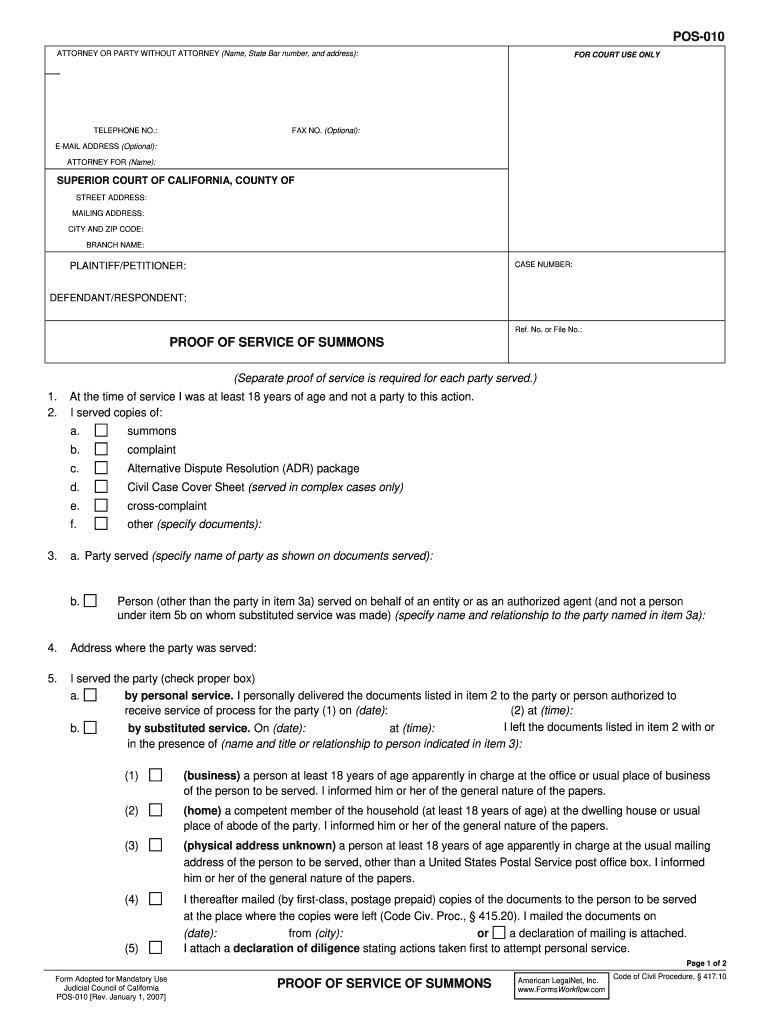
  2. Begin by entering your name, State Bar number, and address in the designated fields for the attorney or party without an attorney. Ensure that your contact information is accurate.
  3. Fill in the telephone number, fax number (if applicable), and email address. This information is crucial for communication regarding your case.
  4. Specify the attorney for whom you are filing, if applicable, and complete the court details including the Superior Court of California, county, street address, mailing address, city, zip code, branch name, and case number.
  5. In the proof of service section, indicate whether you served a complaint, summons, or other documents. Clearly specify who was served and their relationship to the party.
  6. Select the method of service (personal service or substituted service) and provide details such as date and time of service. If mailed, include mailing details as required.
  7. Complete any additional sections as necessary and ensure all information is accurate before submitting your form.

Start using our platform today to streamline your document editing and form completion process for free!

be ready to get more

Complete this form in 5 minutes or less

Get form

Got questions?

We have answers to the most popular questions from our customers. If you can't find an answer to your question, please contact us.
Contact us
Proof of Service of Summons (POS-010) Tells the court that you had a summons or other legal papers delivered to (served on) the other party in a case. Lists the papers that were served and tells who they were served on, where, when, and how they were served, and who served them. Get form POS-010.
3 No POS Environment field with a POS entry mode code of 10 indicates cardholder-initiated, stored credential transactions.
Tells the court some basic information about a case being filed. Filed at the beginning of all civil cases except family law cases. Get form CM-010. Effective: January 1, 2024.
Section 1008 - Service; Proof of Service (a) Proof of Service of papers shall be a Declaration stating the title of the paper Served or filed, the name and address of the person making the Service, and that he or she is over the age of 18 years and not a party to the matter.
The customers card issuer has indicated there is a problem with the card number. The customer should contact their bank or the customer should use an alternate card. Sometimes this response code can also be due to a transaction being declined by Fraud Protection.

Security and compliance

At DocHub, your data security is our priority. We follow HIPAA, SOC2, GDPR, and other standards, so you can work on your documents with confidence.

Learn more
ccpa2
pci-dss
gdpr-compliance
hipaa
soc-compliance

People also ask

When initiating a transaction using a stored credential, the merchant or its agent, a PF, or an SDWO must submit the payment transaction with a value 10 in the POS Entry Mode Code field. Value 10 indicates the credential presented is a stored credential.
The full form of POS is Point of Sale. A POS device in retail outlets processes customer payments for goods or services. It includes hardware like cash registers, barcode scanners, payment terminals, and software that records sales.
When viewing transaction details and reports, information about card entry at the point of sale is presented as a two-digit numeric value. This topic provides you with a legend to be able to read and understand the numeric values presented for MasterCard, Visa, Discover, and JCB, respectively.

form pos 010