Minnesota real form application 2026

Get Form
real form Preview on Page 1

Here's how it works

01. Edit your real form online
Type text, add images, blackout confidential details, add comments, highlights and more.

02. Sign it in a few clicks
Draw your signature, type it, upload its image, or use your mobile device as a signature pad.

03. Share your form with others
Send it via email, link, or fax. You can also download it, export it or print it out.

How to use or fill out Minnesota Real Form Application with DocHub

Form edit decoration
9.5
Ease of Setup
DocHub User Ratings on G2
9.0
Ease of Use
DocHub User Ratings on G2
  1. Click ‘Get Form’ to open the Minnesota Real Form Application in our editor.
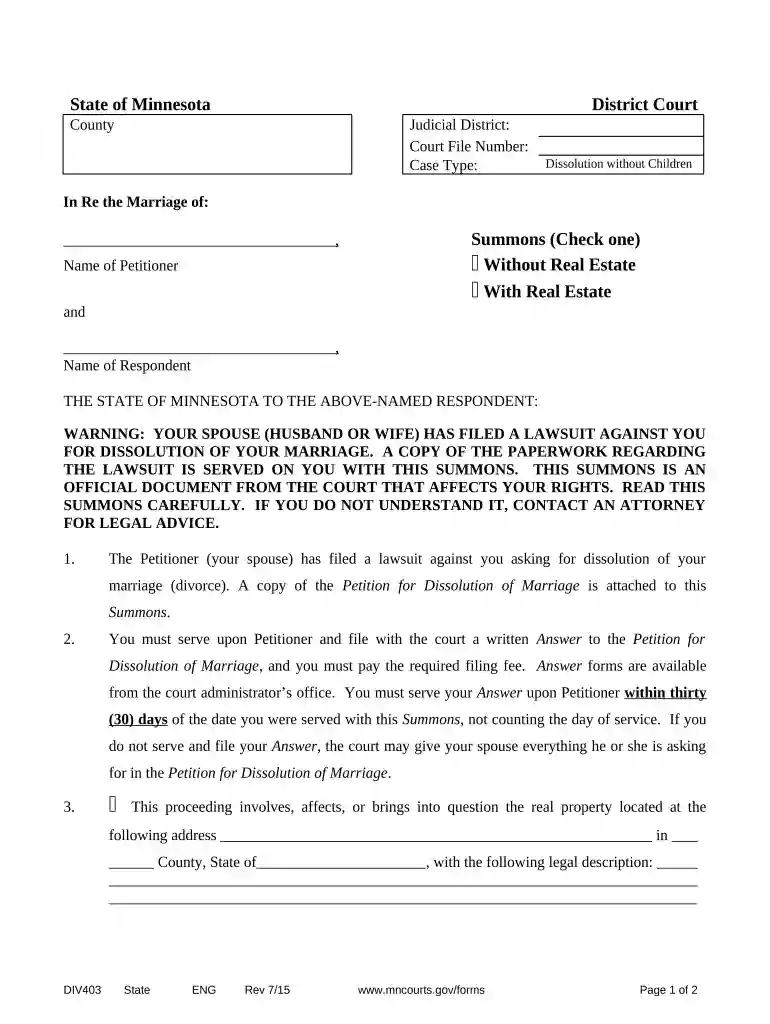
  2. Begin by filling in the 'District Court' and 'County' fields at the top of the form. This information is essential for identifying the jurisdiction of your case.
  3. Next, enter the 'Judicial District' and 'Court File Number'. If you do not have a court file number yet, leave this blank for now.
  4. Indicate the 'Case Type' by selecting 'Dissolution without Children'. This clarifies the nature of your application.
  5. In the section labeled 'In Re the Marriage of', input the names of both the Petitioner and Respondent. Ensure that spelling is accurate to avoid any legal issues.
  6. Select whether this case involves real estate by checking either 'With Real Estate' or 'Without Real Estate'. If applicable, provide details about any real property involved.
  7. Complete any additional required fields regarding temporary restraining provisions as outlined in the document. This ensures compliance with Minnesota law.

Start using our platform today to fill out your Minnesota Real Form Application easily and for free!

be ready to get more

Complete this form in 5 minutes or less

Get form

Got questions?

We have answers to the most popular questions from our customers. If you can't find an answer to your question, please contact us.
Contact us
Proof of a Social Security number - You can provide your Social Security card, Form W-2, which shows your earnings for tax purposes, or a pay stub or paycheck from your job.
You must be at least 18 years old, and you must successfully complete three 30-hour education courses (known as Course I, Course II, and Course III), pass the salespersons examination, become associated with a licensed real estate broker (who must submit the application for your license), and receive notice that the

Security and compliance

At DocHub, your data security is our priority. We follow HIPAA, SOC2, GDPR, and other standards, so you can work on your documents with confidence.
Learn more
ccpa2
pci-dss
gdpr-compliance
hipaa
soc-compliance