Type text, add images, blackout confidential details, add comments, highlights and more.
02. Sign it in a few clicks
Draw your signature, type it, upload its image, or use your mobile device as a signature pad.
03. Share your form with others
Send ex parte application example via email, link, or fax. You can also download it, export it or print it out.
How to use or fill out ex parte application with our platform
Ease of Setup
DocHub User Ratings on G2
Ease of Use
DocHub User Ratings on G2
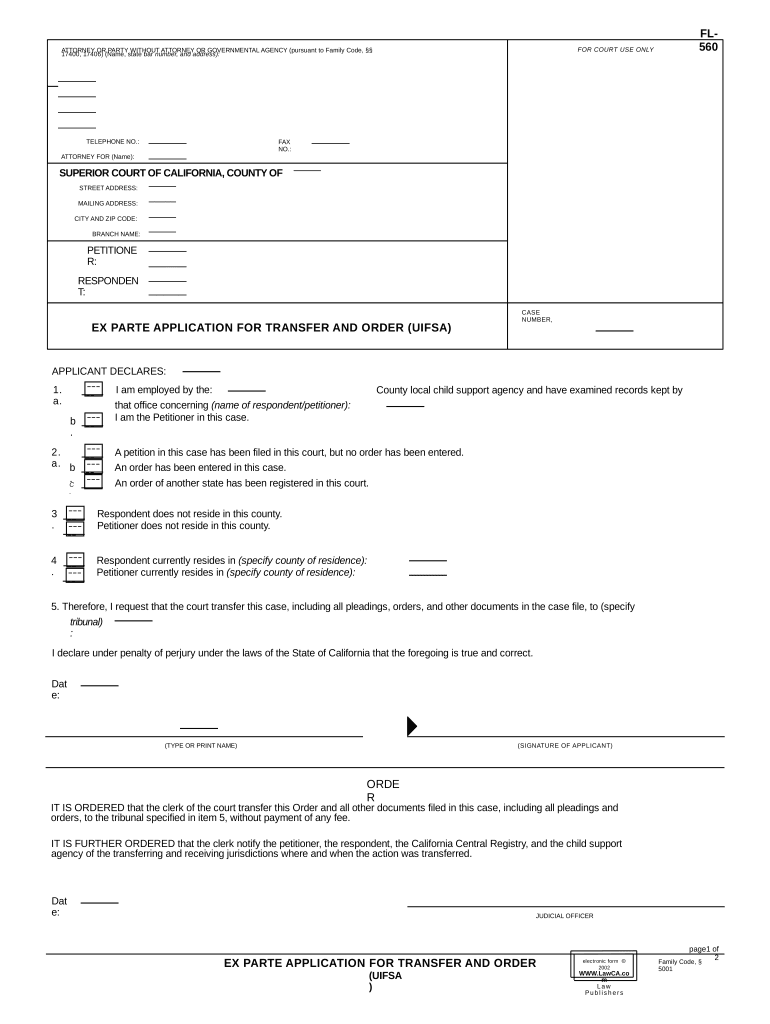
Click ‘Get Form’ to open the ex parte application in the editor.
Begin by filling in your contact information, including your telephone number and fax number, as well as the name of the attorney representing you, if applicable.
Next, provide details about the Superior Court, including the county, street address, mailing address, city, and zip code.
Identify yourself as either the petitioner or respondent by entering your name in the designated fields.
In the 'Applicant Declares' section, carefully check each statement regarding residency and previous orders. Mark the appropriate boxes based on your situation.
Specify which tribunal you are requesting to transfer your case to in item 5. Ensure all information is accurate before proceeding.
Finally, type or print your name and sign where indicated. Review all entries for accuracy before submitting.
Start using our platform today for free to streamline your ex parte application process!
ex parte application for admission as an advocate template
Ex Parte application formEx parte application exampleRequirements for ex parte applicationEx parte application crcNotice of ex parte applicationEx parte application to advance hearing dateCcp ex parte applicationEx parte application Los Angeles Superior Court
Security and compliance
At DocHub, your data security is our priority. We follow HIPAA, SOC2, GDPR, and other standards, so you can work on your documents with confidence.
ex parte application for admission as an attorney template
Ex Parte Applications
An Ex Parte Application is used for one party to ask the Court for an order All Ex Parte Application documents must be filed by 4:00 p.m. on theRead more
ex parte | Wex | US Law | LII / Legal Information Institute
In civil procedure, ex parte refers to motions or applications made by one party without notice to or participation by the opposing party. These are typicallyRead more
Cookie consent notice
This site uses cookies to enhance site navigation and personalize your experience.
By using this site you agree to our use of cookies as described in our Privacy Notice.
You can modify your selections by visiting our Cookie and Advertising Notice.