
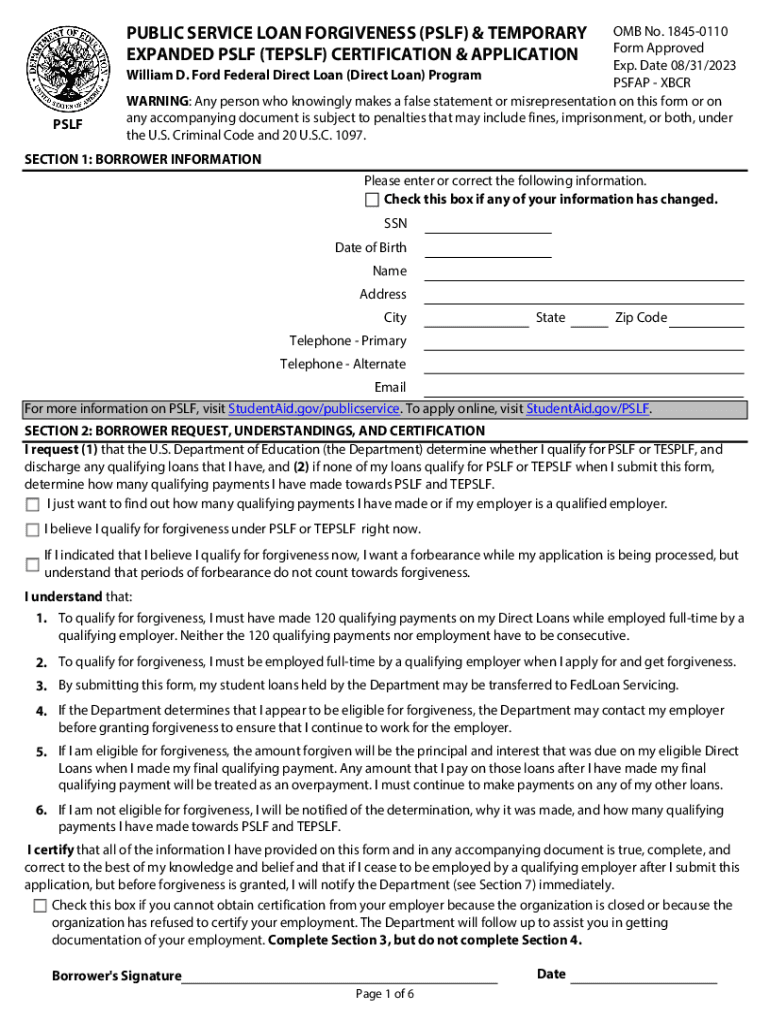



Public Service Loan Forgiveness Application for Forgiveness (PDF) 2026

Get Form
pslf form 2024 pdf Preview on Page 1

Here's how it works

01. Edit your pslf form 2024 pdf online
Type text, add images, blackout confidential details, add comments, highlights and more.

02. Sign it in a few clicks
Draw your signature, type it, upload its image, or use your mobile device as a signature pad.

03. Share your form with others
Send pslf form pdf via email, link, or fax. You can also download it, export it or print it out.

How to use or fill out Public Service Loan Forgiveness Application for Forgiveness (PDF) with DocHub

Form edit decoration
9.5
Ease of Setup
DocHub User Ratings on G2
9.0
Ease of Use
DocHub User Ratings on G2
  1. Click ‘Get Form’ to open the Public Service Loan Forgiveness Application for Forgiveness in our editor.
  2. Begin with Section 1: Borrower Information. Fill in your Social Security Number, Date of Birth, Name, Address, and Contact Information. Ensure all details are accurate.
  3. Move to Section 2: Borrower Request, Understandings, and Certification. Review the statements carefully and check the appropriate boxes that apply to your situation.
  4. In Section 3: Employer Information, provide details about your employer. This includes their name, address, and whether they qualify under the specified categories.
  5. If applicable, have an authorized official complete Section 4: Employer Certification. They must sign and provide their contact information.
  6. Follow the instructions in Section 5 for completing the form correctly. Use dark ink and format dates as mm-dd-yyyy.
  7. Finally, review all sections for accuracy before submitting the completed form as directed in Section 7.

Start using our platform today to easily fill out your Public Service Loan Forgiveness Application for free!

be ready to get more

Complete this form in 5 minutes or less

Get form

Got questions?

We have answers to the most popular questions from our customers. If you can't find an answer to your question, please contact us.
Contact us
If you have Direct Loans and have made 120 qualifying monthly payments under a qualifying repayment plan while working full-time for a qualifying employer, you may be eligible for PSLF or TEPSLF. Before you apply, however, it can help to confirm that your employer is qualified for the program.
If you choose to complete a downloaded PDF of the PSLF form, it must be submitted with acceptable signatures from both you and your employer. You may also fax your PSLF form to 540-212-2415. You may also upload your form by logging on to StudentAid.gov and going to My Activity.
If youre working toward Public Service Loan Forgiveness (PSLF), complete and submit the Public Service Loan Forgiveness (PSLF) Temporary Expanded PSLF (TEPSLF) Certification Application (PSLF) form annually or when you change employers. If youve made 120 qualifying payments, fill out and submit this same form.
Because you have to make 120 qualifying monthly payments, it will take at least 10 years before you can qualify for PSLF. Important: You must still be working for a qualifying employer at the time you submit your form for forgiveness.
You can download your unsigned PSLF form from your StudentAid.gov account. Go to My Activity and select Download Unsigned Form. The form will appear as an editable PDF pop-up. To download a signed PSLF form from My Activity, locate your completed form and select the Download Completed Application link.

Security and compliance

At DocHub, your data security is our priority. We follow HIPAA, SOC2, GDPR, and other standards, so you can work on your documents with confidence.

Learn more
ccpa2
pci-dss
gdpr-compliance
hipaa
soc-compliance
be ready to get more

Complete this form in 5 minutes or less

Get form

People also ask

A final review of your account will be done to process forgiveness, which will take at least 90 business days. Youre required to continue making payments while your form is being processed, unless your account is in a forbearance status.

pslf form

