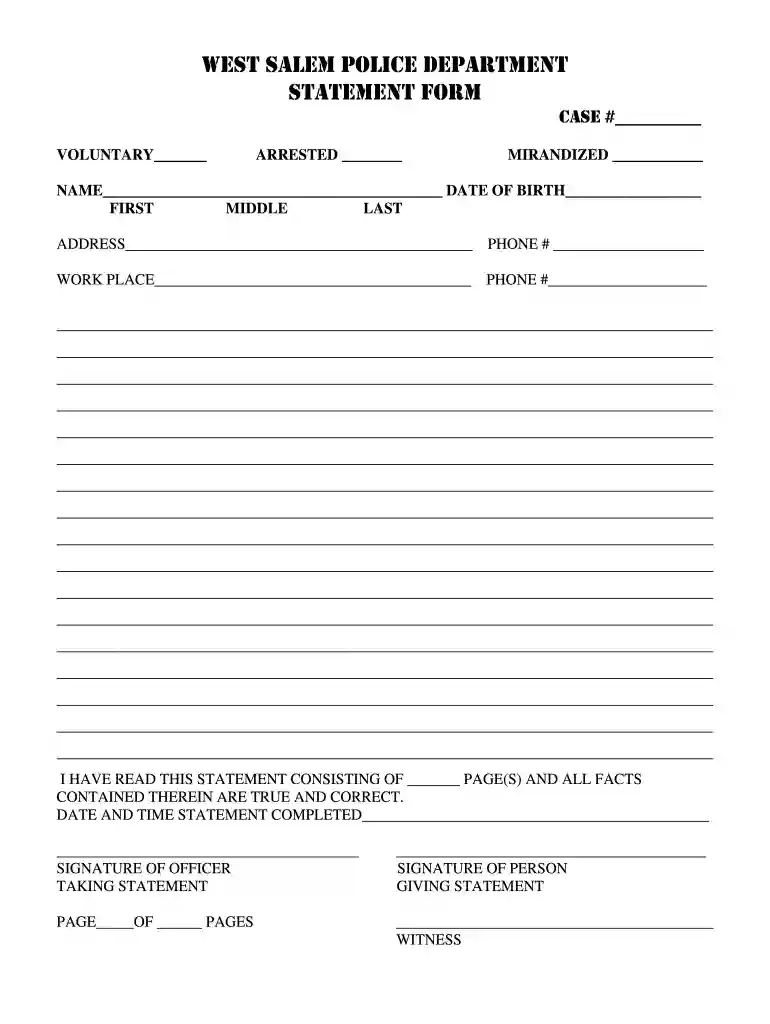
mirandized Preview on Page 1

West salem police department statement form case # voluntary arrested mirandized - westsalempolice 2026

Here's how it works

  • 01. Edit your mirandized online

    Type text, add images, blackout confidential details, add comments, highlights and more.

  • 02. Sign it in a few clicks

    Draw your signature, type it, upload its image, or use your mobile device as a signature pad.

  • 03. Share your form with others

    Send mirandized statement via email, link, or fax. You can also download it, export it or print it out.

How to use or fill out west salem police department statement form case # voluntary arrested mirandized - westsalempolice

Form edit decoration
9.5
Ease of Setup
DocHub User Ratings on G2
9.0
Ease of Use
DocHub User Ratings on G2
  1. Click ‘Get Form’ to open it in the editor.
  2. Begin by entering the case number in the designated field labeled 'CASE #____'. This is crucial for tracking your statement.
  3. Indicate whether the arrest was voluntary by checking the box next to 'VOLUNTARY____'.
  4. Fill in the 'ARRESTED __' section with relevant details about the arrest.
  5. Complete the 'MIRANDIZED ___' field, noting if Miranda rights were read.
  6. Provide your full name, including first, middle, and last names, along with your date of birth in the respective fields.
  7. Enter your address and phone number accurately to ensure proper communication.
  8. List your workplace and its contact number for verification purposes.
  9. Review all entered information for accuracy before signing. Confirm that you have read the statement and that all facts are true.
  10. Finally, sign and date where indicated at the bottom of the form. Ensure that both you and the officer taking your statement sign as required.

Start using our platform today to fill out your West Salem Police Department statement form easily and for free!

be ready to get more

Complete this form in 5 minutes or less

Got questions?

We have answers to the most popular questions from our customers. If you can't find an answer to your question, please contact us.

Managing your paperwork with DocHub this way is very simple once you have downloaded its extension for Google Chrome. Navigate to the Chrome Web Store and install DocHub - Sign PDF from Gmail to obtain it. Give our tool access to your Google account, and then open an email with the salem police department reviews attached and point to the file with your cursor - the DocHub extension key will automatically appear there. Click on it to open your file in our editor. Make any necessary adjustments, complete the blanks, and click Sign to create your legally-binding electronic signature.

With DocHub, you have several convenient methods to edit your west salem police department online. You can drag and drop the form and modify it directly at the DocHub site or use our browser extension to fill out your form immediately. Additionally, you can modify your PDF on your smartphone, as DocHub is compatible with all the accessible mobile platforms.

Security and compliance

At DocHub, your data security is our priority. We follow HIPAA, SOC2, GDPR, and other standards, so you can work on your documents with confidence.

Related links

West salem police department statement form case voluntary ...

West Salem Police Department Statement Form Case # Voluntary Arrested Mirandized Westsalempolice. Use a voluntary statement 0 template to make your document ...

Learn more
If you believe that this page should be taken down, please follow our DMCA take down process here