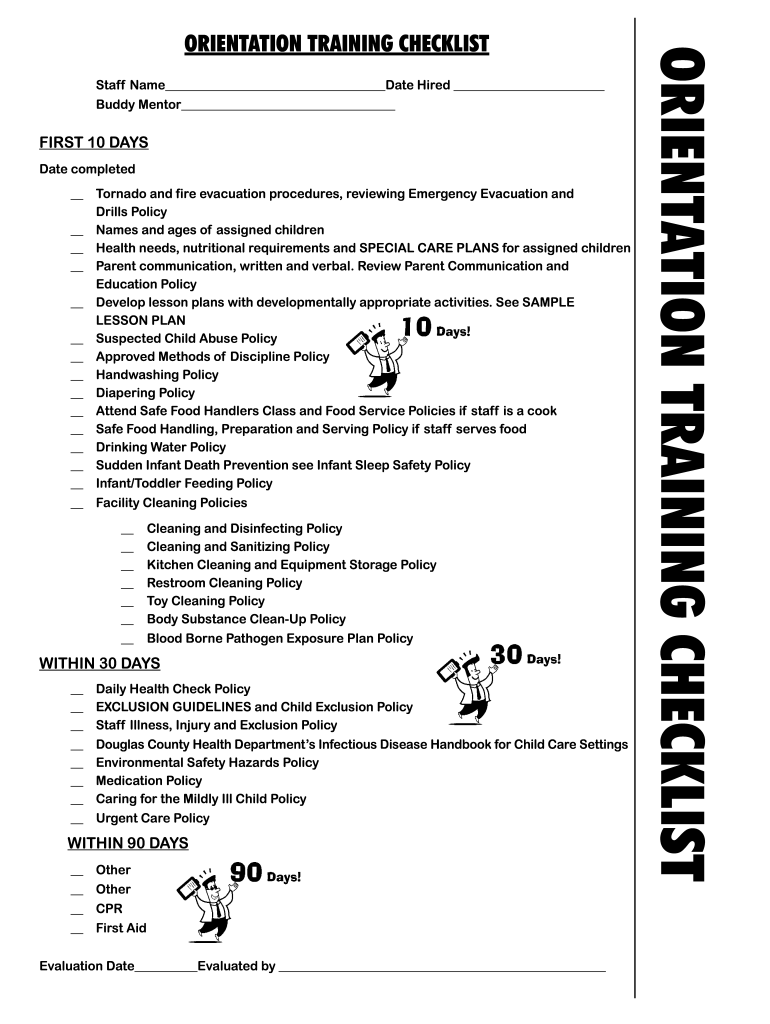
ORIENTATION TRAINING CHECKLIST - Douglas County Nebraska - douglascounty-ne 2026

Get Form
ORIENTATION TRAINING CHECKLIST - Douglas County Nebraska - douglascounty-ne Preview on Page 1

Here's how it works

01. Edit your form online
Type text, add images, blackout confidential details, add comments, highlights and more.
02. Sign it in a few clicks
Draw your signature, type it, upload its image, or use your mobile device as a signature pad.
03. Share your form with others
Send it via email, link, or fax. You can also download it, export it or print it out.

How to use or fill out ORIENTATION TRAINING CHECKLIST - Douglas County Nebraska

Form edit decoration
9.5
Ease of Setup
DocHub User Ratings on G2
9.0
Ease of Use
DocHub User Ratings on G2
  1. Click ‘Get Form’ to open the ORIENTATION TRAINING CHECKLIST in our editor.
  2. Begin by entering your Staff Name and Date Hired at the top of the form. This personalizes the checklist for your records.
  3. In the FIRST 10 DAYS section, check off each item as you complete it. This includes reviewing emergency procedures and understanding health needs of assigned children.
  4. For each policy listed, ensure you read and understand them thoroughly. You can add notes in the provided spaces if needed.
  5. Move on to the WITHIN 30 DAYS section, where you will continue checking off completed items related to health checks and safety policies.
  6. Finally, complete the WITHIN 90 DAYS section by marking off any additional training such as CPR and First Aid.
  7. Once all sections are filled out, review your checklist for accuracy before saving or sharing it directly from our platform.

Start using our platform today to easily fill out your ORIENTATION TRAINING CHECKLIST for free!

be ready to get more

Complete this form in 5 minutes or less

Get form

Got questions?

We have answers to the most popular questions from our customers. If you can't find an answer to your question, please contact us.
Contact us

Yes, you’ll find numerous apps for this on the web. However, if you need to eSign your ORIENTATION TRAINING CHECKLIST - Douglas County Nebraska - douglascounty-ne without installing additional software, DocHub is the best choice you can make. This robust editor works on mobile devices just as on desktops. Open our editor in your preferred internet browser, register or log in to your account, and start processing your documents.

You need only a web connection and a web browser to fill out your ORIENTATION TRAINING CHECKLIST - Douglas County Nebraska - douglascounty-ne on an iOS phone. Open the DocHub website and authenticate. Then, add your document or select it from the list in your dashboard. Then use our editing instruments to fill out your form and preserve all your changes. You may also send it to a dedicated recipient right away.