Type text, add images, blackout confidential details, add comments, highlights and more.
02. Sign it in a few clicks
Draw your signature, type it, upload its image, or use your mobile device as a signature pad.
03. Share your form with others
Send penn foster student login via email, link, or fax. You can also download it, export it or print it out.
How to use or fill out the Penn Foster Enrollment Agreement with our platform
Ease of Setup
DocHub User Ratings on G2
Ease of Use
DocHub User Ratings on G2
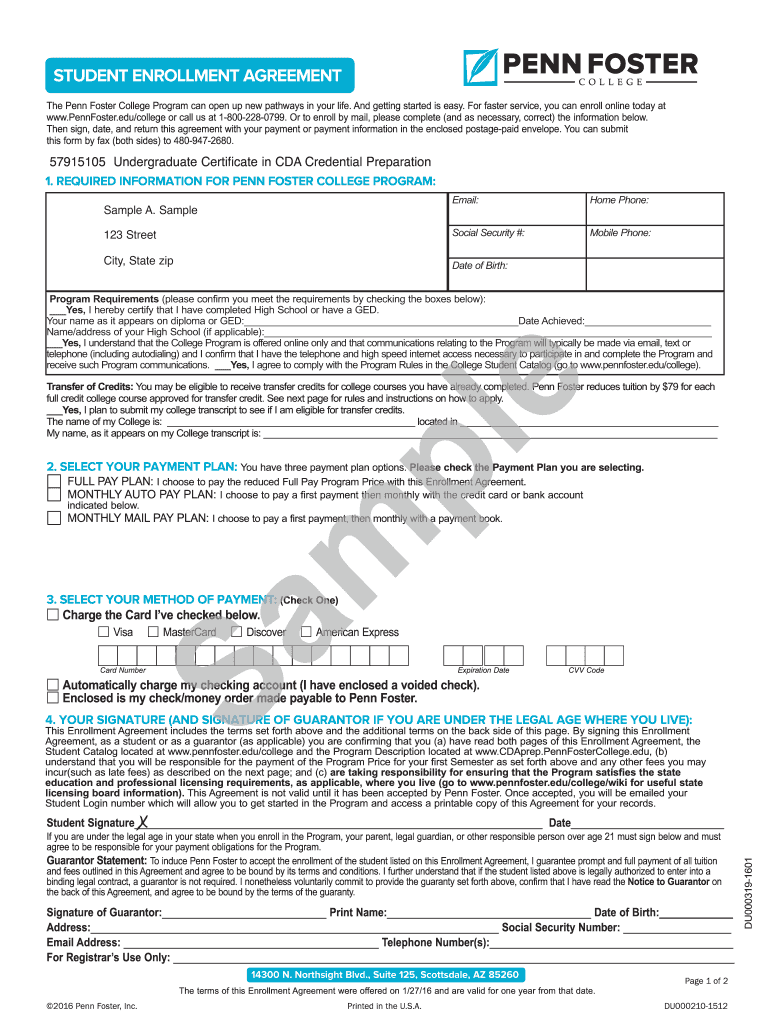
Click ‘Get Form’ to open the Penn Foster Enrollment Agreement in the editor.
Begin by filling out your required information, including your name, address, email, and phone numbers. Ensure accuracy as this information is crucial for communication.
Confirm that you meet the program requirements by checking the appropriate boxes. Provide details such as your high school name and graduation date if applicable.
Select your preferred payment plan by checking one of the options: Full Pay Plan, Monthly Auto Pay Plan, or Monthly Mail Pay Plan.
Indicate your method of payment by selecting a card type or checking if you will pay via check. Fill in all necessary card details if applicable.
Sign and date the agreement at the bottom of the form. If underage, ensure a guarantor signs as well.
Start using our platform today to complete your enrollment effortlessly and for free!
Fill out penn foster enrollment agreement online It's free
Your Enrollment Agreement specified the completion time for your program. * Students enrolled in the Telecommunications. Program are allowed three years toRead more
Congratulations on your enrollment! This is your official Penn Foster College. Enrollment Agreement. The information you provided to us is reflected below.Read more
Pennsylvania State Police Criminal Background Check (SP-164). 2. Pennsylvania Child Abuse History Clearance Form (CY-113). 3. Federal (FBI) FingerprintRead more
Cookie consent notice
This site uses cookies to enhance site navigation and personalize your experience.
By using this site you agree to our use of cookies as described in our Privacy Notice.
You can modify your selections by visiting our Cookie and Advertising Notice.