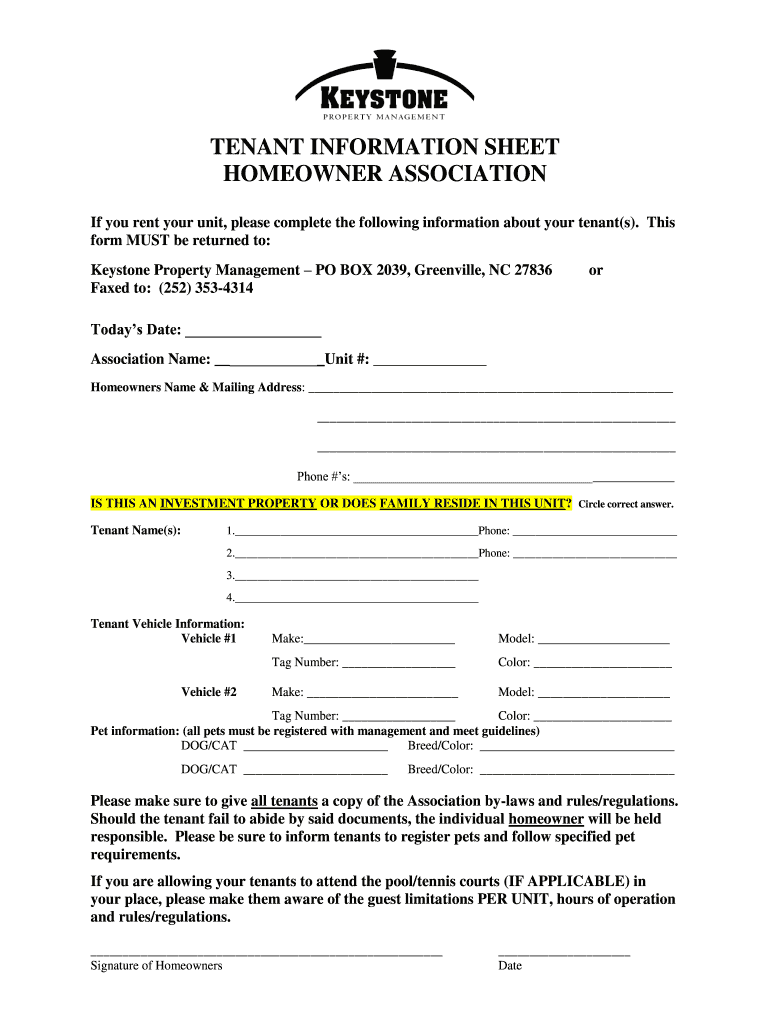
New tenant information sheet 2025

Get Form
353 rule dating Preview on Page 1

Here's how it works

01. Edit your 353 rule dating online
Type text, add images, blackout confidential details, add comments, highlights and more.
02. Sign it in a few clicks
Draw your signature, type it, upload its image, or use your mobile device as a signature pad.
03. Share your form with others
Send it via email, link, or fax. You can also download it, export it or print it out.

How to use or fill out new tenant information sheet with our platform

Form edit decoration
9.5
Ease of Setup
DocHub User Ratings on G2
9.0
Ease of Use
DocHub User Ratings on G2
  1. Click ‘Get Form’ to open the new tenant information sheet in the editor.
  2. Begin by entering today’s date and the association name at the top of the form. This sets the context for your submission.
  3. Fill in your unit number, homeowner's name, and mailing address. Ensure that all contact details are accurate for effective communication.
  4. Indicate whether this is an investment property or if family resides in the unit by circling the correct answer.
  5. List tenant names along with their phone numbers. You can add multiple tenants as needed, ensuring each entry is clear and legible.
  6. Provide vehicle information for each tenant, including make, model, tag number, and color. This helps in managing parking regulations.
  7. Complete the pet information section if applicable. Register all pets according to management guidelines to avoid any issues.
  8. Finally, ensure you sign and date the form before submission to confirm accuracy and responsibility.

Start filling out your new tenant information sheet online for free today!

be ready to get more

Complete this form in 5 minutes or less

Get form

Got questions?

We have answers to the most popular questions from our customers. If you can't find an answer to your question, please contact us.
Contact us

Electronic document signing demands a software solution that complies with data protection and eSignature regulations. DocHub is a great tool for that, since it fulfills all the aforementioned requirements. Whatever method you prefer to sign your new tenant information sheet in DocHub, your eSignature will be legally binding and court-admissible.

In case your go-to electronic mail service is Gmail, you can easily incorporate your DocHub editor into your work. Edit your new tenant information sheet with DocHub tools and connect it to your drafts in Gmail. See how easy it is to exchange files and work together with a swift PDF editing solution at hand.