Type text, add images, blackout confidential details, add comments, highlights and more.

02. Sign it in a few clicks
Draw your signature, type it, upload its image, or use your mobile device as a signature pad.

03. Share your form with others
Send ameritrade login via email, link, or fax. You can also download it, export it or print it out.

How to use or fill out Change of Address Apex - TD Ameritrade with our platform
Ease of Setup
DocHub User Ratings on G2
Ease of Use
DocHub User Ratings on G2
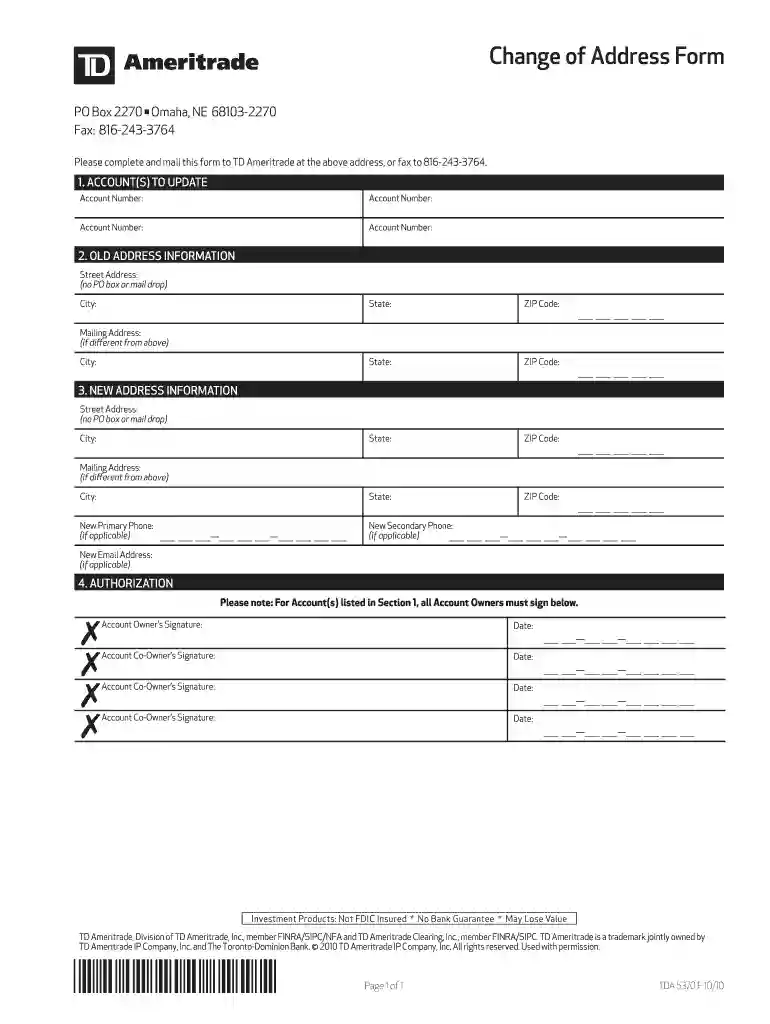
Click ‘Get Form’ to open the Change of Address Apex - TD Ameritrade in the editor.
In Section 1, 'ACCOUNT(S) TO UPDATE', enter your account numbers in the provided fields. Ensure you list all accounts that require an address change.
Proceed to Section 2, 'OLD ADDRESS INFORMATION'. Fill in your previous street address, city, state, and ZIP code. If you have a different mailing address, complete that section as well.
Next, move to Section 3, 'NEW ADDRESS INFORMATION'. Input your new street address and other relevant details. Again, if there’s a different mailing address, provide that information too.
In this section, also include any new primary or secondary phone numbers and email addresses if applicable.
Finally, navigate to Section 4 for 'AUTHORIZATION'. All account owners must sign and date the form. Make sure each signature is clear and legible.
Start using our platform today to easily fill out your Change of Address form for free!
Fill out Change of Address Apex - TD Ameritrade online It's free
Standard: Mailed within 2-3 business days of the transaction request. Exchanges, allocation changes, and deferral changes. $2,500 per calendar year. 3Q: MailedRead more
Cookie consent notice
This site uses cookies to enhance site navigation and personalize your experience.
By using this site you agree to our use of cookies as described in our Privacy Notice.
You can modify your selections by visiting our Cookie and Advertising Notice.