




Here's how it works

01. Edit your golf cart rental colonial beach va online
Type text, add images, blackout confidential details, add comments, highlights and more.

02. Sign it in a few clicks
Draw your signature, type it, upload its image, or use your mobile device as a signature pad.

03. Share your form with others
Send golf cart checklist via email, link, or fax. You can also download it, export it or print it out.
How to use or fill out golf cart inspection colonial beach with our platform

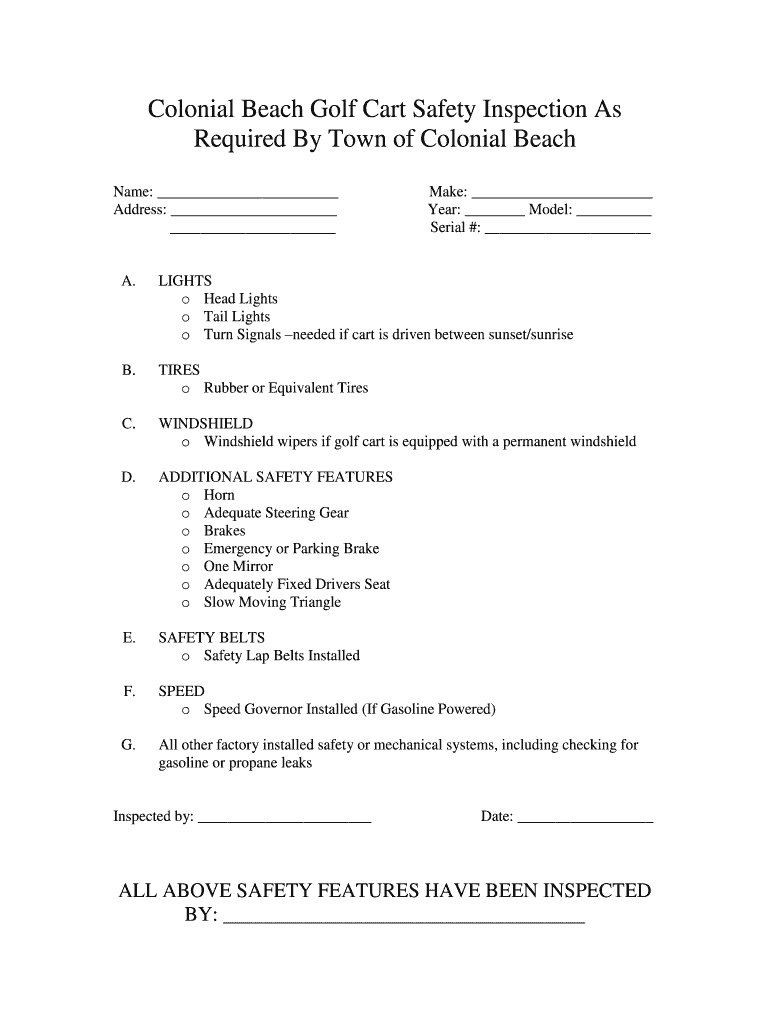
- Click ‘Get Form’ to open the golf cart inspection form in the editor.
- Begin by entering your name and address in the designated fields at the top of the form. This information is essential for identifying the owner of the golf cart.
- Next, fill in the make, year, model, and serial number of your golf cart. Accurate details here ensure proper documentation.
- Proceed to section A for lights. Check each item listed (headlights, tail lights, turn signals) and mark them as inspected.
- In section B, confirm that your tires are rubber or equivalent. Ensure they meet safety standards.
- For section C, if your cart has a permanent windshield, verify that windshield wipers are functioning properly.
- Continue to section D and check all additional safety features such as brakes and mirrors. Mark each feature as inspected.
- In section E, confirm that safety lap belts are installed correctly.
- For gasoline-powered carts in section F, ensure a speed governor is installed.
- Finally, review all factory-installed safety systems for any leaks or issues before signing off on the inspection at the bottom of the form.
Start using our platform today to complete your golf cart inspection easily and for free!
Fill out golf cart inspection colonial beach online
It's free
Security and compliance
At DocHub, your data security is our priority. We follow HIPAA, SOC2, GDPR, and other standards, so you can work on your documents with confidence.
Learn more


