




Here's how it works

01. Edit your backflow testing bloomington online
Type text, add images, blackout confidential details, add comments, highlights and more.

02. Sign it in a few clicks
Draw your signature, type it, upload its image, or use your mobile device as a signature pad.

03. Share your form with others
Send backflow testing minnesota via email, link, or fax. You can also download it, export it or print it out.
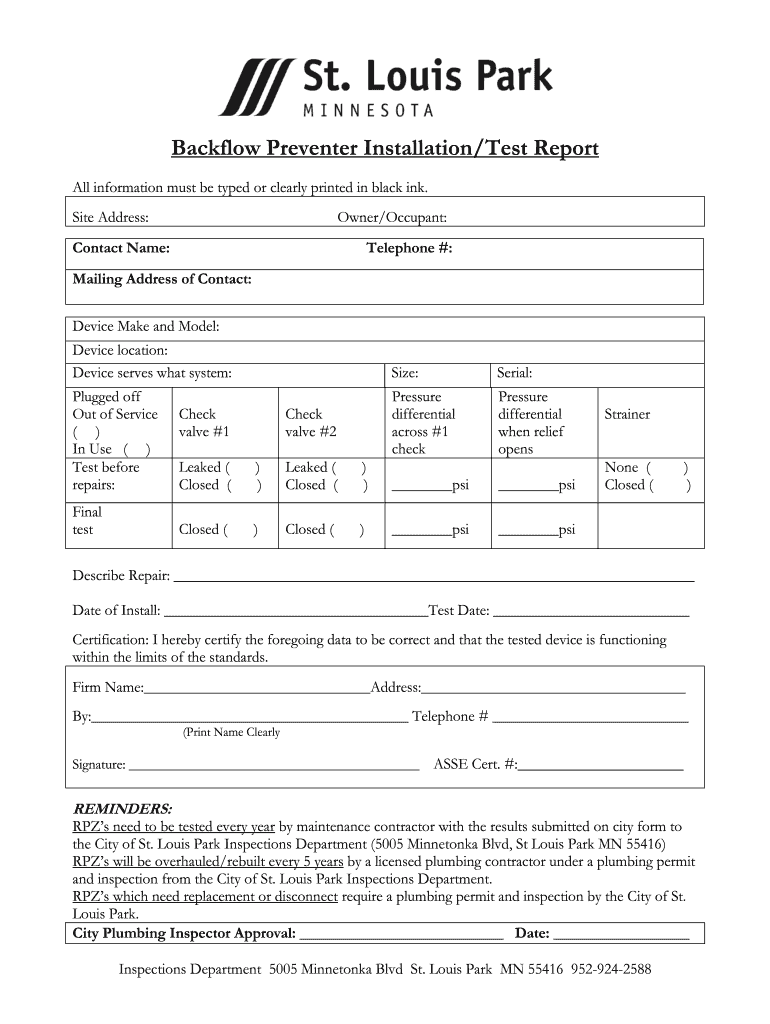
How to use or fill out Backflow Preventer Test Report - St Louis Park Minnesota - stlouispark with our platform

- Click ‘Get Form’ to open the Backflow Preventer Test Report in the editor.
- Begin by entering the Site Address, Owner/Occupant name, and Contact Name in the designated fields. Ensure all information is typed clearly.
- Fill in the Telephone # and Mailing Address of Contact to ensure proper communication.
- Specify the Device Make and Model, Device Location, and what system the device serves. Indicate whether it is Plugged off, Out of Service, or In Use.
- Complete the testing sections for Check Valve #1 and #2 by entering Size, Serial numbers, Pressure differentials, and any leakage information as applicable.
- Describe any repairs made in the provided section and enter both Date of Install and Test Date accurately.
- Finally, certify your data by filling in Firm Name, Address, your printed name, signature, and ASSE Certification number before submitting.
Start using our platform today to easily complete your Backflow Preventer Test Report for free!
Fill out Backflow Preventer Test Report - St Louis Park Minnesota - stlouispark online
It's free
Security and compliance
At DocHub, your data security is our priority. We follow HIPAA, SOC2, GDPR, and other standards, so you can work on your documents with confidence.
Learn more


