Type text, add images, blackout confidential details, add comments, highlights and more.
02. Sign it in a few clicks
Draw your signature, type it, upload its image, or use your mobile device as a signature pad.
03. Share your form with others
Send vtr61 via email, link, or fax. You can also download it, export it or print it out.
How to use or fill out vtr 61 with our platform
Ease of Setup
DocHub User Ratings on G2
Ease of Use
DocHub User Ratings on G2
Click ‘Get Form’ to open the VTR-61 in the editor.
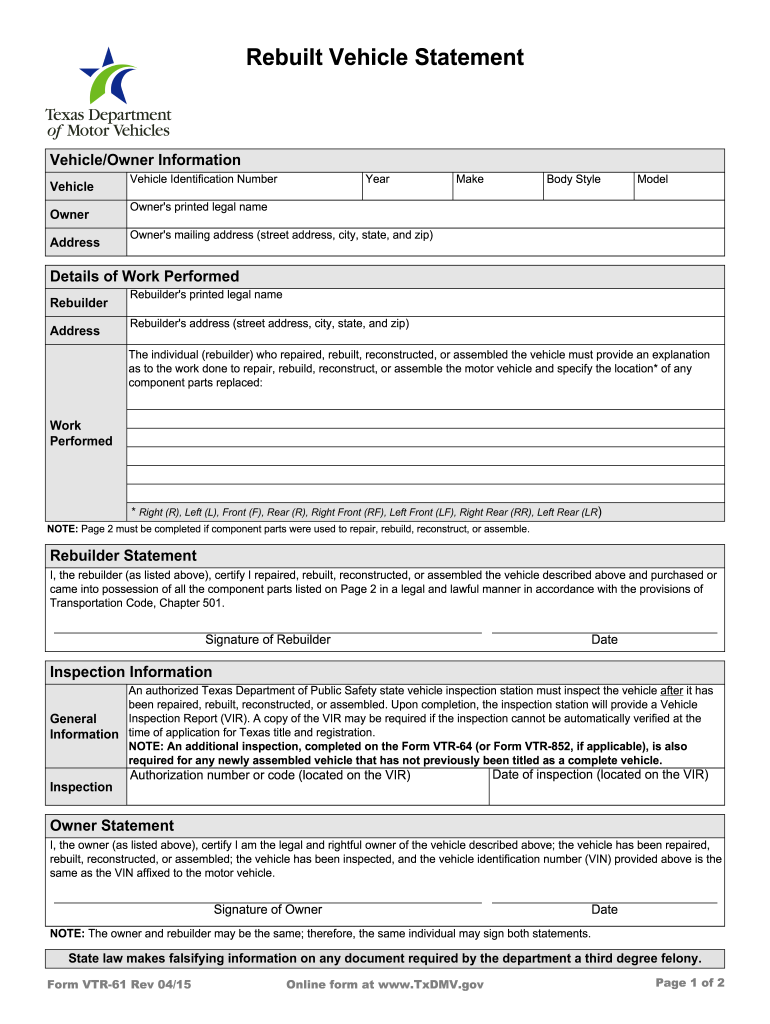
Begin by entering the vehicle information, including the Vehicle Identification Number (VIN), year, make, body style, and model in the designated fields.
Next, fill in the owner's printed legal name and mailing address. Ensure all details are accurate for proper identification.
In the 'Details of Work Performed' section, provide a comprehensive explanation of the work done by the rebuilder. Specify any replaced component parts and their locations using abbreviations like R (Right) or L (Left).
The rebuilder must then sign and date the statement certifying that they have legally repaired or rebuilt the vehicle.
Complete inspection information by entering details from the Vehicle Inspection Report (VIR) provided after inspection.
Finally, have the owner sign and date their statement confirming ownership and compliance with regulations.
Start filling out your VTR-61 form online for free today!
Form Vtr 61 - This form is required for any address change,. Web you can initiate the application process for a tx rebuilt salvage title once you or a rebuilderRead more
The hybrid navigation system receives radio waves from satellites to determine the current location.GPS, The current location of the own vehicle isRead more
Instructions. This form is required when a vehicle is repaired, rebuilt, reconstructed, or assembled in order to obtain a Texas title. The completed.Read more
Cookie consent notice
This site uses cookies to enhance site navigation and personalize your experience.
By using this site you agree to our use of cookies as described in our Privacy Notice.
You can modify your selections by visiting our Cookie and Advertising Notice.